A practical guide for accountants, bookkeepers and tax advisers in small practice. What your site needs, copy-ready prompts you can paste into Ullbek, and how the jobs that used to need a developer — the services and fixed-fee packages, who you work with, the deadlines calendar, the plain-English guides, the switch-to-us form — become a conversation. The worked example is a real Dublin practice built with Ullbek.
Why accountant websites are harder than they look
An accountant's website is read by someone who is either starting out and terrified of the tax office, or unhappy with the accountant they've got and wondering how hard it is to switch. Both want to know do you work with businesses like mine, what does it cost, will you actually reply, and what happens if I move to you. Most practice sites answer with a stock photo of a handshake over a spreadsheet, a list of “services” in tax-code language, and “contact us for a quote”.
The old way
Pick a “professional services” template. Keep the handshake. Discover the packages block can't say “from €120 a month”. Ask the web firm to add the new VAT deadline. Wait. Pay. Leave last year's deadlines calendar up through this year's.
With Ullbek
Describe who you work with and how you charge. Get a site designed around it — fixed-fee packages with prices, who you're for in plain words, a deadlines calendar you update in a sentence, guides that answer the 11pm questions, a switch-to-us form that says what happens next. Change a fee by saying so.
This guide does two jobs. It tells you what a strong practice website includes, and it shows you how to get each piece built in Ullbek — in plain language, with your own packages and deadlines, using prompts you can copy.
How to use the prompts
Every prompt below is written for Fairweather Accounting, the Dublin practice shown in the worked example. Swap the bold details for your name, your jurisdiction, your packages and your clients. Hit Copy, paste into the Ullbek chat, and adjust anything that doesn't fit. You're not a template — neither is your practice, and neither should its website be.
What a great accountant website needs
You don't need a dozen pages. You need the few things a sole trader or small-company owner checks before they ring — and a way to keep deadlines and fees current without anyone's help.
A homepage that says who you're for
Sole traders, contractors, small limited companies, landlords — in those words. One line on how you work, and two buttons: See packages and Book a call.
Fixed-fee packages with prices
Monthly packages for the common client types — what's included, what's not, a price. “Contact for a quote” sends people to the practice that answered.
Services in plain English
Bookkeeping, VAT, payroll, year-end accounts, tax returns, company formation — what each is and when you need it. No tax-code language.
A deadlines calendar
The dates that matter this year, in order, with what's due. The page people bookmark and the reason they come back.
Plain-English guides
“Sole trader or limited company?”, “What can I claim?” The 11pm questions. They build trust and they rank.
A switch-to-us page
What happens when you move — the letter to your old accountant, what you need to send, how long it takes. Removes the biggest fear.
Who you are, and your qualification
The body you're a member of, how long you've practised, the team. People hand you their bank statements.
The worked example: Fairweather Accounting
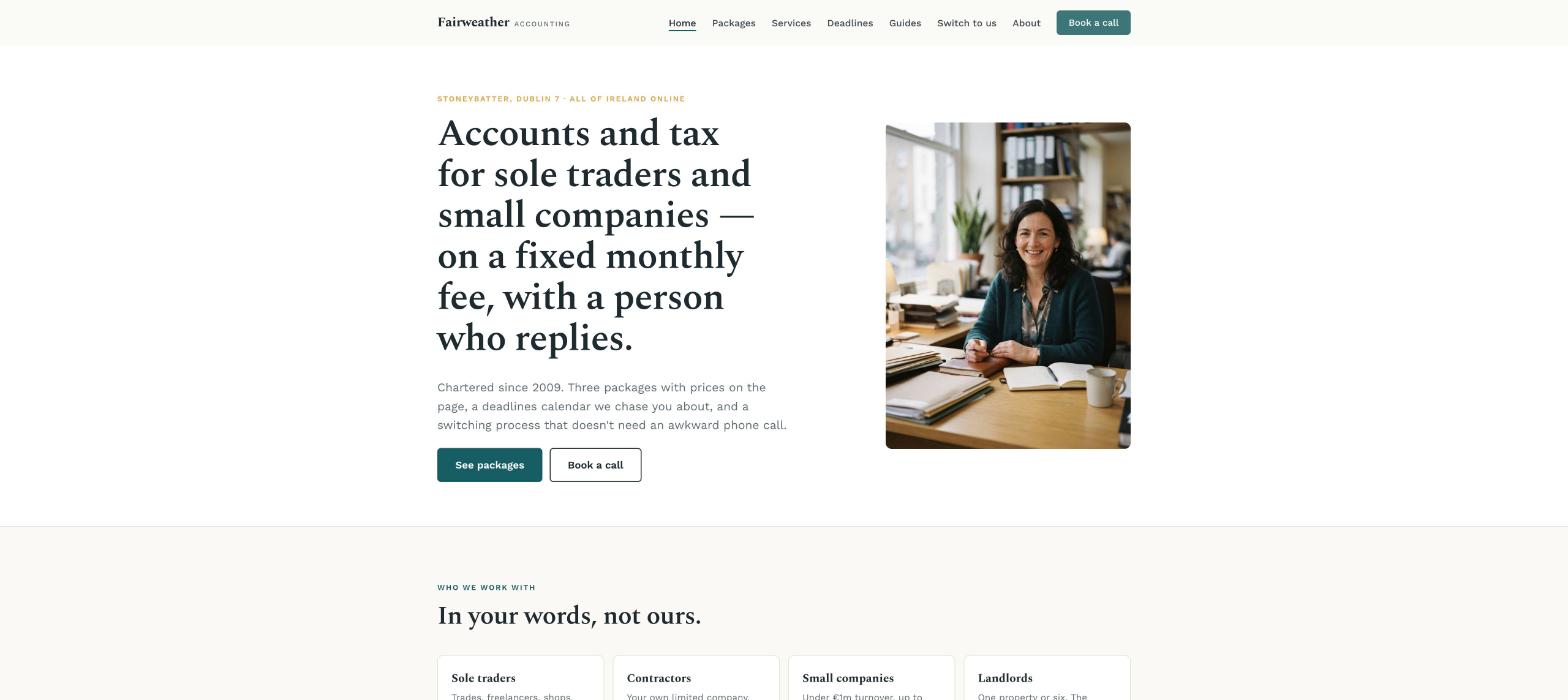
Fairweather Accounting is a fictional three-person practice in Dublin's Stoneybatter — Siobhán Fairweather, FCA, chartered since 2009, with a bookkeeper and a part-qualified trainee, serving sole traders, contractors and small limited companies on fixed monthly fees, with a deadlines calendar and a set of plain-English guides. It was built in Ullbek from a description much like the kickoff prompt below, and it's live. Every prompt in this guide is written for Fairweather, so you can see the result of each one.
Fairweather Accounting
Live example
Dublin accountancy practice · fixed-fee packages, services, deadlines, guides, switch to us · designed and built with Ullbek
Homepage — who you're for and what it costs, above the fold; the handshake left out
The prompt library
Work through these in order the first time you build. After launch, jump straight to the tier you need — a fee change, next year's deadlines, a new guide — and paste the matching prompt.
Tier 1Kick off the whole site
Start with one rich description. Lead with who you work with and the tone — plain, calm, reliably prompt — because that's what a professional-services template can't give you and it's what Ullbek designs around. Give it the packages and the qualification, and tell it what not to invent.
Capability: full site from plain language
Kickoff — full practice site
Build a website for my accountancy practice, Fairweather Accounting, at 41 Manor Street, Stoneybatter, Dublin 7, phone 01 555 0192. I'm Siobhán Fairweather, a Chartered Accountant (FCA, Chartered Accountants Ireland) in practice since 2009; with me are Dara (bookkeeper) and Niamh (trainee). We work with sole traders, contractors, small limited companies and landlords — mostly under €1m turnover, mostly in Dublin, all over Ireland online. Fixed monthly fees: Sole trader from €95 a month, Contractor company from €160 a month, Small company from €240 a month; one-off tax returns from €350. Every package includes a named person, replies within one working day, and no surprise bills. Tone: plain, calm, a little dry — no “trusted partner”, no “bespoke solutions”. Pages: Home, Packages, Services, Who We Work With, Deadlines, Guides, Switch to Us, About, and Contact. The homepage needs two buttons: “See packages” and “Book a call”. Palette: a warm white, a deep teal and a soft ochre accent; a confident serif for headings, clean readable body text on a phone. Don't invent clients, testimonials, awards or savings figures I haven't given you. Put the professional body and “regulated by Chartered Accountants Ireland” in the footer of every page.
Tier 2Shape the homepage
Once the shell exists, tighten the order of things. A practice homepage says who you're for and what it costs — it isn't a mission statement.
Capability: restructure layout by describing intent
Structure — homepage sections
Rebuild the Fairweather Accounting homepage with these sections in order: (1) a hero with my portrait, the line “Accounts and tax for sole traders and small companies — on a fixed monthly fee, with a person who replies.”, and two buttons — See packages, Book a call; (2) “Who we work with” — four cards: Sole traders, Contractors, Small limited companies, Landlords, each with one line and a link; (3) “Three packages” — the monthly prices and what's in each, with “Most of our clients are here” on Contractor company; (4) “How we're different” — four plain promises (fixed fees, a named person, one-working-day replies, we chase you before deadlines, not after); (5) “Deadlines this quarter” — the next four dates, linking to the calendar; (6) “Read first” — three guides; (7) “Switching is easier than you think” — three sentences and a link; (8) a contact strip with phone and a short form. Keep every section short enough to read on a phone in a van.
Tier 3Fixed-fee packages with prices
This is where practice sites hide. The sole trader with a shoebox wants a monthly number and a recommendation. Three packages, what's in, what's not, the price — laid out like a menu, not an engagement letter.
Capability: structured packages you can edit in a sentence
Packages — three, with prices
Build the Packages page for Fairweather Accounting with three columns: Sole trader — from €95 a month: bookkeeping on Xero, your income tax return (Form 11), VAT returns if registered, a year-end summary, unlimited questions by email. Contractor company — from €160 a month: everything above plus company accounts and CRO filing, corporation tax, director's payroll, your personal return; mark this “Most of our clients are here”. Small company — from €240 a month: everything above plus payroll for up to five staff, management accounts quarterly, a yearly planning meeting. Under them: “‘From' prices assume up to 50 transactions a month and tidy records; we quote exactly after a 30-minute call. Everything includes a named person, replies within one working day, and no surprise bills.” Then “One-off work”: income tax return from €350, company formation €450 including CRO fees, catch-up bookkeeping quoted by the year. Then a short FAQ: Do I have to use Xero? (we'll move you, free), Can I pay yearly? (yes, 5% off), What if I'm behind? (we fix that first, no judgement).
Packages — a fee change
From 1 January the Sole trader package is from €105, Contractor company from €175, Small company from €260. Update the Packages page and the homepage cards; keep every description exactly as it is.
Tier 4The deadlines calendar (the reason they come back)
The page people bookmark. Every date that matters this year, in order, with what's due and who it applies to. Ullbek builds it as a clean list you update once a year — and in a sentence when a date moves.
Capability: structured content you update in a sentence
Deadlines — this year's calendar
Build the Deadlines page for Fairweather Accounting as a dated list for the current tax year, each entry with the date, what's due and who it applies to. Use only these facts (I'll correct any that change): [paste this year's Irish dates — income tax pay-and-file deadline and the ROS extension, preliminary tax, VAT return periods, PAYE monthly, CRO annual return date, corporation tax, local property tax, capital gains tax payment dates]. Group by month, mark each with Sole trader / Company / Landlord / Everyone. A note at the top: “We chase our clients two weeks before every one of these. If you're not a client yet, bookmark this page.” Show the next four dates on the homepage “Deadlines this quarter” block, automatically from this list if possible.
Deadlines — a date moved
Revenue has extended the ROS pay-and-file deadline to [new date]. Update that entry on the Deadlines page and the homepage block, and add a slim banner across every page for the next three weeks: “ROS deadline extended to [date] — if your return isn't filed, call us this week.” Leave a note in the site brief to remove the banner after.
Tier 5Services in plain English, and the guides
Services in the words a sole trader uses, and guides that answer the 11pm questions. Both bring people to the site and both build trust — written from your facts, never guessed.
Capability: long-form pages in your voice
Services — what each thing is
Build the Services page for Fairweather Accounting with one short section per service, each “What it is”, “When you need it”, “What we do”, in plain English: Bookkeeping, VAT returns, Payroll, Year-end accounts and CRO filing, Income tax returns, Corporation tax, Company formation, Landlord tax, Revenue audits and letters (we deal with Revenue so you don't have to). Link each to the relevant package. A line at the top: “No tax-code language. If a word here needs explaining, we've failed — tell us.”
Guides — the 11pm questions
Build a Guides section for Fairweather Accounting with an index page and four articles, 600–900 words each, Ireland-specific, dated, with a “general information, not advice — ask us about your situation” note, from these facts only: [paste the key thresholds, rates and rules per guide] — “Sole trader or limited company? The honest answer for 2026”, “What can I actually claim as a contractor?”, “When do I have to register for VAT?”, “Landlord tax in Ireland: the five things people get wrong”. Where I haven't given a fact, say “ask us” rather than guessing. Show the three most useful on the homepage “Read first” block.
Tier 6Switching, and the call that reaches you
Ullbek has a built-in form backend: ask for the fields you want and messages are spam-checked and sent to your inbox — no plugin, no form service. The Switch to Us page removes the biggest fear; the form asks only what you need to quote.
Capability: built-in forms → your inbox
Switch to Us — what actually happens
Write the Switch to Us page for Fairweather Accounting in Siobhán's plain, calm voice, as four steps: (1) a 30-minute call — what you do, what you've got, what's gone wrong; (2) we send one letter to your current accountant asking for your records (professional clearance) — you don't have to have an awkward conversation; (3) you send us your logins or a shoebox, we set up Xero and move everything across; (4) you get a named person and a fixed monthly fee from the first month. “Most switches take two to three weeks. Mid-year is fine. Behind on filings is fine — we fix that first.” End with “Book a call”.
Contact — book a call
On the Contact page for Fairweather Accounting, add a “Book a call” form: Name, Business name, Email, Phone, What are you? (Sole trader, Contractor, Limited company, Landlord, Not sure yet), Roughly how many transactions a month? (under 50, 50–150, more), Do you have an accountant now?, Anything else. Use Ullbek's built-in form handling so messages email me with spam filtering. Above it: “We reply within one working day to arrange a 30-minute call. No pitch — we'll tell you which package fits and what it would cost.” Beside it: phone, address, hours Monday–Friday 9–5:30, and the professional body line.
Where messages go
Form messages land in the email on your Ullbek account and in your dashboard — no extra tool to learn. Full walkthrough: Contact forms & submissions.
Tier 7About, and real reviews
People hand you their bank statements. A short true story, the qualification where it can be checked, the team — and three real reviews with business names, nothing invented.
Capability: credibility from your real facts
About — Siobhán and the team, in facts
Write the About page for Fairweather Accounting from these facts only — don't invent awards, client counts or savings: Siobhán Fairweather, BComm UCD 2004, trained with a Big Four firm in Dublin, qualified ACA 2008, FCA 2018; ran the small-business department of a mid-size firm until 2016; started Fairweather in 2016 to do fixed fees properly; Chartered Accountants Ireland member, regulated for practice. Dara Ó Briain, bookkeeper, Xero-certified, with us since 2018. Niamh Kelly, trainee, ACA finals this year. Structure: a portrait, “Why fixed fees”, “Who's who” with a line each, “Check us” — the professional body with a link to the register. Tone: plain, calm, dry.
Trust — real reviews only
Add a “What clients say” section on the homepage using only these real reviews (do not invent any): [paste three with first name, business type and area]. If I haven't given you enough, use one and a button “Read our Google reviews” linking to [your profile URL]. Never fabricate savings figures, client counts or rankings.
Tier 8Polish for phones and search
Sole traders find you on a phone, in a van, between jobs. A few targeted asks before you publish go a long way.
Capability: responsive design + on-page SEO
Polish — mobile & SEO basics
Review the whole Fairweather Accounting site on a phone: the two homepage buttons visible without scrolling, package columns stacking cleanly with prices readable, the deadlines list easy to scan, the phone number tap-to-call. Give every page a title and meta description that mention accountant for sole traders Dublin or small business accountant Dublin naturally where it fits — don't stuff keywords. Add alt text to every image. Make the professional-body line plain text in every footer.
Tier 9Publish and go live
When it looks right, publish. You get a free *.ullbek.site address immediately, with HTTPS. Connect your own domain when you're ready — or buy one in the chat.
Capability: one-click publish · free address · your own domain
Launch — publish checklist
I'm ready to publish Fairweather Accounting. Do a final pass: every page has a title and meta description, package prices match between Packages and the homepage, the deadlines list is for the current year and dated, every guide carries the not-advice note, the contact form sends to my email, the professional-body line is in every footer, and there are no placeholder or TODO notes left. Then publish to a free Ullbek address. After that, tell me how to put the site on fairweather.ie.
“A practice website is never finished. Fees move in January, Revenue moves a deadline in October, a guide needs the new threshold — and the site should say so before the next sole trader panics.”
After launch: the updates that used to be painful
The real product for a practice isn't the first build — it's the week Revenue changes a date and the web firm takes a fortnight. Here's how the common jobs map to what you've already learned:
Common practice updates → what to do in Ullbek
A deadline moves
The Tier 4 date-moved prompt — calendar, homepage block and a banner in one go.
Next year's calendar
Paste the new dates → the Tier 4 calendar prompt. Once a year.
Fee change
The Tier 3 fee-change prompt — Packages page and homepage cards.
A new guide
Write it from your facts (Tier 5), date it, first on the index.
“Sole traders, contractors, small companies, landlords” — not “SMEs and HNWIs”. People search the way they speak.
Put a monthly number on every package
The shoebox client wants a price and a recommendation. “Contact for a quote” sends them to the practice that answered.
Keep the deadlines page current
It's the reason people bookmark you and come back. Make the yearly refresh a January ritual.
Never invent savings or client counts
Ask for placeholders instead. Your professional body notices, and so do clients.
Republish after every change
Edits in the builder aren't live until you publish again. New fees, a moved deadline, a new guide — publish, then check the live site on your phone.
Preview ≠ live
The preview shows your working site. Clients only see what you've published. After a fee change or a moved deadline, publish again so the world sees it.