A practical guide for barbers and barber-shop owners. What your site needs, copy-ready prompts you can paste into Ullbek, and how the jobs that used to need a developer — the price list, the barbers, booking and walk-ins, the gallery — become a conversation. The worked example is a real Glasgow barber shop built with Ullbek.
Why barber shop websites are harder than they look
A barber shop website is read in about eight seconds, on a phone, by someone who wants three things: what it costs, can I get in today or do I book, and which barber do I ask for. Then they want to see the work. Most barber sites are a dark template with a stock photo of a stranger's fade, a price list that's an image Google can't read, and a booking button that goes to a dead app.
The old way
Pick a barber template. Keep the stock fade. Discover the price list is a JPEG. Ask the web guy to add the new barber. Wait. Pay. Leave “now open Sundays” up after you stopped.
With Ullbek
Describe your shop and how it runs. Get a site designed around it — a price list as text, the barbers with their chairs, walk-in versus booking stated plainly, a gallery of your own work. Add a barber by saying so.
This guide does two jobs. It tells you what a strong barber website includes, and it shows you how to get each piece built in Ullbek — in plain language, with your own prices and barbers, using prompts you can copy.
How to use the prompts
Every prompt below is written for Kingsway Barbers, the Glasgow shop shown in the worked example. Swap the bold details for your name, your street, your barbers and your prices. Hit Copy, paste into the Ullbek chat, and adjust anything that doesn't fit. You're not a template — neither is your shop, and neither should its website be.
What a great barber shop website needs
You don't need a dozen pages. You need the few things someone checks in eight seconds — and a way to keep them current without anyone's help.
A homepage that answers three questions fast
Prices, book-or-walk-in, which barber. One photo of your chair, one line, and one button: Book (or Walk-ins welcome, if that's your shop).
A price list as text, not a JPEG
Cut, skin fade, beard trim, cut and beard, kids, OAP. Readable on a phone, readable by Google.
The barbers, with their chairs
Name, what they're known for, their Instagram, which days they're in. People book a barber, not a shop.
Booking or walk-ins, stated plainly
If you book, the link. If you're walk-in, the quiet times. If both, say which days. No dead apps.
Hours and where you are
Which days, late nights, the street, the nearest subway. The page people check on the way.
A gallery of your own work
Your fades, your beards, your shop. Phone photos in your own light beat a stock stranger.
Products and the practical bits
What you stock, gift cards, cancellation policy in a line, and your Instagram front and centre.
The worked example: Kingsway Barbers
Kingsway Barbers is a fictional three-chair shop in Finnieston, Glasgow — Callum Reid, opened 2017, with two other barbers, bookings on weekdays and walk-ins on Saturdays, a price list from £18, and a gallery of their own fades. It was built in Ullbek from a description much like the kickoff prompt below, and it's live. Every prompt in this guide is written for Kingsway, so you can see the result of each one.
Kingsway Barbers
Live example
Glasgow barber shop · price list, barbers, bookings & walk-ins, gallery · designed and built with Ullbek
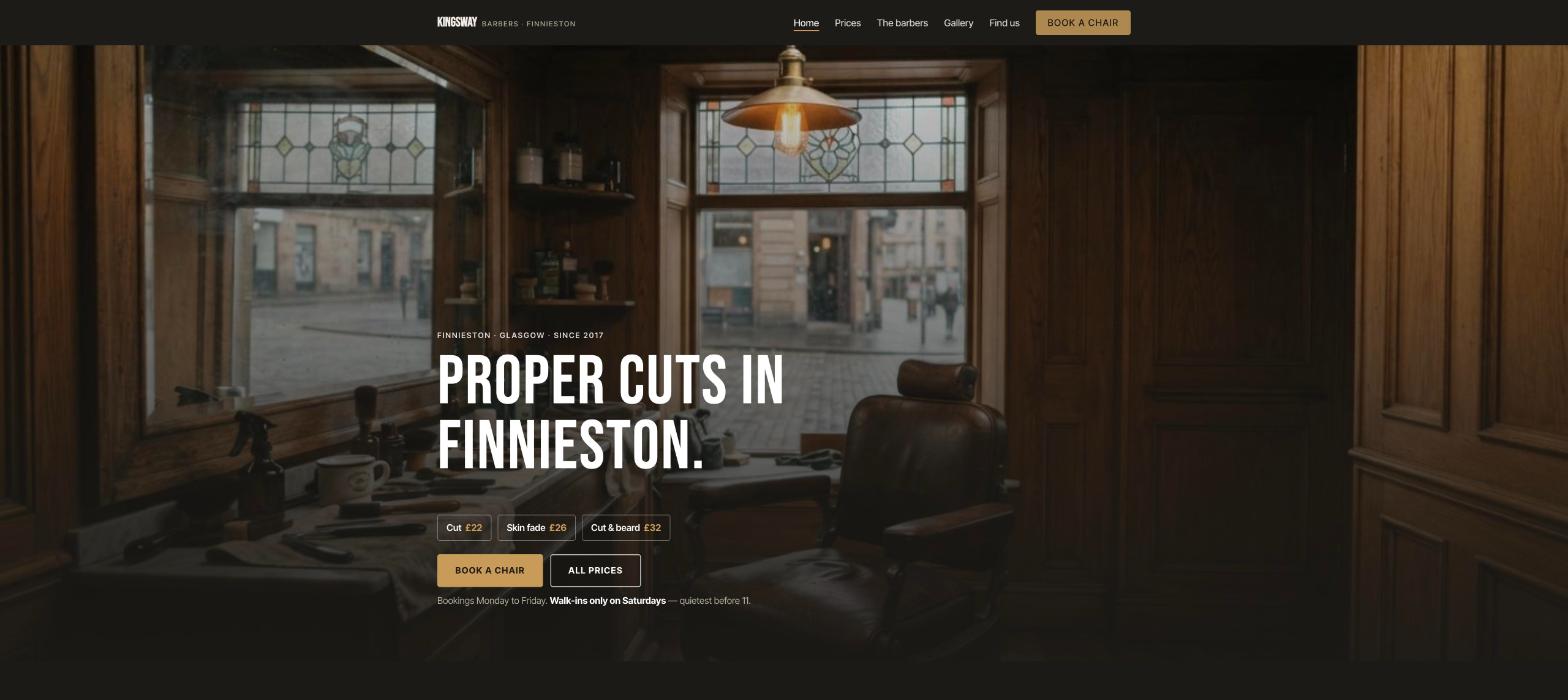
Homepage — three questions answered in eight seconds; the stock fade left out
The prompt library
Work through these in order the first time you build. After launch, jump straight to the tier you need — a price change, a new barber, Christmas hours — and paste the matching prompt.
Tier 1Kick off the whole site
Start with one rich description. Lead with the facts and the mood — the mood is what a dark template can't give you, and it's what Ullbek designs around. Give it the chairs, the prices, how booking works, and tell it what not to invent.
Capability: full site from plain language
Kickoff — full barber-shop site
Build a website for my barber shop, Kingsway Barbers, at 1042 Argyle Street, Finnieston, Glasgow G3 8LY, phone 0141 555 0177. Three chairs: Callum Reid (owner, opened in 2017, skin fades and classic scissor cuts), Ryan Docherty (beards and hot-towel shaves), Aisha Khan (textured and curly cuts, kids). Prices: Cut £22, Skin fade £26, Beard trim £12, Cut & beard £32, Hot-towel shave £25, Kids under 12 £16, OAP £18 weekdays before 12. We take bookings Monday to Friday through Booksy and we're walk-in only on Saturdays; closed Sundays. Hours Mon–Fri 9–7, Sat 9–5. The mood: a proper shop — warm wood, leather, a good playlist — confident, friendly, not try-hard. Pages: Home, Prices, The Barbers, Gallery, and Find Us. The homepage needs one main button: “Book a chair” on weekdays and a clear “Walk-ins Saturday” note. Palette: deep charcoal, warm oak and a brass accent; bold, clean type that reads at a glance on a phone. Don't invent reviews, awards or products I haven't given you. Put our Instagram @kingswaybarbers in the header and footer.
Tier 2Shape the homepage
Once the shell exists, tighten the order of things. A barber homepage answers three questions in eight seconds — then shows the work.
Capability: restructure layout by describing intent
Structure — homepage sections
Rebuild the Kingsway Barbers homepage with these sections in order: (1) a hero with a photo of the leather chair under the pendant light, the line “Proper cuts in Finnieston since 2017.”, three price pills (Cut £22 · Skin fade £26 · Cut & beard £32), one button — Book a chair — and a small line “Walk-ins only on Saturdays”; (2) “The chairs” — three barbers with a photo, name, what they're known for, days in; (3) “Prices” — the full list as text with a link; (4) “Recent work” — six gallery photos with an Instagram link; (5) “Find us” — hours, the address, “two minutes from Exhibition Centre station”, a maps link; (6) a footer with hours, phone, Instagram, and gift cards. Keep it readable on a phone in eight seconds.
Tier 3The price list as text
A JPEG price list is invisible to Google and unreadable on a phone. Ullbek lays yours out as a clean text list, grouped, with the day-specific bits where they belong.
Capability: structured price list you can edit in a sentence
Prices — the list
Build the Prices page for Kingsway Barbers as a text list in two groups. Hair: Cut £22, Skin fade £26, Scissor cut £24, Clipper all-over £16, Kids under 12 £16, OAP (weekdays before 12) £18. Beard & shave: Beard trim £12, Beard shape with hot towel £16, Hot-towel shave £25, Cut & beard £32, Cut & shave £42. Under it: “Card and cash. Bookings Monday to Friday; walk-ins Saturday — quietest before 11. Please give us 2 hours' notice to cancel.” Prices right-aligned, easy to scan on a phone.
Prices — a change
From Monday: Cut £24, Skin fade £28, Cut & beard £34. Update the Prices page and the three homepage price pills; keep everything else exactly as it is.
Tier 4The barbers, with their chairs
People book a barber, not a shop. A photo, what they're known for, their Instagram, which days they're in — and adding a new barber is one message.
Capability: brand voice from your real people
The Barbers — three chairs
Build The Barbers page for Kingsway Barbers from these facts only — don't invent awards or training: Callum Reid — owner, cutting since 2010, opened Kingsway in 2017, skin fades and classic scissor work, in Tuesday to Saturday, Instagram @callumcuts. Ryan Docherty — beards, hot-towel shaves, the straight razor, in Monday to Friday, @ryan.shaves. Aisha Khan — textured and curly cuts, kids who hate haircuts, in Wednesday to Saturday, @aisha.kingsway. One portrait slot each (I'll upload), two sentences each in a confident, friendly tone, days in, Instagram link, and a “Book with [name]” button that opens Booksy.
The Barbers — a new chair
Jordan Lee joins us on the 1st — fades and designs, previously at a shop in Shawlands, in Monday to Thursday, @jordanlee.cuts. Add a fourth chair to The Barbers page in the same style and to the homepage “The chairs” section. I'll upload the portrait.
Tier 5Booking, walk-ins, and the practical bits
If you book, link it. If you're walk-in, say the quiet times. If both, say which days. And gift cards, cancellation, your products — a sentence each, where they belong.
Capability: structured content you can update anytime
Booking — Booksy on weekdays, walk-ins Saturday
Make every “Book a chair” button on Kingsway Barbers open [your Booksy link] in a new tab. Under the homepage button and on the Prices page, add: “Bookings Monday to Friday. Saturdays are walk-in only — quietest before 11, busiest 1–3.” On the Find Us page, add “Gift cards — any amount, from the shop or by calling us.” and the products we stock: Uppercut Deluxe, Reuzel, our own beard oil, one line each, no prices.
Find Us — a short contact form
On the Find Us page, add a short “Ask us” form — Name, Phone or email, Message — using Ullbek's built-in form handling so messages email me with spam filtering, for group bookings, wedding parties and questions. Above it: “For a cut, book on Booksy or walk in Saturday. This form's for everything else.”
Where messages go
Form messages land in the email on your Ullbek account and in your dashboard. Full walkthrough: Contact forms & submissions.
Tier 6The gallery
A barber site lives on its photographs, and only yours will do. Phone photos of your fades under your own light, the shop, the chairs — and the Instagram link beside them.
Capability: your uploads · stock · AI images
Gallery — your own work
I've uploaded thirty photos. Build the Gallery page for Kingsway Barbers as a tidy grid — portrait photos kept portrait, no cropping of heads — with a light-box on tap and the barber's name under each where the file name says. Use the six best fades on the homepage “Recent work” strip. Optimise for the web, keep the warm, slightly moody light. Add a line at the top: “More every week on @kingswaybarbers.”
Gallery — stock only as a stopgap
I don't have good photos yet. Find realistic photos of a warm, wood-and-leather barber shop — a chair under a pendant light, clippers on a counter, a hot-towel shave — nothing with a stranger's face in focus. Use them as placeholders on Home only, and note in the site brief to replace them with our own this week — customers need to see our cuts.
Tier 7Hours, holidays, the things that change
This is the ongoing win. Christmas week, a barber on holiday, a new late night — update it yourself in a sentence instead of waiting on a ticket.
Capability: ongoing edits without a developer
Hours — set them everywhere
Set Kingsway Barbers' hours to Monday–Friday 9–7, Saturday 9–5, Sunday closed, with “late night Thursday until 8”. Show them on the homepage Find Us block, the Find Us page and the footer.
Holidays — a slim banner
Add a slim banner across the top of every page: “Christmas: open till 5 on the 24th, closed 25th–27th, back Monday 29th. Book early — December fills fast.” Keep it compact; if a banner already exists, replace it. Leave a note in the site brief to remove it in January.
A barber away — one line
Ryan is on holiday 10–21 March. Add “Away 10–21 March — book Callum or Aisha for beards” under Ryan on The Barbers page and the homepage “The chairs” section. On the 22nd, remove it.
Tier 8Polish for phones and search
Everyone finds you on a phone, in eight seconds. A few targeted asks before you publish go a long way.
Capability: responsive design + on-page SEO
Polish — mobile & SEO basics
Review the whole Kingsway Barbers site on a phone: the price pills and Book button visible without scrolling, the price list readable without pinching, the gallery swiping cleanly, the phone number tap-to-call. Give every page a title and meta description that mention barber Finnieston Glasgow naturally where it fits — don't stuff keywords. Add alt text to every photo. Make the address plain text so maps can read it, and the Instagram handle a link in the header.
Tier 9Publish and go live
When it looks right, publish. You get a free *.ullbek.site address immediately, with HTTPS. Connect your own domain when you're ready — or buy one in the chat.
Capability: one-click publish · free address · your own domain
Launch — publish checklist
I'm ready to publish Kingsway Barbers. Do a final pass: every page has a title and meta description, prices match between the Prices page and the homepage pills, every Book button opens Booksy, hours are identical everywhere, the Ask us form sends to my email, and there are no placeholder or TODO notes left. Then publish to a free Ullbek address. After that, tell me how to put the site on kingswaybarbers.co.uk.
“A barber shop website is never finished. Prices move, a chair changes hands, December fills by the first week — and the site should say so before the next walk-in checks the price.”
After launch: the updates that used to be painful
The real product for a barber isn't the first build — it's the Monday a new barber starts and the price list changes. Here's how the common jobs map to what you've already learned:
Common barber-shop updates → what to do in Ullbek
Price change
The Tier 3 price-change prompt — Prices page and homepage pills together.
New barber
The Tier 4 new-chair prompt — The Barbers page and homepage, with the Booksy button.
Holiday hours
The Tier 7 banner prompt — one line across every page, removed in January.
A barber away
The Tier 7 one-line prompt — under their name, gone when they're back.
New photos
Upload from your phone → ask Ullbek to add them to the gallery and the homepage strip (Tier 6).