
Your main workspace
A workspace holds three things: sites, people and billing. Everything that costs money lives there: the credit balance, the ways to pay, the hosting plan for each site, the domains and the billing country. The rule is simple: the wallet pays for what it holds.
You get one workspace when you sign up. For a studio, that's your main workspace, and it's where your clients' sites belong. Build each client's site right next to your own, pay Ullbek from this one wallet, and bill your clients yourself, usually a one-off build fee plus a small monthly care fee. Clients see their site through a draft preview link and never need an account.
An agency isn't a special kind of account.
One main workspace
Name it, and make it your default
- Name it after your studio, not after yourself: "Maya's Studio" rather than "Maya". It's what a client sees if you ever invite them in. The owner can rename it any time in Workspace settings → General.
- Make it your default. Open the switcher and click Make default on it. The default is where you land when you sign in, and where the Claude and ChatGPT connectors build.
- Name sites after the business, exactly as the client would say it, and mark samples clearly, for example "Bao & Brew (sample)", so a pitch is never mistaken for a live client. Your dashboard shows each site as a card with a letter tile, its name and when it was last edited. There's no search, so good names do the organising. Rename a site any time from the ⋯ menu on its card.
You never need a second account to keep clients apart, and you shouldn't open one: the free starter credit is granted once per person and stays in the workspace where you first built. A new account or a new workspace starts with no credit. Add a second workspace only when a client's billing needs to be different, as below.
Once you have more than ten sites on premium hosting, email us at support@ullbek.com and we'll take 25% off premium hosting from your 11th site onwards. Domains and credit top-ups stay at the normal price. Prices are on the pricing page, in your currency.
When to give a client their own workspace
A separate workspace for a client is the exception, and the reason is always billing. One workspace has one wallet and one currency, so when a client's money has to be separate from yours, their site needs a workspace of its own.
If none of these is true, keep the site in your main workspace.
A client who pays for their own site
- Create a workspace named after the client
The business name, as the client would say it: "Golden Hour Salon". See Create a workspace below.
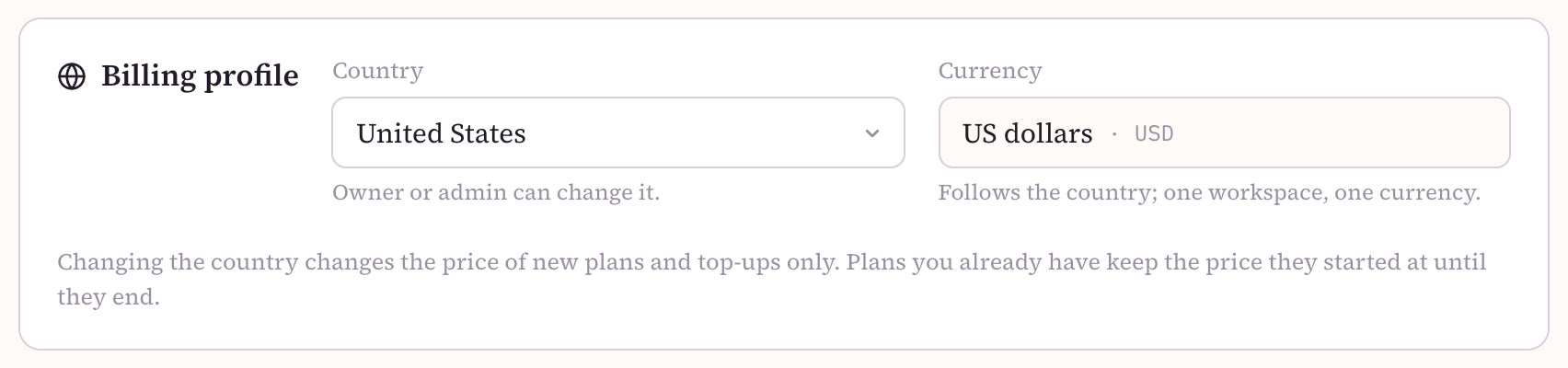
- Set its country, if they're elsewhere
Under Billing → Billing profile, before anything is bought. The currency follows the country.
- Invite the client as an Admin
From Workspace settings… → Members. Admins can manage the workspace's billing.
- They add their way to pay
From then on, their workspace pays for their site's building, hosting and domain.
- You keep building
You stay in the workspace and make every change, as before. If the client later wants to own the workspace too, its owner can use Transfer ownership…; the old owner stays on as an admin.
When a site should leave you for good, that's a different move: a hand-over sends it into the client's own workspace, with its address, form messages, hosting and domain.
What doesn't need a new workspace
Most of what clients ask for works from your main workspace:
- Showing a client their site. Send a draft preview link: in the builder, Share → Share a draft preview → Turn on sharing. Anyone with the link sees the current draft, view-only, with no account. See Previews, approvals & changes.
- Letting a client edit their own site. Add them as a site guest: Manage → Access, their email, Editor or Viewer, Share. They see that one site and nothing else. More in Guests or members? below.
- Bringing in help. A freelancer or partner joins your main workspace as a member. See Your team.
The client wants… → do this
| The client wants… | Do this |
|---|---|
| "Just do it for me" | Keep the site in your main workspace and bill them yourself |
| "Can I see it first?" | Send a draft preview link |
| "I'd like to make small changes myself" | Add them as a site guest (Editor) on their site |
| "I'd like to pay Ullbek myself", or in their own currency | Give them their own workspace, invite them as an Admin, and they add their way to pay |
| "We'll run the billing ourselves" | Their own workspace; transfer ownership later if they ask |
| "It's ours now, we're taking it" | Hand the site over, keeping yourself on as editor if they agree |
None of these is a one-way door. A client can sit in your main workspace for a year, move to their own when they want to pay directly, and take the site over completely later.
Create a workspace
- Open the switcher
Click the workspace name pill in the top bar of your dashboard.
- Choose New workspace…
It's at the bottom of the list, under your workspaces.
- Give it a name
One field, up to 80 characters. For a client's workspace, use their business name.
- Click Create workspace
You're its owner, and it opens straight away, empty and ready for its first site.
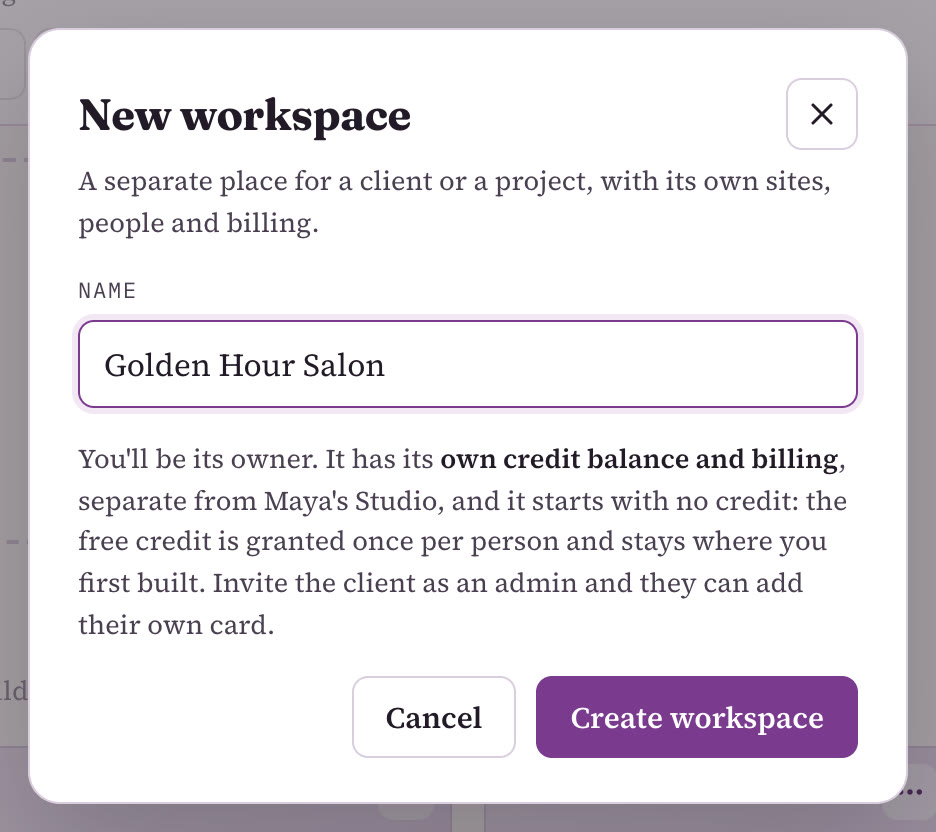
A new workspace has its own credit balance and its own billing, and it starts with no credit: the free starter credit is once per person and stays where you first built. So before anyone builds there, the client adds their way to pay, or credits are added to it. Prices are on the pricing page.
Switch between workspaces
Open the same switcher to move between workspaces. It lists Your workspaces (the ones you own) and Workspaces you're in (the ones you've been invited to), with your role next to each. Pick one and the dashboard shows that workspace's sites, people and billing.
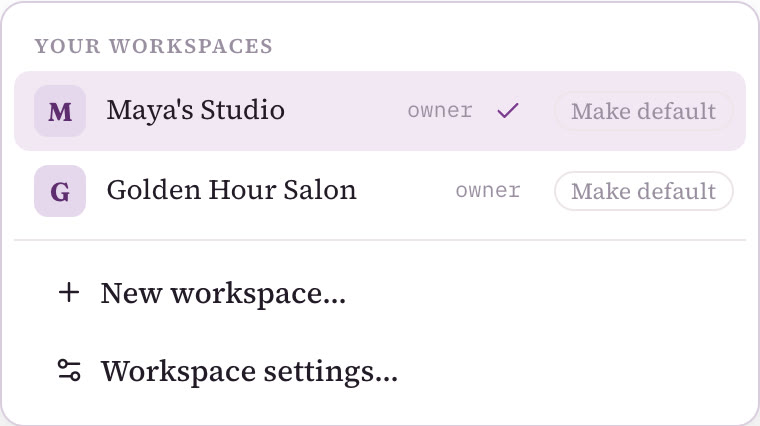
- Switching applies to the browser tab you're in. Open a client's workspace in one tab and your main workspace in another, and each tab stays where you put it.
- Make default picks where you land when you sign in, marked default in the list. Keep it on your main workspace. If you build in a client's workspace from Claude or ChatGPT, make that one the default for the session, then switch back.
Your team
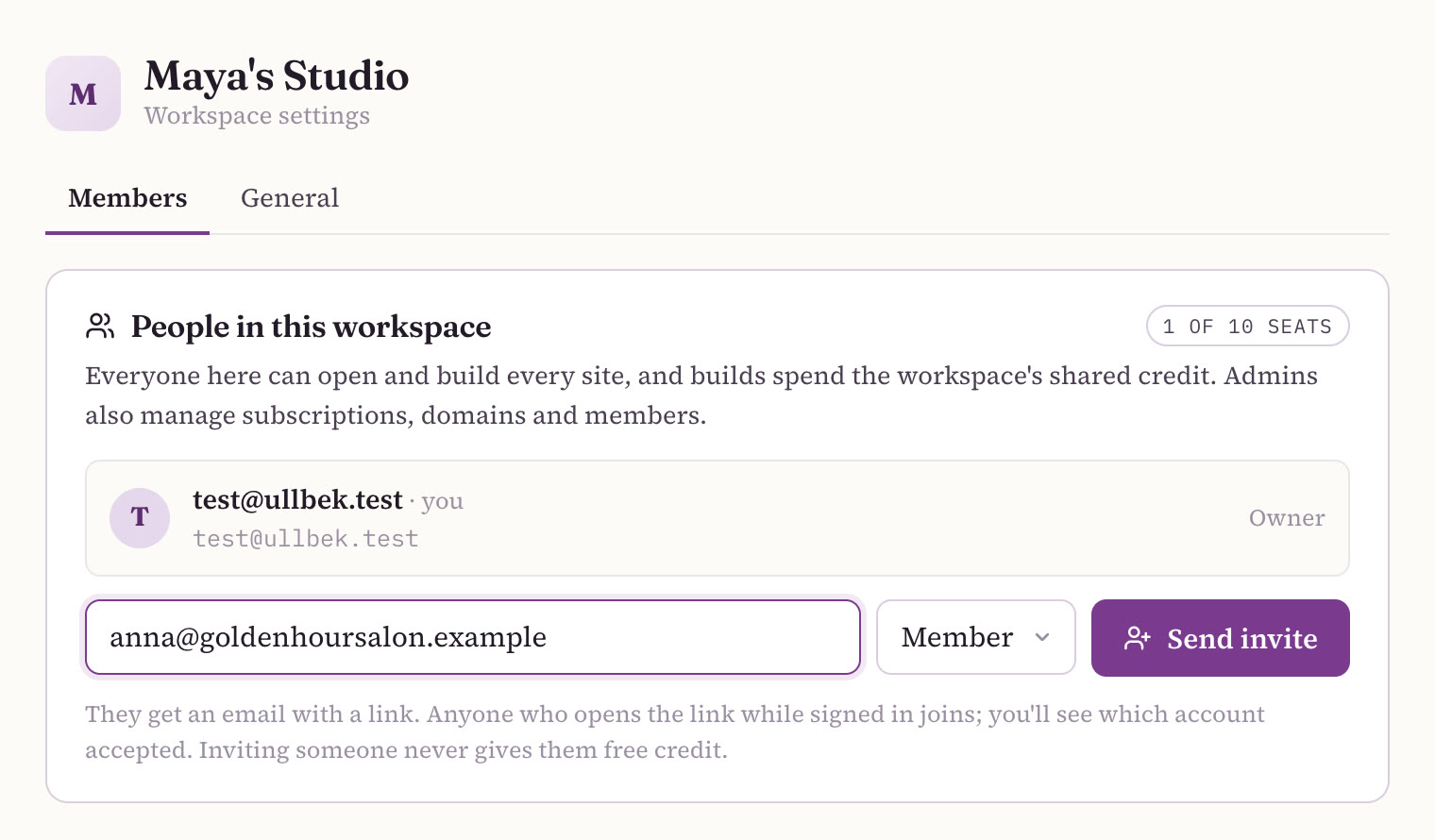
Every workspace can hold up to 10 people, counting active members and open invitations. Seats are free. Open the switcher and choose Workspace settings…; the Members tab lists People in this workspace and how many seats are in use.
Owner, Admin and Member
Everyone in a workspace can open and build every site in it, and their builds spend the workspace's shared credit. The difference between roles is who looks after the money and the people.
| What they can do | Owner | Admin | Member |
|---|---|---|---|
| Open, build, save, publish and unpublish any site | ✓ | ✓ | ✓ |
| Share a draft preview; create and rename sites | ✓ | ✓ | ✓ |
| See the balance and add credits | ✓ | ✓ | ✓ |
| Hosting plans: subscribe, cancel, resume | ✓ | ✓ | — |
| Ways to pay, billing country, auto top-up | ✓ | ✓ | — |
| Domains | ✓ | ✓ | — |
| Delete a site | ✓ | ✓ | — |
| Invite and remove people | ✓ | ✓ | — |
| Hand a site over, or accept one | ✓ | ✓ | — |
| Rename the workspace | ✓ | — | — |
| Transfer ownership… | ✓ | — | — |
So: make a freelancer who helps you build a Member of your main workspace. Make a business partner an Admin, and the same for a client in a workspace they pay for.
Invite someone
- Open Workspace settings… → Members
Owners and admins see the invite row.
- Type their email and pick a role
Member or Admin.
- Click Send invite
They get an email with a link. They open it while signed in to Ullbek and they're in.
The link belongs to the link, not to the email address: whoever opens it while signed in joins, and you'll see which account accepted. It works once and expires after 7 days. You can Resend or Revoke an open invitation, and take anyone out of the workspace again with Remove. A workspace can send up to 20 invitations an hour.
A new member builds on the workspace's shared balance, not on credit of their own. If you're inviting a client so they can pay, they add a way to pay to the workspace; see Who pays for what.
Anyone other than the owner can leave a workspace with Leave workspace. The owner can't leave until they've transferred ownership; after that they stay on as an admin and can leave like anyone else.
Guests or members?
When a client wants into their own site, make them a guest, not a member: a guest sees one site, a member sees every site in your main workspace. On the site, open Manage → Access, and under Who can work on this site type their email, pick Editor or Viewer, and click Share. An editor can build and publish that one site; a viewer sees the builder, the preview and the conversation, but can't send.
| Guest | Member | |
|---|---|---|
| Sees | One site | Every site in the workspace |
| Roles | Editor or Viewer | Owner, Admin or Member |
| Your other sites, balance, billing | Never sees them | Sees the sites and balance; owners and admins manage billing |
| Whose credit their builds use | The workspace the site belongs to | The workspace's shared credit |
| Where they find it | "Shared with you" on their dashboard | "Workspaces you're in" in their switcher |
| How they step away | Leave this site | Leave workspace |
A guest's builds spend your workspace's credit, so agree up front how you'll bill for them. If a guest uses up the credit, they see a card to ask the owner, which emails the workspace's owner and admins. Only one person builds a site at a time: if someone else is already building, you'll see who, with an option to Take over.
A day in Maya's studio
Maya runs Maya's Studio from home (she and her clients are an example, not real customers). Her main workspace, also called Maya's Studio, is her default. It holds her own site, a few portfolio samples, Rosie & Bean, a neighbourhood bakery, and Hartley Plumbing. She pays Ullbek from it and sends each client a monthly bill for their care plan. Every one of those sites carries a small "Website by Maya's Studio" line in its footer, linking back to her own site.
At nine, Rosie's owner messages: the autumn menu is out. Maya opens the bakery's site, tells Ullbek what to change, and sends the preview link for a yes before she publishes.
At eleven, the plumber asks to fix a typo in his prices himself. Maya adds him as a guest editor on his own site. He sees that one site, nothing else, and his edit runs on her credit, covered by his care fee.
After lunch she switches to Golden Hour Salon, her one exception. Anna, the salon's owner, wanted to pay for her own site, so it has its own workspace: Maya owns it, Anna is an admin, and Anna's way to pay covers the hosting and the domain. Maya builds a new price list there on Anna's credit, then switches back.
Before she logs off, she builds a sample site in her main workspace for the café on her street. One account, one main workspace, one exception, and never a doubt about whose money pays for what.
Related
Who pays for what
Building, hosting and domains; the workspace wallet; you pay and bill your clients, or a client pays.
Hand a site to a client
Move a finished site into the client's workspace, and keep yourself on as editor.
Previews, approvals & changes
Send a preview link, get the yes, and let clients ask for changes.
Agency FAQ
The badge, client ownership, leaving a client, and what Ullbek doesn't do.
New to all this? Start with Ullbek for web design agencies or the starting-out guide. For every billing detail, see Billing & payments.
Set up your studio tonight
Sign up, build your studio's own site, then build your first client's site right next to it. One account and one main workspace is all most studios need.