A practical guide for solo practitioners and small firms. What your site needs, copy-ready prompts you can paste into Ullbek, and how the jobs that used to need a developer — practice areas, attorney bios, the fee conversation, plain-English guides, the confidential enquiry form — become a conversation. The worked example is a real two-partner family and estate firm built with Ullbek.
Why law firm websites are harder than they look
A law firm's website is read by someone having one of the worst weeks of their life — a separation, a death in the family, a letter from a landlord — and by their adult child googling on their behalf. They want to know do you handle my kind of problem, what will it cost, who will I actually talk to, and can I ask without committing. Most firm sites answer with a marble column, a phrase like “aggressive representation”, and a contact form that feels like signing something.
The old way
Pick a legal template. Keep the gavel photo. Discover the practice-area block can't say “we don't do criminal — here's who does”. Ask the agency to add the new associate. Wait. Pay. Leave “free consultation” up after you stopped offering it.
With Ullbek
Describe who you help and how you talk to them. Get a site designed around it — practice areas in plain English, bios as people, a fee page that says how it works, guides that answer the 11pm questions, an enquiry form that promises confidentiality and a reply time. Add an attorney by saying so.
This guide does two jobs. It tells you what a strong small-firm website includes, and it shows you how to get each piece built in Ullbek — in plain language, with your own practice areas and people, using prompts you can copy.
How to use the prompts
Every prompt below is written for Calloway Baird, the two-partner Denver firm shown in the worked example. Swap the bold details for your name, your jurisdiction, your practice areas and your attorneys. Hit Copy, paste into the Ullbek chat, and adjust anything that doesn't fit. You're not a template — neither is your firm, and neither should its website be. One note: advertising rules differ by bar; have the final copy checked against yours.
What a great small law firm website needs
You don't need a dozen pages. You need the few things a worried person checks before they pick up the phone — and a way to keep them current without an agency.
A homepage that says what you do, plainly
Family law and estates, for example — in those words. Who you are, one calm sentence, and one button: Request a consultation. No gavel.
Practice areas in plain English
Each one: who it's for, what usually happens, what you'll do, what you won't. And a line about what you don't handle, with a referral.
Attorneys as people
A photo, the bar admission, where they trained, what they're like in a difficult meeting. People hire the lawyer, not the firm.
The fee conversation, started
How you charge — hourly, flat fees for certain matters, retainers — what the first consultation costs, and what happens at it. Honesty here is the differentiator.
Plain-English guides
“What happens in a Colorado divorce”, “Do I need a will or a trust?” The pages people read at 11pm. They build trust and they rank.
A confidential enquiry form
Name, phone, email, the kind of matter, a few sentences, best time to call. With a confidentiality note and a reply time. Spam-checked and in your inbox — no plugin.
The required bits, done right
Bar numbers, the jurisdictions you're licensed in, the disclaimer that the site isn't legal advice, no attorney-client relationship until engaged. In the footer, every page.
The worked example: Calloway Baird
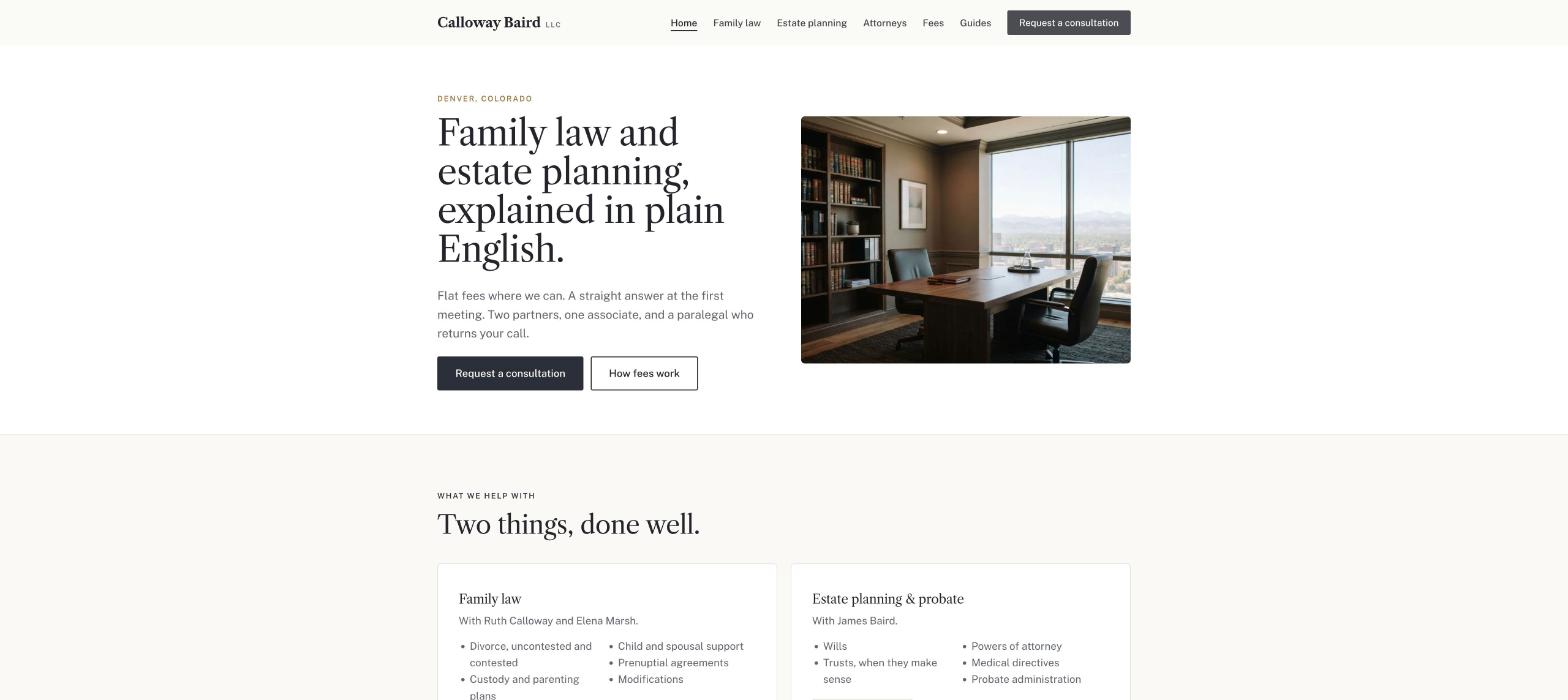
Calloway Baird is a fictional two-partner firm in Denver, Colorado — Ruth Calloway (family law) and James Baird (estate planning and probate), one associate, one paralegal, flat fees for uncontested matters, a paid first consultation, and a set of plain-English guides. It was built in Ullbek from a description much like the kickoff prompt below, and it's live. Every prompt in this guide is written for Calloway Baird, so you can see the result of each one.
Calloway Baird
Live example
Denver family law & estate planning · practice areas, attorneys, fees, guides, confidential enquiries · designed and built with Ullbek
Homepage — what you do, in plain words; the marble column left out
The prompt library
Work through these in order the first time you build. After launch, jump straight to the tier you need — a new attorney, a fee change, a new guide — and paste the matching prompt.
Tier 1Kick off the whole site
Start with one rich description. Lead with the practice areas in plain words and the tone — calm, clear, humane — because that's what a legal template can't give you and it's what Ullbek designs around. Give it the people, the bar details, how you charge, and tell it what not to invent.
Capability: full site from plain language
Kickoff — full firm site
Build a website for my law firm, Calloway Baird LLC, at 1660 Lincoln Street, Suite 1800, Denver, CO 80264, phone (303) 555-0119. Two partners: Ruth Calloway (family law — divorce, custody, parenting plans, prenuptial agreements; Colorado bar since 2006) and James Baird (estate planning and probate — wills, trusts, powers of attorney, probate administration; Colorado bar since 2008). One associate, Elena Marsh (family law, bar 2019), and a paralegal, Dev Patel. We charge hourly for contested matters and flat fees for uncontested divorces, simple wills and powers of attorney; the first consultation is $250 for an hour, credited against the retainer if you hire us. We don't do criminal, immigration or personal injury — we refer. Tone: calm, clear, humane — no “aggressive”, no “fight for you”, no gavels. Pages: Home, Family Law, Estate Planning & Probate, Attorneys, Fees & First Consultation, Guides, and Contact. The homepage needs one main button: “Request a consultation”. Palette: warm white, a deep charcoal and a muted brass accent; a serious serif for headings, very readable body text on a phone. Don't invent case results, testimonials, awards or rankings I haven't given you. Put the bar admissions, the “not legal advice / no attorney-client relationship until engaged” line and “Attorney advertising” in the footer of every page.
Tier 2Shape the homepage
Once the shell exists, tighten the order of things. A firm's homepage is a short, calm argument for one phone call — not a monument.
Capability: restructure layout by describing intent
Structure — homepage sections
Rebuild the Calloway Baird homepage with these sections in order: (1) a hero with a restrained photo of the two partners, the line “Family law and estate planning in Denver, explained in plain English.”, one line under it (“Flat fees where we can. A straight answer at the first meeting.”), and one button — Request a consultation; (2) “What we help with” — two cards, Family law and Estate planning & probate, each with four bullet matters and a link; (3) “How the first meeting works” — three steps and the $250 note; (4) “Who you'll work with” — the three attorneys with a photo, name and one line; (5) “Read first” — the three most useful guides; (6) “What we don't do” — one honest paragraph with referral links; (7) a contact strip with phone, address and a short confidential form. Keep every section short enough to read on a phone in a hospital corridor.
Tier 3Practice areas in plain English
This is where legal sites hide behind nouns. Each practice area should say who it's for, what usually happens, what you'll do and what you won't — and what you don't handle, with a referral. Ullbek writes it in your register, not a brochure's.
Capability: long-form pages in your voice
Family law — the page
Build the Family Law page for Calloway Baird in Ruth's calm, plain voice, with one section per matter: Divorce (uncontested — flat fee; contested — hourly; what the Colorado process looks like in five steps, roughly how long each takes, without promising outcomes), Custody and parenting plans, Child and spousal support, Prenuptial and postnuptial agreements, Modifications. For each: who it's for, what usually happens, what we do, what we don't (we don't do custody evaluations — we work with evaluators). A short “What to bring to the first meeting” list. End with “Request a consultation”. No invented statistics, no “win rates”.
Estate planning & probate — the page
Build the Estate Planning & Probate page for Calloway Baird in James's plain, reassuring voice: Wills (simple will — flat fee), Trusts (when a trust makes sense in Colorado and when it doesn't), Powers of attorney and medical directives (flat fee as a package), Probate administration (what the executor actually has to do, hourly, typical timeline without promises), Estate disputes (we handle some; we refer complex litigation). A short “Do I need a will or a trust?” box linking to the guide. End with “Request a consultation”.
What we don't do — the referral paragraph
Add a “What we don't handle” block to the homepage and the Contact page: criminal defence, immigration, personal injury, business formation. One warm paragraph: we'd rather send you to someone excellent than do an average job — with a line per area and a referral (“for criminal matters we recommend [firm]”, etc. — [paste your referrals]).
Tier 4Fees, and the first consultation
Honesty about money is the differentiator for a small firm. How you charge, what the first meeting costs, what happens at it, what a retainer is — on one page, in plain words.
Capability: structured content you can update anytime
Fees — how it works
Build the Fees & First Consultation page for Calloway Baird: (1) “The first meeting” — one hour, $250, with a partner or the associate, you leave with a clear picture of your options and what it would cost; credited against the retainer if you hire us; (2) “Flat fees” — uncontested divorce from $3,500, simple will $650, will plus powers of attorney and medical directive $950, prenuptial agreement from $2,500 — with “from” exactly where written and a line that we quote in writing before starting; (3) “Hourly matters” — partners $375, associate $275, paralegal $150, billed in tenths of an hour, monthly statements; (4) “Retainers” — what one is, that unused funds are returned; (5) “Payment plans” — available for flat-fee matters. Date the page. A note: “Fees are current as of the date above; we confirm every fee in writing in the engagement letter.”
Fees — a change
From 1 January the associate rate is $295 and the simple will is $700. Update the Fees page and change the date at the top; keep everything else exactly as it is.
Tier 5Attorneys as people
People hire the lawyer. A photo, the bar admission, where they trained, and three sentences about what they're like in a hard meeting — nothing invented, nothing superlative.
Capability: brand voice from your real people
Attorneys — the three of us
Build the Attorneys page for Calloway Baird from these facts only — don't invent awards, rankings or case results: Ruth Calloway, Partner — University of Colorado Law 2006, Colorado bar 2006, ten years at a large Denver family-law firm before founding Calloway Baird in 2016, known for keeping divorces out of court where that's possible and being ready when it isn't; raised in Pueblo. James Baird, Partner — University of Denver Sturm 2008, Colorado bar 2008, joined Ruth in 2017 after nine years in trusts and estates, explains probate to executors who've never done it, a former high-school teacher. Elena Marsh, Associate — Sturm 2019, Colorado bar 2019, family law, bilingual Spanish and English. Dev Patel, Paralegal — the person who returns your call. One portrait slot each, three sentences each in a calm tone, bar admissions and years clearly stated.
Attorneys — a new associate
Sam Okoro joins as an Associate in estate planning — Colorado Law 2021, Colorado bar 2021, previously two years at a Boulder trusts firm. Add to the Attorneys page in the same style and to the homepage “Who you'll work with” section. I'll upload the portrait.
Tier 6Plain-English guides, and the confidential form
Ullbek has a built-in form backend: ask for the fields you want and enquiries are spam-checked and sent to your inbox — no plugin, no form service. The guides answer the 11pm questions and bring people to the site; the form promises confidentiality and a reply time.
Capability: built-in forms → your inbox
Guides — the 11pm questions
Build a Guides section for Calloway Baird with an index page and these four articles, each 600–900 words in plain English, Colorado-specific, with a “this is general information, not legal advice” note at the top and a “Request a consultation” at the end: “What happens in a Colorado divorce, step by step”, “Do I need a will or a trust?”, “What an executor actually has to do in Colorado probate”, “How child support is calculated in Colorado (in plain words)”. Use only the facts I give you here: [paste the key facts per guide — waiting periods, thresholds, forms, timelines]; where I haven't given a fact, say “ask us” rather than guessing. Show the three most useful on the homepage “Read first” block.
Contact — the confidential enquiry form
On the Contact page for Calloway Baird, add a “Request a consultation” form: Name, Phone, Email, What kind of matter? (Divorce or separation, Custody or parenting, Support, Prenuptial agreement, Will or trust, Powers of attorney, Probate, Something else), A few sentences about your situation, Best time to call, How did you find us?. Use Ullbek's built-in form handling so enquiries email me with spam filtering. Above it: “Confidential. We reply within one business day to arrange a first meeting ($250, one hour). Sending this form doesn't create an attorney-client relationship — please don't include anything you'd consider privileged until we've spoken.” Beside it: phone, address, parking (the Lincoln Street garage), hours Monday–Friday 8:30–5:30, and the “What we don't handle” block.
Where enquiries go
Form messages land in the email on your Ullbek account and in your dashboard. Full walkthrough: Contact forms & submissions.
Tier 7Reviews, and what the rules allow
Real client reviews with permission do more than any “top lawyer” badge — and many bars regulate how you present them. Never let the site invent a result, a review or a ranking.
Capability: credibility from your real facts
Reviews — real, permitted, labelled
Add a quiet “What clients say” section on the homepage using only these real reviews, each with written permission on file (do not invent any): [paste two or three, first initial and matter type only]. Add the line our bar requires: “Testimonials reflect individual experiences; results vary.” If I haven't given you enough, use one and a button “Read our Google reviews” linking to [your profile URL]. Never fabricate ratings, rankings or case results.
Tier 8The things that change
This is the ongoing win. A new associate, a fee change in January, a holiday closure, a new guide after a change in the law — update it yourself in a sentence instead of waiting on an agency.
Capability: ongoing edits without a developer
Closures — a slim banner
Add a slim banner across the top of every page: “Closed Thursday 27 and Friday 28 November. Emergencies: leave a message on (303) 555-0119 and we'll call back Monday.” Keep it compact; if a banner already exists, replace it. Leave a note in the site brief to remove it on the Monday.
Guides — a change in the law
Add a fifth guide: “Colorado's new parenting-time rules: what changes in 2027”, 600 words, from these facts only: [paste]. Put it first on the Guides index and in the homepage “Read first” block, bumping the oldest. Date it.
Tier 9Polish for phones and search
Worried people read you on a phone, late. Large type, a tap-to-call number, and page titles that say what Google needs to hear.
Capability: responsive design + on-page SEO
Polish — mobile & SEO basics
Review the whole Calloway Baird site on a phone: the phone number must be tap-to-call in the header of every page, the consultation button visible without scrolling, the fee page readable without pinching, body text large enough for a tired reader. Give every page a title and meta description that mention family law attorney Denver or estate planning attorney Denver naturally where it fits — don't stuff keywords. Add alt text to every photo. Make sure the footer disclaimer, “Attorney advertising” and bar admissions are plain text on every page.
Tier 10Publish and go live
When it looks right, publish. You get a free *.ullbek.site address immediately, with HTTPS. Connect your own domain when you're ready — or buy one in the chat.
Capability: one-click publish · free address · your own domain
Launch — publish checklist
I'm ready to publish Calloway Baird. Do a final pass: every page has a title and meta description, the fee page is dated and matches the homepage, every attorney shows bar admission and year, every guide carries the not-legal-advice note, the enquiry form sends to my email and carries the confidentiality line, the footer disclaimer is on every page, and there are no placeholder or TODO notes left. Then publish to a free Ullbek address. After that, tell me how to put the site on callowaybaird.com.
“A firm's website is never finished. Rates move in January, an associate joins in June, the law changes in July — and the site should say so before the next worried phone call.”
After launch: the updates that used to be painful
The real product for a small firm isn't the first build — it's January, when the rates change and the agency takes a month. Here's how the common jobs map to what you've already learned:
Common firm updates → what to do in Ullbek
Rate change
The Tier 4 fees-change prompt — page and date updated together.
New attorney
The Tier 5 new-associate prompt — Attorneys page and homepage, bar details included.
A new guide
The Tier 8 change-in-the-law prompt — written from your facts, dated, first on the index.
Holiday closure
The Tier 8 banner prompt — one line across every page, removed after.
A new review
Paste it with permission → the Tier 7 reviews prompt, with the bar's required line.
“Divorce, custody, wills, probate” — not “matrimonial and testamentary matters”. People search the way they speak.
Put the first-meeting price on the page
A number and a promise of what they'll leave with removes the fear of calling.
Write the guides from your own facts
Give Ullbek the real thresholds and timelines, and tell it to say “ask us” where you haven't. Never let it guess the law.
Never invent results, reviews or rankings
Ask for placeholders instead. Bars notice, and so do opposing counsel.
Have the copy checked against your bar's rules
Then republish. Edits in the builder aren't live until you publish again — new rates, a new associate, a closure — publish, then check the live site on your phone.
Preview ≠ live
The preview shows your working site. Clients only see what you've published. After a rate change or a new guide, publish again so the world sees it.
Open Ullbek, paste the Tier 1 kickoff prompt, and swap in your name, your practice areas and your attorneys. Your first draft is one conversation away.