A practical guide for independent consultants, advisors and coaches. What your site needs, copy-ready prompts you can paste into Ullbek, and how the jobs that used to need a developer — services, case studies, your approach, the discovery-call form — become a conversation. The worked example is a real operations consultant built with Ullbek.
Why consultant websites are harder than they look
A consultant's website is read by someone who has already heard your name — from a referral, a talk, a LinkedIn post — and is checking one thing: is this person the real deal, and do they solve my specific problem? They want to see who you help, what you actually do, proof it worked, and how to start. Most consultant sites answer with a wall of abstract nouns — “strategic transformation partner” — a stock photo of a handshake, and a contact form with no promise of what happens next.
The old way
Pick a “corporate” template. Fill it with words like leverage. Discover the case-study block wants a logo you can't share. Ask the agency to add last quarter's engagement. Wait. Pay. Keep “now booking Q3” up through Q1.
With Ullbek
Describe who you help and what happens when you do. Get a site designed around it — services as outcomes, case studies as short stories, your approach in your own voice, a discovery-call form that asks three things. Add a case study by saying so.
This guide does two jobs. It tells you what a strong consulting website includes, and it shows you how to get each piece built in Ullbek — in plain language, with your own engagements and voice, using prompts you can copy.
How to use the prompts
Every prompt below is written for North Fork Advisory, the Toronto operations consultant shown in the worked example. Swap the bold details for your name, your niche, your engagements and your voice. Hit Copy, paste into the Ullbek chat, and adjust anything that doesn't fit. You're not a template — neither is your practice, and neither should its website be.
What a great consultant website needs
You don't need a dozen pages. You need the few things a referred prospect checks before they book the call — and a way to keep them current between engagements.
A homepage that says who you're for
Your face, one specific sentence about who you help and with what, and one button: Book a discovery call. Specific beats impressive.
Services as outcomes, not deliverables
Three ways to work with you — what the client gets, how long it takes, who it's for, and how it's priced (a range, a day rate, a retainer). “Contact for pricing” loses the ones with a budget.
Case studies as short stories
The situation, what you did, what changed, with numbers where you can share them and anonymised where you can't. Three good ones beat twelve logos.
Your approach, in your voice
How an engagement actually runs — the first call, the diagnosis, the work, the handover. The page that tells them what it's like to work with you.
About, with the real background
Where you learned this, the operating roles you held, why you went independent. Proof you've done the job, not just advised on it.
Writing, talks, a newsletter
The things that made them hear your name. A short list with links, so the referral loop closes.
A discovery-call form that asks three things
Name, company, what's going on in a few sentences. Spam-checked and in your inbox — no plugin, no scheduling-app maze unless you want one.
The worked example: North Fork Advisory
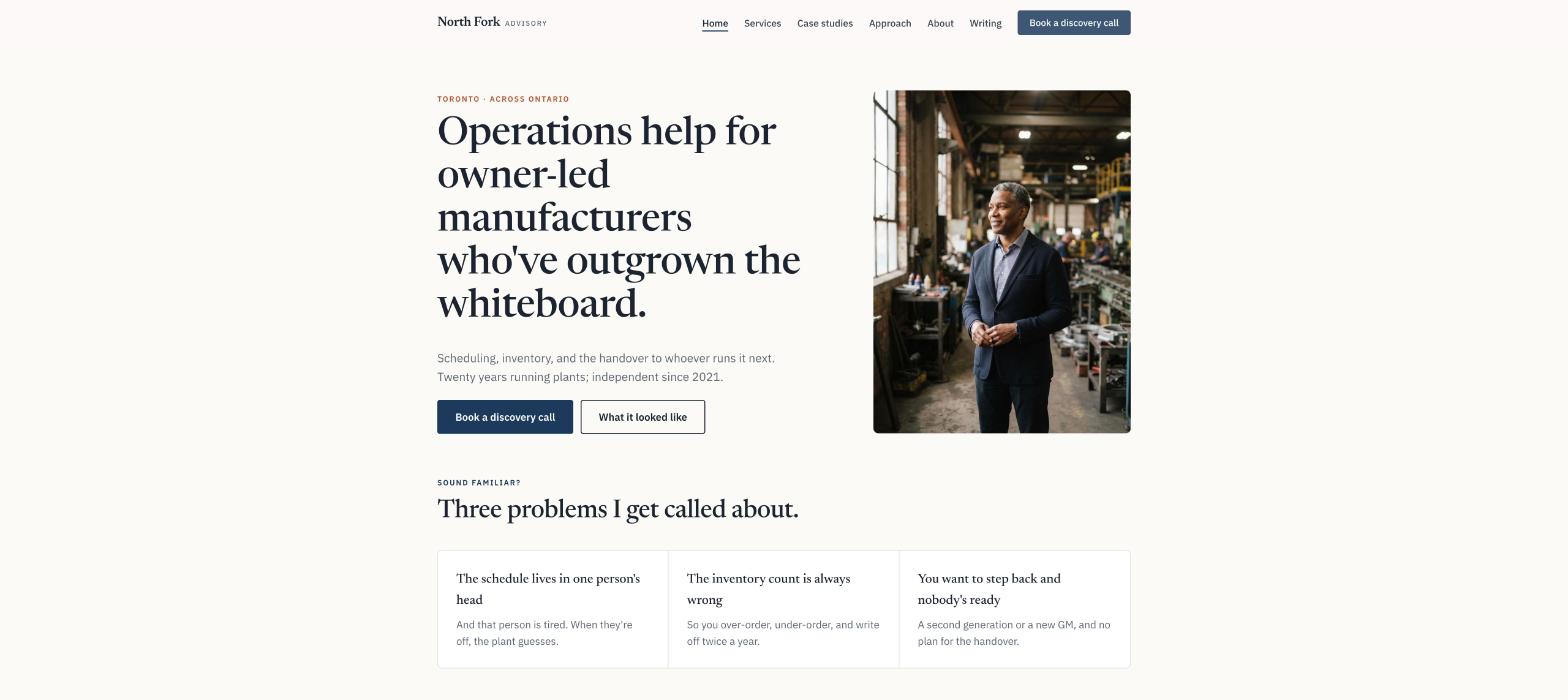
North Fork Advisory is a fictional one-person consultancy in Toronto — Marcus Oyelaran, twenty years running operations for mid-size manufacturers, independent since 2021, helping owner-led plants with 30 to 300 people fix scheduling, inventory and the handover to a second generation. Three services, three case studies, a monthly newsletter. It was built in Ullbek from a description much like the kickoff prompt below, and it's live. Every prompt in this guide is written for North Fork, so you can see the result of each one.
North Fork Advisory
Live example
Toronto operations consultant · services, case studies, approach, discovery calls · designed and built with Ullbek
Homepage — one specific sentence about who you help; the handshake photo left out
The prompt library
Work through these in order the first time you build. After launch, jump straight to the tier you need — a new case study, a changed retainer, a talk to add — and paste the matching prompt.
Tier 1Kick off the whole site
Start with one rich description. Lead with who you help and with what — specificity is what a corporate template can't give you and it's what Ullbek designs around. Give it your background and your voice, and tell it what not to invent.
Capability: full site from plain language
Kickoff — full consulting site
Build a website for my consulting practice, North Fork Advisory, based in Toronto. I'm Marcus Oyelaran. I spent twenty years running operations for mid-size manufacturers — plant manager, then VP Operations at two companies — and went independent in 2021. I help owner-led manufacturers with 30 to 300 people fix three things: production scheduling that's in someone's head, inventory that's always wrong, and the handover to a second generation or a new GM. Three ways to work with me: a two-week Operations Diagnostic (fixed fee, $12,000), a 90-day Fix engagement (from $8,000 a month), and a monthly Advisory retainer ($3,500 a month, two half-days). Every engagement starts with a 30-minute discovery call. Tone: plain, direct, a little dry — the way a plant manager talks, not a strategy deck. No words like leverage, synergy, transformation or journey. Pages: Home, Services, Case Studies, Approach, About, Writing, and Contact. The homepage needs one main button: “Book a discovery call”. Palette: warm white, a deep navy and a rust accent; a confident serif for headings, clean body text on a phone. Don't invent clients, results, logos or testimonials I haven't given you; leave Case Studies as a placeholder I'll fill next.
Tier 2Shape the homepage
Once the shell exists, tighten the order of things. A consultant's homepage is a short argument for one call — not a capabilities deck.
Capability: restructure layout by describing intent
Structure — homepage sections
Rebuild the North Fork Advisory homepage with these sections in order: (1) a hero with my portrait, the line “Operations help for owner-led manufacturers who've outgrown the whiteboard.”, one line under it (“Scheduling, inventory, and the handover to whoever runs it next.”), and one button — Book a discovery call; (2) “Sound familiar?” — three short cards: the schedule lives in one person's head, the inventory count is always wrong, you want to step back and nobody's ready; (3) “Three ways to work together” — the services with prices and a link; (4) “What it looked like” — three case-study cards; (5) “How I work” — four lines and a link to Approach; (6) “Recently” — the three latest pieces from Writing; (7) the discovery-call form. Keep every section short enough to read on a phone between meetings.
Tier 3Services as outcomes
This is where consultant sites hide. Prospects with a budget leave at “contact for pricing”. Three ways to work together — what they get, how long, who it's for, what it costs — laid out like a menu, not a proposal.
Capability: structured services you can edit in a sentence
Services — three ways to work together
Build the Services page for North Fork Advisory with three sections: Operations Diagnostic — two weeks, $12,000 fixed: for owners who know something's wrong but not what; three days on the floor, interviews, a written diagnosis with the five things to fix in order, a read-out meeting. The 90-Day Fix — from $8,000 a month: for plants ready to change one big thing; I run the project with your team, weekly on site, a scheduling or inventory system that works without me by day 90; mark this “Most clients start here after a Diagnostic”. Advisory retainer — $3,500 a month: two half-days a month, for owners and new GMs who want a second opinion on tap; cancel with a month's notice. Under them: “Every engagement starts with a 30-minute call. If I'm not the right person I'll say so and suggest who is.” Then a short FAQ: Do you work outside Ontario? (yes, with travel at cost), Do you do software selection? (I'll help you choose, I don't sell any), Minimum plant size? (around 30 people — below that, hire a good scheduler instead).
Services — a price change
From January the Diagnostic is $13,500 and the retainer is $3,900 a month; the 90-Day Fix stays as is. Update the Services page and the homepage cards; keep every description exactly as it is.
Tier 4Case studies as short stories
Three good stories beat a wall of logos. The situation, what you did, what changed — with numbers where you can share them, anonymised where you can't. Ullbek gives each one a page and a card.
Capability: structured stories, anonymised where needed
Case studies — three, in the same shape
Build the Case Studies page for North Fork Advisory: an index of cards, each opening a page with “The situation”, “What we did”, “What changed” and a one-line quote where I have permission. Use only these facts: A 120-person metal fabricator, Hamilton — scheduling in a foreman's head, 30% of orders late; built a visual schedule board and a weekly planning meeting; late orders under 8% in four months; quote from the owner (I'll paste). A 60-person food packer, Mississauga — inventory counts off by 20%, two write-offs a year; cycle counting and a simple reorder rule; counts within 3%, no write-off in the following year; anonymised, no quote. A 200-person plastics plant, Cambridge — founder retiring, no successor ready; a 12-month handover plan, the new GM shadowed on the retainer; founder stepped back on schedule; anonymised. Label anonymised ones clearly. Each page ends with “Something similar?” linking to Contact.
Case studies — add a new one
Add a fourth case study: a 90-person wood-products plant, Barrie — three legacy spreadsheets for one schedule; consolidated into one, trained two planners; overtime down a third in a quarter; quote from the GM: [paste]. Put it first on the index and in the homepage cards, bumping the oldest off the homepage. Nothing else changes.
Tier 5Your approach, and the discovery call
Ullbek has a built-in form backend: ask for the fields you want and messages are spam-checked and sent to your inbox — no plugin, no form service. The Approach page and the call form belong together: one tells them what working with you is like, the other asks only what you need to say yes or no.
Capability: built-in forms → your inbox
Approach — how an engagement actually runs
Write the Approach page for North Fork Advisory in Marcus's plain, dry voice, as five steps: (1) a 30-minute call — what's going wrong, in your words; (2) I come to the plant before I write anything; (3) a diagnosis you could act on without me; (4) the work — on site weekly, with your people doing it, so it sticks; (5) the handover — a system, a cadence, and a date I'm no longer needed. Then “What I won't do”: sell software, write a 90-slide deck, or stay longer than the job needs. End with “Book a discovery call”. No invented statistics.
Contact — the discovery-call form
On the Contact page for North Fork Advisory, add a short “Book a discovery call” form: Name, Company, Email, Phone (optional), Roughly how many people? (under 30, 30–100, 100–300, more), What's going on? (a few sentences), How did you hear about me?. Use Ullbek's built-in form handling so messages email me with spam filtering. Above it: “I reply within two working days with a few times for a 30-minute call. No pitch, no deck.” Beside it, my email marcus@northforkadvisory.ca and a line that I'm based in Toronto and work across Ontario.
Contact — if you use a scheduling link
I book calls through [Calendly / Cal.com / your link]. Make the “Book a discovery call” buttons open [your link] in a new tab, and keep the form on the Contact page for people who'd rather write first.
Where messages go
Form messages land in the email on your Ullbek account and in your dashboard — no extra tool to learn. Full walkthrough: Contact forms & submissions.
Tier 6About, and the writing that got you here
Referred prospects want proof you've done the job, not just advised on it. A real career in facts, and the writing and talks that made them hear your name.
Capability: brand voice from your real background
About — Marcus, in facts
Write the About page for North Fork Advisory from these facts only — don't invent employers, degrees or awards: Marcus Oyelaran, mechanical engineering at Waterloo (2001); production supervisor then plant manager at a Hamilton auto-parts supplier (2001–2012); VP Operations at a Mississauga packaging company (2012–2018) and a Cambridge plastics plant (2018–2021); independent since 2021; lives in Toronto's east end; coaches his daughter's hockey team. Structure: a portrait, “Why I do this”, a plain timeline, “What I'm like to work with” (three lines), and a note on the name — North Fork is the creek behind the first plant he ran. Tone: plain, dry, warm underneath.
Writing — the list that closes the referral loop
Build the Writing page for North Fork Advisory: a dated list of pieces, newest first, each with a title, one line and a link — [paste your articles, newsletter issues and talks with URLs]. Add a “Monthly notes” block at the top: one paragraph about the newsletter and an email sign-up that uses Ullbek's built-in form handling (Name, Email). Show the three newest pieces on the homepage “Recently” section.
Tier 7Availability, the things that change
This is the ongoing win. Whether you're taking new engagements this quarter, a talk next month, a new piece — update it yourself in a sentence instead of waiting on an agency.
Capability: ongoing edits without a developer
Availability — this quarter
Update the availability line on the homepage hero and the Contact page to: “Taking one new 90-Day engagement from March. Diagnostics and retainers available now.” Date it. When I give you the next quarter's, replace it rather than stacking.
A talk — slim banner
Add a slim banner across the top of every page: “Speaking at the Ontario Manufacturers' Forum, Hamilton, 14 May — ‘Scheduling without the whiteboard’.” linking to [event URL]. Keep it compact; if a banner already exists, replace it. Leave a note in the site brief to remove it after the 14th.
Tier 8Polish for phones and search
Referred prospects open your site on a phone from a LinkedIn message. A few targeted asks before you publish go a long way.
Capability: responsive design + on-page SEO
Polish — mobile & SEO basics
Review the whole North Fork Advisory site on a phone: the discovery-call button must be visible without scrolling on every page, service sections must stack cleanly with prices readable, case-study pages must be comfortable to read. Give every page a title and meta description that mention operations consultant for manufacturers Ontario naturally where it fits — don't stuff keywords. Add alt text to every image. Add my LinkedIn link to the footer.
Tier 9Publish and go live
When it looks right, publish. You get a free *.ullbek.site address immediately, with HTTPS. Connect your own domain when you're ready — or buy one in the chat.
Capability: one-click publish · free address · your own domain
Launch — publish checklist
I'm ready to publish North Fork Advisory. Do a final pass: every page has a title and meta description, prices match everywhere they appear, anonymised case studies are labelled, the discovery-call and newsletter forms send to my email, the availability line is current, and there are no placeholder or TODO notes left. Then publish to a free Ullbek address. After that, tell me how to put the site on northforkadvisory.ca.
“A consultant's website is never finished. An engagement ends, a case study clears, a talk lands — and the site should say so before the next referral checks you out.”
After launch: the updates that used to be painful
The real product for a consultant isn't the first build — it's the week an engagement wraps and there's a story to tell. Here's how the common jobs map to what you've already learned:
Common consulting-site updates → what to do in Ullbek
A new case study
The Tier 4 add-a-new-one prompt — page, index and homepage cards together.
Price change
The Tier 3 price-change prompt — Services page and homepage cards.
Availability
The Tier 7 this-quarter prompt — replace the line, date it.
A new article or talk
Add it to Writing (Tier 6); the homepage “Recently” block follows.
Switching to a scheduling link
The Tier 5 scheduler prompt — buttons repointed, form kept.
“Owner-led manufacturers with 30 to 300 people” beats “businesses of all sizes”. The wrong prospects leave, the right ones lean in.
Put a number on at least one service
A fixed-fee diagnostic with a price is the easiest yes a nervous owner can say.
Tell three stories well
Situation, what you did, what changed. Anonymise if you must; never invent.
Ban the words you'd never say out loud
Tell Ullbek which words are off limits. It'll hold the line better than you will at 11pm.
Republish after every change
Edits in the builder aren't live until you publish again. New case study, new price, new availability — publish, then check the live site on your phone.
Preview ≠ live
The preview shows your working site. Prospects only see what you've published. After a new case study or a price change, publish again so the world sees it.