
The three things that cost money
Everything you'll pay Ullbek for falls into three groups. Prices are on the pricing page, shown in your workspace's currency, and Ullbek always shows you the price before anything is charged.
Building
Building and changing sites uses credit. You buy it in packs with Add credits, and every new account starts with some free.
Hosting
Free on an ullbek.site address, for as long as you like. Premium hosting is a monthly plan for one site, and it's what a site needs to go on its own domain.
Domains
A domain bought in Ullbek is its own yearly plan, separate from hosting. A domain your client already owns elsewhere can be connected instead.
No seat fees
A workspace holds up to ten people, and seats are free. Your team and your clients don't add to the bill.
For a typical client on their own domain, that means some credit to build the site, a monthly hosting plan, and a yearly domain. More detail is in Billing & payments.
The rule: the wallet pays for what it holds
Every workspace has its own wallet. The wallet is everything money-related in that workspace: its credit balance, its saved ways to pay, its auto top-up, the hosting plan for each of its sites, its domains, and its billing country and currency.
The rule is simple: the wallet pays for what it holds. A site in your main workspace is paid for by your studio. A site in a client's workspace is paid for by theirs. One workspace never pays for another.
The same goes for people. Anyone working inside a workspace builds on that workspace's credit:
- Members and admins spend the workspace's shared credit. Everyone can see the balance and add credits; only the owner and admins manage hosting, domains, ways to pay and the billing country.
- Guests invited to one site spend the host workspace's credit. If you share a site with a client as an editor, their changes come out of your wallet. When it runs out, they see a card asking the owner to top up, and you and your admins get an email.
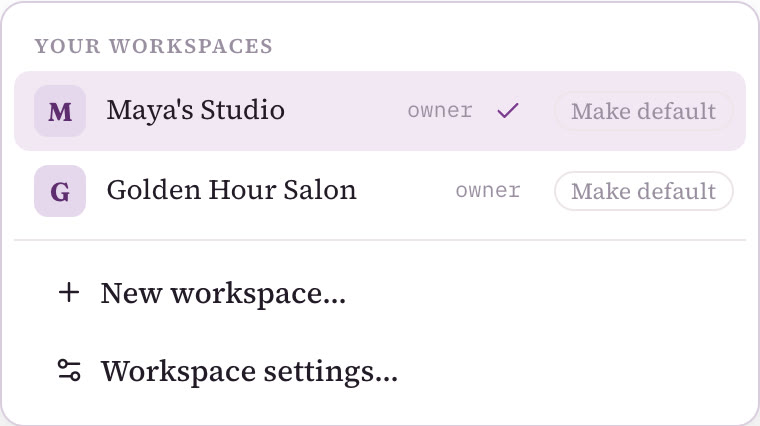
Always the one for the workspace the site is in. Switch workspaces from the name in the top bar, and the balance you see is the one that pays.
Model A: your main workspace. You pay, and bill your clients
This is the default, and how most agencies run. Your client sites live in your main workspace, right next to your own site and portfolio. Your wallet pays Ullbek for building, hosting and domains, and you invoice each client yourself, usually a one-off build fee and a small monthly care fee. Maya keeps Rosie & Bean, Hartley Plumbing and her own portfolio this way: they all sit in Maya's Studio, her main workspace, and the owners pay Maya, not Ullbek.
There's nothing to set up. The workspace you signed up with is already your main workspace; rename it to your studio's name in Workspace settings… → General if you like.
Why it works
- The simplest setup: one place, one bill, every site you look after in one list.
- Your clients never need an account. They see their site through a draft preview link and ask you for changes. If a client wants to make their own edits, invite them to just their site as a guest; that doesn't need a workspace either.
- Changes are your service, and part of what your care fee pays for.
- As your client list grows past ten premium sites, the hosting discount improves your margin.
What to watch
- You pay Ullbek before your client pays you, so set your care fee to cover each site's hosting and domain.
- If a client stops paying you, their site's hosting is still on your bill until you cancel it or hand the site over.
- You pay in your workspace's currency, whatever currency your client pays you in.
Your records are on the Billing page, under Charges and Usage & purchases, which helps when you invoice.
Model B: a client's own workspace, for the exceptions
Now and then a client's billing needs to be different from everyone else's. That, and only that, is the reason to give a client a workspace of their own. It's the right move when the client:
- Wants to pay Ullbek directly, with their own way to pay, rather than through you.
- Should pay in their own currency, because they're in another country.
- Wants to control the billing themselves. Often a larger client, who may also bring their own team.
Their wallet then pays for their site's hosting, domain and building, and you stay in the workspace to build and manage everything. Anna, who owns Golden Hour Salon, wanted to pay for her own site, so Maya set it up like this:
- Create a workspace named after the client
Open the workspace switcher from the name in the top bar and choose New workspace…. Name it after the client, then Create workspace. You're its owner. It starts with no credit of its own.
- Invite the client as an admin
In Workspace settings… → Members, enter their email, choose Admin and Send invite. Admins can add ways to pay and manage hosting and domains.
- The client adds their own way to pay
Signed in to their workspace, they open Billing, check the country under Billing profile, and use Add a way to pay, or simply pay on Stripe's page when a charge comes up. Then they add credit for the build.
- You keep building
Switch to the client's workspace and build their site as usual. Your builds there spend the client's credit, not yours.
- Transfer ownership later, if they want it
When the client wants to own the workspace outright, use Transfer ownership… in Workspace settings. You stay on as an admin.
Why it works
- No money passes through you for that client. You charge for your time and care, not for hosting.
- The client pays in their own currency, with the ways to pay they're used to.
- If the client ever leaves, there's nothing to untangle: the site, the hosting and the domain are already theirs.
What to watch
- Renewals go to the client's saved way to pay, so keeping it current is up to them.
- As an admin, the client can manage hosting, domains and people in that workspace, so agree who does what.
More on setting this up in Organise clients with workspaces.
Most agencies do both
In practice it isn't either-or. Your main workspace is home for most clients; a client's own workspace is for the few whose billing has to be different; and a hand-over is how a site leaves you for good, into the client's own workspace. Here's who pays in each case:
| Main workspace (most clients) | A client's own workspace (exceptions) | After a hand-over | |
|---|---|---|---|
| Building | Your credit | The client's credit, including your builds there | The client's credit, including your builds if you stay on as an editor |
| Hosting | Your monthly plan for that site | The client's monthly plan | Moves with the site, paid up to its date, then renews on the client's way to pay |
| Domain | Your yearly plan | The client's yearly plan | A domain bought in Ullbek and connected to the site moves with it, renewal included |
| Client pays you | Build fee + monthly care fee | Your fee for time and care | Your fee for any further work |
A hand-over needs no card to accept. If the client hasn't saved a way to pay when the hosting comes up for renewal, the plan shows Set up renewal on their Billing page. Your credit never moves with a site. See Hand a site to a client.
Running lots of client sites: the hosting discount
Premium hosting is the cost that grows with your client list, one monthly plan per site. So once you're running a real roster, we share the load: once you have more than ten sites on premium hosting, email us at support@ullbek.com and we'll take 25% off premium hosting from your 11th site onwards.
- It's on request. It isn't applied automatically, so send us a short email when you pass ten.
- Hosting only. Domains and credit top-ups stay at the normal price.
- Your first ten stay as they are. The discount applies from your 11th premium site onwards.
Your care fee stays the same for each client, while the hosting behind it costs you less from your 11th site. Keeping your clients together in your main workspace also makes your roster easy to see at a glance.
Currency and ways to pay
Each workspace pays in one currency, set by its billing country. You'll find both on the Billing page under Billing profile. The country is set from where you signed up, and the owner or an admin can change it. The currency follows the country. Where there's no local price, the workspace pays in US dollars.
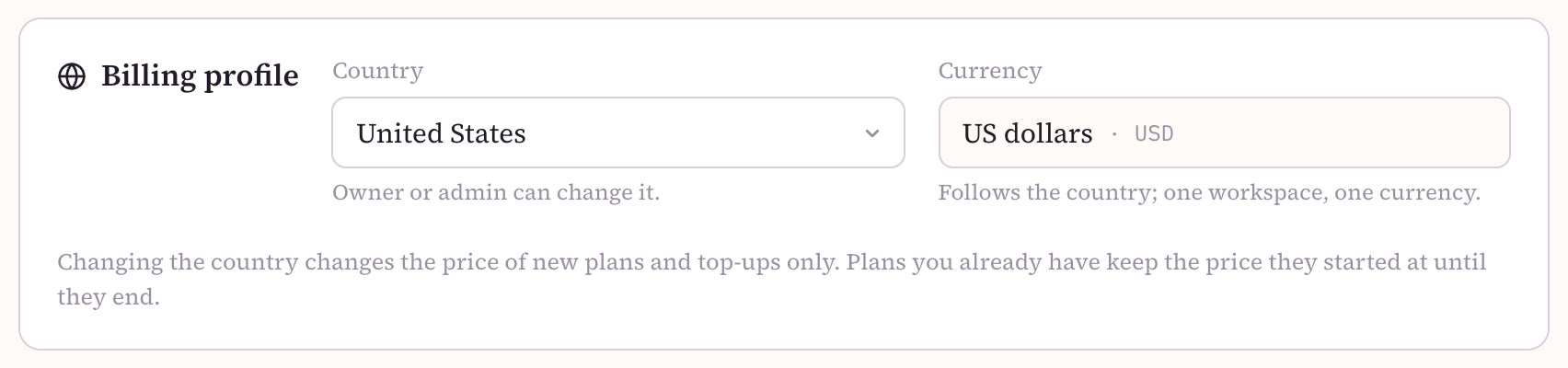
Changing the country changes the price of new plans and top-ups only. Plans you already have keep the price they started at until they end. That's why a client abroad who wants to pay in their own currency is one of the exceptions that gets their own workspace: they pay in their currency, and yours stays as it is.
There are two ways to pay:
- A saved way to pay. A card, Link, or a bank mandate such as SEPA, BECS or UPI AutoPay, added under Ways to pay → Add a way to pay. Plans renew on it, and auto top-up needs one.
- Stripe's pay page. Pay one charge at a time in the workspace's currency, with local methods such as UPI, Pix, SEPA, iDEAL or Klarna, depending on the country.
Someone else can pay
When a workspace runs out of credit, Ullbek shows a card to add more. The pay link on that card can be copied, or sent on WhatsApp, so someone else can pay it. That's handy when you're building in a client's workspace and their credit runs low: send the link to the client and they top up their own workspace, without you handling their money.
Free credit: once per person
Every person gets free starter credit once, in the workspace where they first build. It's never per workspace:
- A new workspace starts with no credit.
- Inviting someone never gives them free credit.
You don't need a second account for a second client, and you don't need a new workspace for most clients either. Keep them in your main workspace, and open a second workspace only when a client's billing needs to be different. A separate account would split your work apart, and the free starter credit doesn't come again: it's once per person, and a new workspace starts with none.
Pricing your own services
Whatever you charge is up to you, but price for your neighbourhood. The local businesses you work with are often the ones a traditional web agency priced out, and agencies built on Ullbek typically charge them a fraction of what a traditional agency asks. A simple shape works best:
- A one-off build fee for getting to know the business, gathering the words and photos, building the site and launching it.
- A small monthly care fee that covers that client's hosting, domain and changes, with a margin for you on top.
In your main workspace (Model A), check that the care fee covers each site's hosting and domain; past ten premium sites, the hosting discount improves that margin. If a client pays Ullbek directly (Model B), your fee is simply for your time and care. Start your agency has a simple way to work out your prices, and the agency page shows the whole picture.
Related
Organise clients with workspaces
Your main workspace, your team, and when a client needs their own.
Hand a site to a client
What moves, what stays, and keeping yourself on as an editor.
Start your agency
Your first 30 days, from your own site to your first client.
Agency FAQ
The badge, ownership, leaving a client, and what Ullbek doesn't do.
Set up your studio
Sign up free with starter credit, build your agency's own site, and build your first client's site right next to it in your main workspace.