
When to hand over
Most of the sites you build stay in your main workspace for good: you look after them and bill the client yourself. A hand-over is how a site leaves you. It moves one site out of your workspace and into a workspace your client controls, and from then on their workspace pays for it and the enquiries go to them. It's the right move when:
- It was a one-off build. You agreed a fee for the website, the work is done, and the site should belong to the business.
- The client wants to own it. Some owners simply want their website in their own account, paid on their own card.
- The client is moving on. They've found someone else, or they're taking things in-house. A clean hand-over is the professional way to part.
If the client only wants to pay for the site themselves, a hand-over is more than they need. Pick the lightest arrangement that does the job:
| Arrangement | Who pays | Good when |
|---|---|---|
| Keep it in your main workspace (the default) | You, and you bill the client | You look after the site as part of a monthly care fee |
| Give the client their own workspace | The client, from that workspace | The client wants to pay Ullbek directly or in their own currency, but you still run everything |
| Hand it over | The client, from their own workspace | The site should be theirs for good, with or without you on it |
The first two are explained in Organise clients with workspaces. A hand-over and a care plan go together well, too: hand the site over, keep yourself on as an editor, and keep charging for the changes you make.
Before you hand over
Settle these first. They take minutes now and save a confused email later.
Tell the client what's coming
A hand-over email from Ullbek is easier to act on when the client already knows why it's arriving. A short note from you does it:
Hand the site over, step by step
You need to be an owner or admin of the workspace the site is in.
- Open the site's Access panel
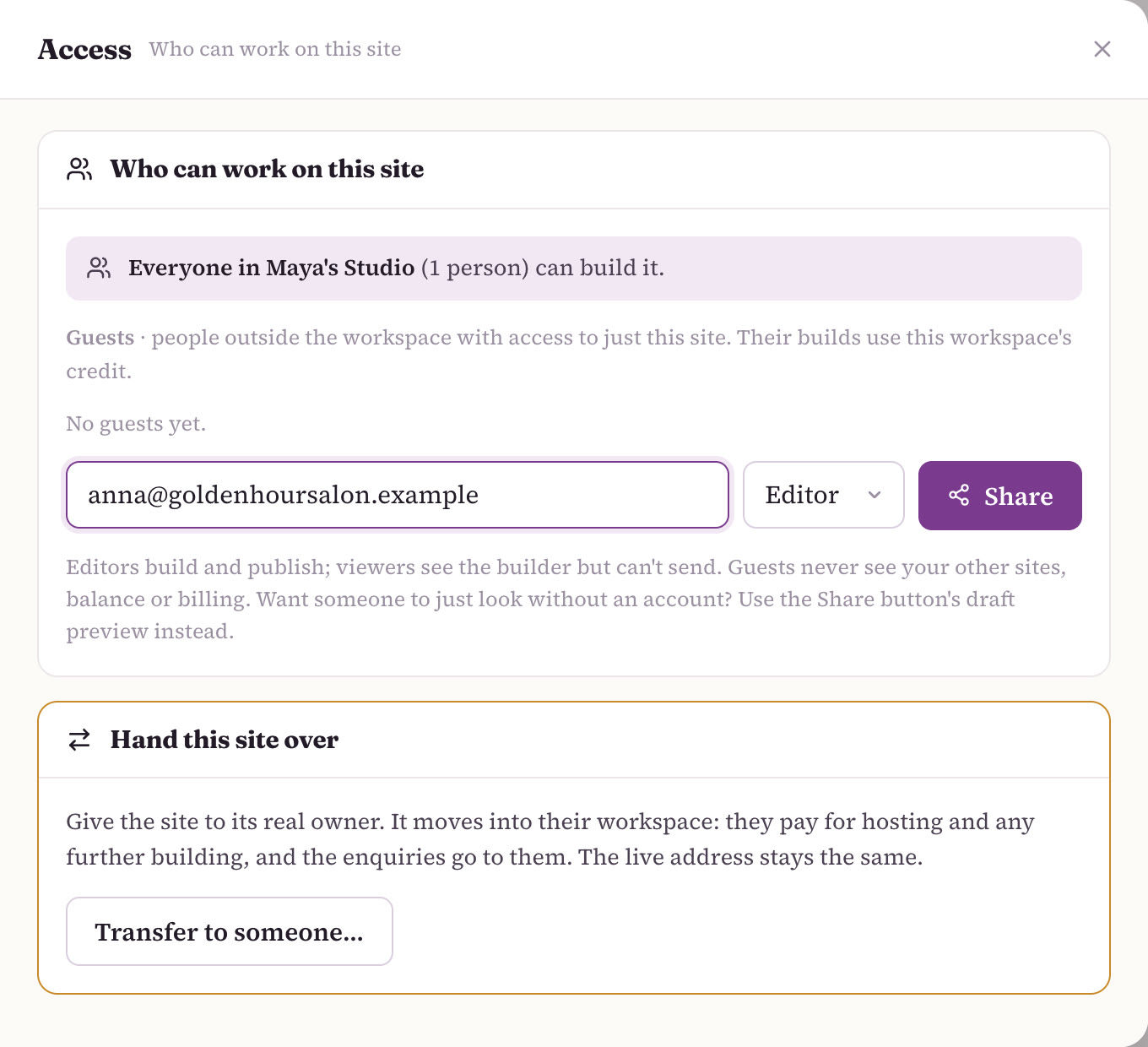
Open the site, then Manage → Access. At the top is Who can work on this site; below it, the Hand this site over card.
- Click Transfer to someone…
The card opens into a short form.
- Type the client's email
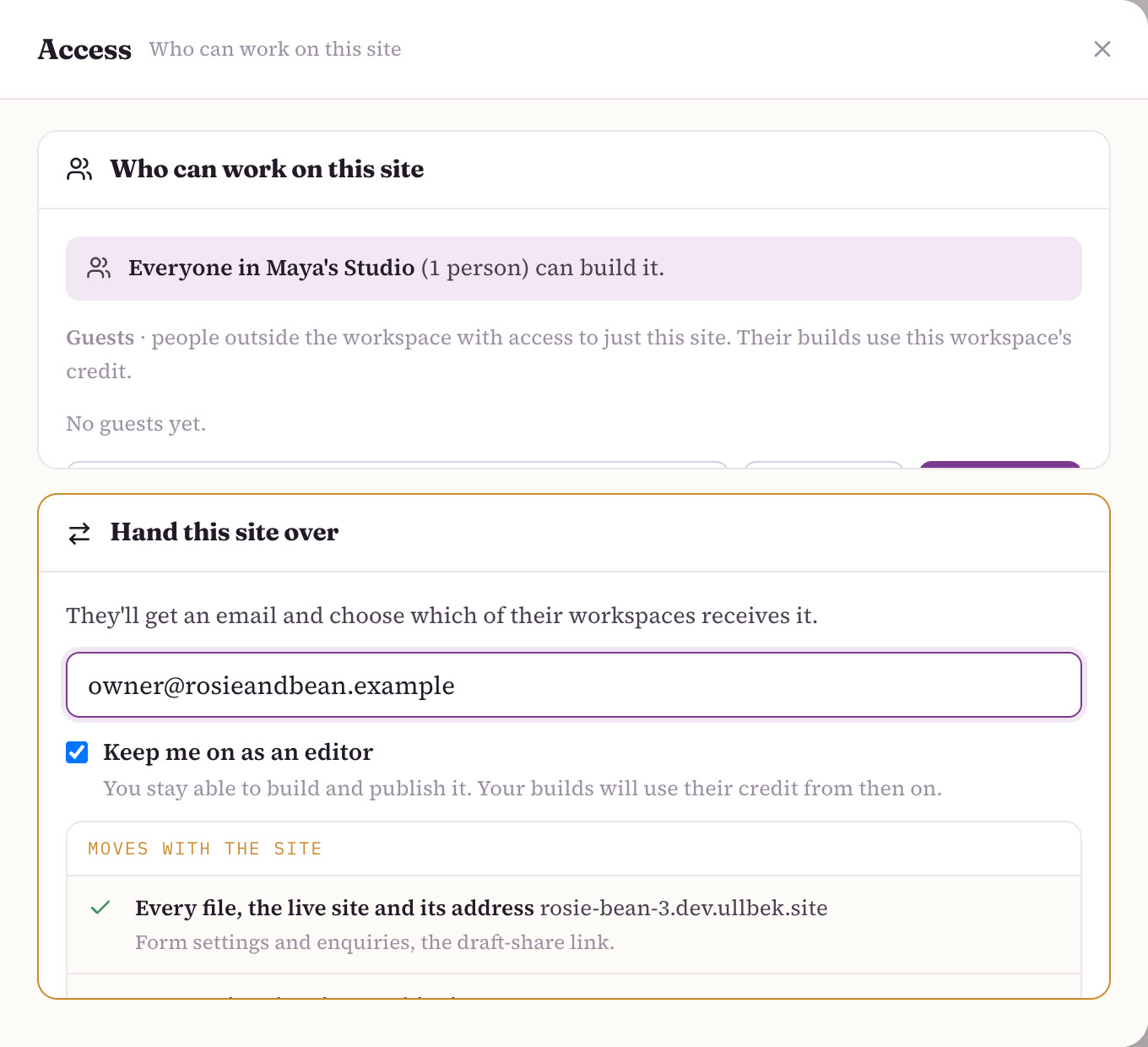
They'll get an email and choose which of their workspaces receives the site.
- Leave Keep me on as an editor ticked, or untick it
It's ticked by default. Ticked, you stay able to build and publish the site as a guest editor, and your builds use the client's credit from then on. Untick it for a clean goodbye.
- Click Send the hand-over
The form lists what moves with the site, so you can check it one last time before you send.
What the client does
The client opens the email and chooses where the site goes: any workspace they own or administer, or a new workspace they create right there on the accept page. Then it's theirs.
Your client can accept the site without adding a way to pay. Nothing stops when it lands: the live site keeps serving, and any hosting you'd already paid for carries on to its paid-through date.
What moves, and what stays
| What | Moves? | Details |
|---|---|---|
| Every file | Moves | The whole site, exactly as it is. |
| The live site and its address | Moves | No downtime. The address stays the same. |
| Form settings and enquiries | Moves | Past messages and where new ones are delivered. |
| The draft-share link | Moves | The same link keeps working. |
| Premium hosting | Moves | Carried to its paid-through date, then renewed by the client's workspace. |
| A connected domain | Moves | Keeps serving the site. |
| A domain bought through Ullbek, connected to the site | Moves | Its ownership and its yearly renewal move to the client's workspace. |
| The conversation history | Stays | Your build conversation stays behind. The site itself moves unchanged. |
| Your credit | Stays | Credit never moves between workspaces. Your balance stays yours. |
After the hand-over
- The client's workspace pays. Building, hosting and the domain for this site now come out of their wallet, not yours. See Who pays for what.
- Hosting renews from the paid-through date. If the client's workspace has a saved way to pay, the renewal is charged to it. If not, the plan shows Set up renewal on Billing → Plans. Remind the client to do one or the other before the date comes round.
- If you stayed on as an editor, your later builds use the client's credit. If it runs out, you'll see a card to ask the owner, and it emails them for you.
- The site appears in your dashboard under "Shared with you", so you can still find it in one click.
- You can step away any time with Leave this site.
If the client wants to pay but you'd rather keep running everything, a hand-over is more than you need. Create a workspace for them, invite them as an admin, and transfer ownership later if they ask. See when to give a client their own workspace.
An example: Hartley Plumbing
Maya built Hartley Plumbing's site in her main workspace, put it on premium hosting with a domain bought through Ullbek, and pointed the contact form at the plumber's own email. (Maya and Hartley Plumbing are an example, not real customers.) It lived there on her care plan until the owner decided he wanted the site in his own account. They agreed the "Website by Maya's Studio" line in the footer would stay, and she sent the hand-over with Keep me on as an editor ticked. The owner accepted it into a new workspace from the accept page.
Nothing changed for visitors: same address, same site, enquiries still arriving in the plumber's inbox. The hosting Maya had paid for runs to its paid-through date, then renews from the plumber's workspace. The site now sits under "Shared with you" on Maya's dashboard, and when the plumber asks for winter opening hours, Maya makes the change and their credit pays for it. Her own credit stayed in her main workspace, ready for the next client.
Moving a domain on its own
A domain connected to the site travels with the site. A domain that isn't, for example one parked in your workspace's Domains list that the client wants for later, moves separately: open Domains in the top bar and use Transfer on that domain. More on domains in Publishing & going live.
When a hand-over can't be sent
- The site is already moving, or being deleted. Wait for that to finish first.
- It's a domain, not a site. Hand-over moves sites. A domain on its own goes through Domains → Transfer, as above.
- You're a member or a guest. Only an owner or admin of the site's workspace can offer a hand-over, and only an owner or admin of the receiving workspace can accept one.
Related
Organise clients with workspaces
Your main workspace, and when a client gets one of their own.
Who pays for what
Building, hosting and domains, and whose wallet each comes out of.
Previews, approvals & changes
Get the final yes before you hand over, and keep changes flowing after.
Agency FAQ
Client ownership, leaving a client, the badge, and more.
Just getting started? See how the whole thing fits together on Ullbek for web design agencies.
Build it, then give it away
Build your client's website, get their yes, and hand it over with one email. Their site, their address, their enquiries.