
Straight answers to the questions agencies ask, before they start and once they're running. Each answer is short and links to the page that covers it in depth. New here? Ullbek for web design agencies is the overview, and the agency page is the short version.
Getting started
Do I need to know how to code or design?
No. You describe a website in plain words and Ullbek builds it, and changes work the same way: tell Ullbek what to change. What helps is a good eye for what looks right, and that grows quickly with every site you make. The starting-out guide shows how to practise on your own portfolio.
What does it cost to start an agency on Ullbek?
Nothing up front. Signing up is free, with no card needed, and comes with starter credit to build with. Sites on a free ullbek.site address cost nothing to host and never expire, so a portfolio of sample sites stays online for free. You pay when you want more: further building, Premium hosting for a site on its own domain, and domains. Prices are on the pricing page in your currency, and Billing & payments explains how billing works.
Where do I start?
With your own agency's website: build it, put it on your own domain, then make three to five sample sites for the kinds of businesses you'll approach. The first month, step by step, is in Start your agency. For how everything fits together, read Ullbek for web design agencies.
Should I open a new account for each client?
No: keep them in your main workspace. That's the workspace you got when you signed up, and it's where your own site, your portfolio and your client sites all live, on one dashboard, with one balance. You pay Ullbek from it and bill your clients yourself. A new account means another sign-in and nothing gained: the free starter credit is granted once per person and stays in the workspace where you first built, so a new account or workspace doesn't bring more. See Organise clients with workspaces.
Do I need a separate workspace for each client?
No. Most agencies keep all, or nearly all, of their clients in their main workspace. A separate workspace is only for a client whose billing has to be different: they want to pay Ullbek directly with their own way to pay, they should pay in their own country's currency, or they want to control the billing themselves (often a larger client with a team of their own). Then create a workspace named after the client, invite them as an admin, and they add their way to pay while you keep building. Showing a client their site needs only a preview link, and letting them edit it needs only guest access, so neither needs a new workspace. See Organise clients with workspaces.
Can I rebuild a client's existing website?
Yes. Give Ullbek the address of the client's current site and it reads the pages (the words, the links and the pictures) and can bring the images across to build with. You get a fresh, custom site made from their content, not a copy of the old design. Bring your agency to Ullbek walks through moving a client this way.
Can I use Claude or ChatGPT with Ullbek?
Yes. Connect Ullbek to Claude, ChatGPT or another assistant that supports connectors, and from there you can build, preview and publish sites, read form messages, choose where they go, and walk through a custom domain's setup. The connector works in your default workspace, which is usually your main workspace, so your client sites are already there. To work on a site in a separate workspace, open the switcher and press Make default on that workspace first. See Ullbek in Claude and Ullbek in ChatGPT.
Clients & access
Can my clients make changes themselves?
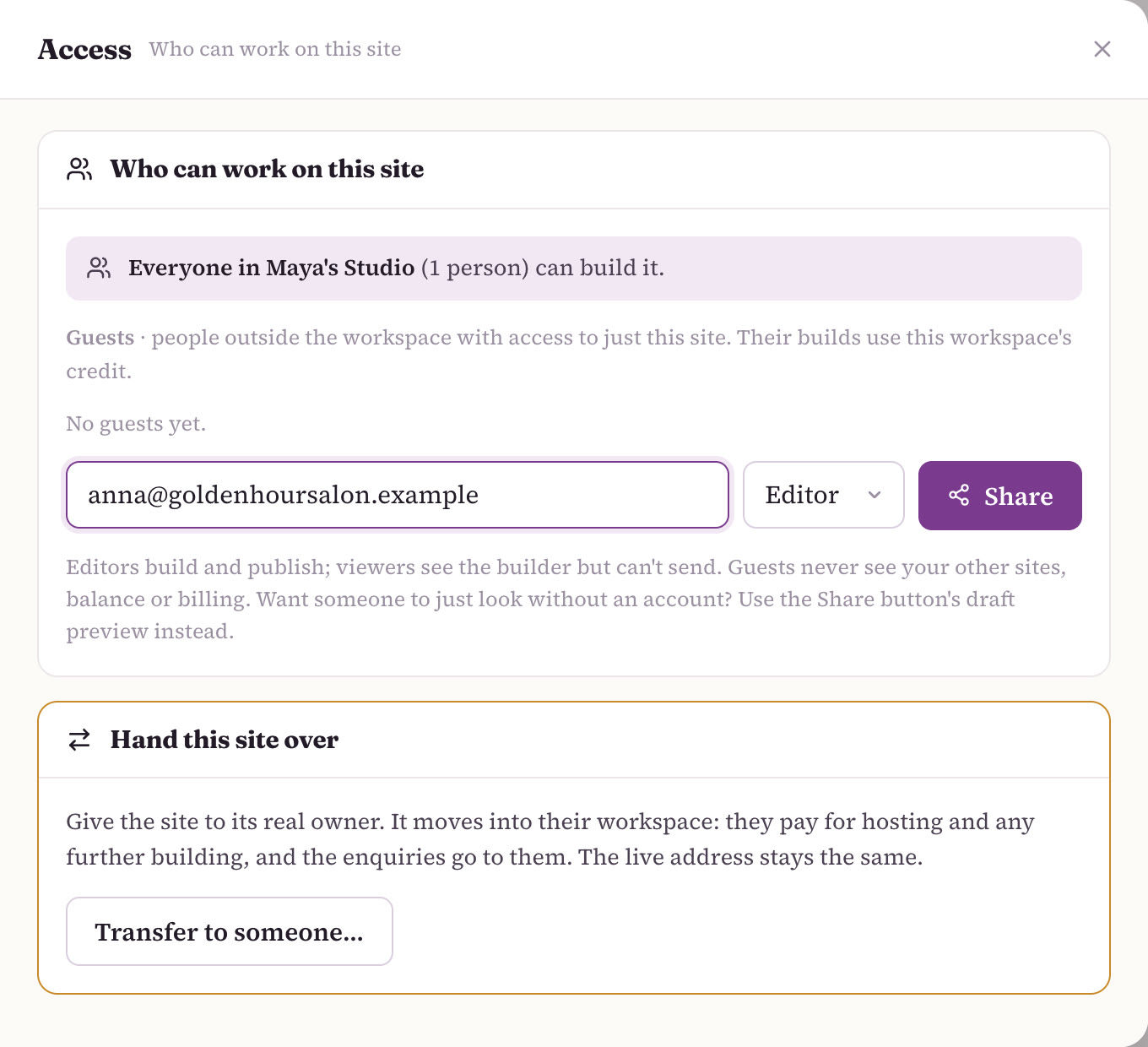
Yes, if you want them to, and the site stays in your main workspace. On the site, open Manage → Access, enter the client's email, choose Editor and press Share: they can build and publish that one site, and never see your other sites, balance or billing. Their builds use your workspace's credit; choose Viewer if they should only look. Or keep every change with you and make it part of your monthly fee. See Previews, approvals & changes.
Can my team help me?
Yes. In Workspace settings… → Members, invite people to your main workspace by email as a Member or Admin. A workspace has up to 10 seats, and seats are free. Everyone can open, build and publish every site in the workspace using its shared credit; admins also manage subscriptions, domains and members. Inviting someone never gives them free credit. See Organise clients with workspaces.
Who owns a client's site?
The workspace that holds it. A site in your main workspace is yours to manage and your wallet pays for it; you bill the client for it yourself. A site in a client's own workspace is paid for by theirs. To move a site from your main workspace to the client's, hand it over: the files, the live address, the hosting and a connected domain all move together. See Hand a site to a client.
What happens if a client leaves me?
You part cleanly. If their site is in your main workspace, use Hand this site over; they accept without needing a card, and the live address keeps working. Untick Keep me on as an editor if you won't be working on it. If they had guest access to a site of yours, remove them in Manage → Access. If the client has a separate workspace that you own, use Transfer ownership… to give it to them, then Leave workspace.
What happens to my clients' sites if I stop?
Sites in your main workspace are paid for by your wallet, so hand each one over to its owner before you step away: the live address keeps working, and the client accepts without needing a card. Sites in a client's own workspace keep running on that workspace's billing; nothing about them depends on you. And sites on a free ullbek.site address never expire. See Hand a site to a client.
Money
Can a client pay for their own website?
Yes, and this is the main reason to give a client a separate workspace. Create a workspace named after the client, invite them as an admin, and they add their own way to pay. That workspace's wallet then pays for the site's hosting, domain and building, in the client's own currency, while you stay in the workspace and keep building. You can transfer ownership to them later. Every other client can stay in your main workspace. See Who pays for what.
Can I sell websites I build with Ullbek?
Yes, that's the point. You're selling your service: understanding the business, building the site, getting it live and looking after it. You pay Ullbek from your main workspace and invoice your clients yourself, at prices you set. Ullbek's own costs are on the pricing page. See Start your agency.
What should I charge?
Price for your neighbourhood. The businesses you'll build for are mostly local, and a studio like yours can charge them a fraction of what a traditional web agency asks, because Ullbek does the building. The usual shape is a one-off build fee plus a small monthly care fee that covers your hosting, the domain and their changes, with a margin for you. Check Ullbek's costs on the pricing page, set prices your neighbours can say yes to, and agree up front what the monthly fee includes. See Start your agency.
Is there a discount when I host lots of client sites?
Yes. Once you have more than ten sites on Premium hosting, email us at support@ullbek.com and we'll take 25% off Premium hosting from your 11th site onwards. Domains and credit top-ups stay at the normal price. It isn't automatic: just email us when you pass ten. See Who pays for what.
What currency do I pay in?
Each workspace pays in one currency, which follows the country under Billing → Billing profile. The country is set from where you signed up, and an owner or admin can change it; existing plans keep the price they started at. Your main workspace pays in your currency. If a client should pay in their own country's currency, that's a reason to give them a separate workspace that they pay for. Countries without a local price pay in US dollars. See Who pays for what.
Domains & going live
Can I use my own agency name?
Yes, everywhere your clients look. Your agency gets its own website on its own domain, built with Ullbek like any client site, each client's site goes on their own domain, and each one can carry your studio's credit in its footer. The dashboard where you build is Ullbek's and carries Ullbek's name; there's no white-label version of it. Your clients never need to use it: they see your preview links and their finished site.
Can I put my studio's name on my clients' sites?
Yes, and we recommend it. Put a small credit line in the footer of every client site, such as "Website by Maya's Studio", linking to your studio's site. Everyone who visits a client's site sees who made it, which is how your work finds you the next client. There's no setting for it: just ask Ullbek, for example: "Add a small line to the footer on every page: 'Website by Maya's Studio', linking to https://mayasstudio.com. Keep it subtle." Use your own studio's name and site. Agree it with the client up front; it's normal agency practice. Your credit line is separate from the Ullbek badge, which only appears on sites on a free ullbek.site address.
Does my client's website say Ullbek on it?
Sites on a free ullbek.site address carry a small badge: "Ullbek · Build beautiful websites". A site on Premium hosting with its own domain doesn't. While a client is looking at a draft preview link, a small "Draft preview — built with Ullbek" chip shows. Most client sites go live on the client's own domain, so they carry the client's name and nobody else's. See Publishing & going live.
Can my client's site go on their own domain?
Yes. Put the site on Premium hosting, then connect the domain the client already has (Ullbek gives you the DNS records to add) or buy a new .com, .net or .org inside Ullbek. A domain bought here for a Premium site is connected for you, DNS and certificate included. A domain is its own yearly plan, separate from monthly hosting. See Publishing & going live.
Can contact form messages go to my client's email?
Yes. Each site sends its form messages to one address, which starts as the workspace owner's email. To use the client's, ask Ullbek ("send form messages to anna@goldenhoursalon.example") or set it in Manage → Form → Deliver to. A 6-digit code goes to that address and has to be typed back to confirm it, so have the client to hand. See Contact forms.
What Ullbek isn't
What can't Ullbek build?
Ullbek builds websites, not web apps: no member logins, no booking engines and no full online shops. That's a deliberate choice. A site can link out to the tools a business already uses, like a Shopify store or a booking page, and every site can have a working contact form. If a client's whole business is a complex online shop, Ullbek isn't the tool for that part.
Is this a course or a "make money from home" scheme?
No. There's nothing to buy up front, no course, no starter kit and no recruiting, and we don't promise an income. Ullbek is a tool for building websites businesses are proud of, and these docs are a method for using it. Finding clients is real work and it's yours; most people who succeed start with someone they already know. More on the agency page.
Email support@ullbek.com. People at Ullbek read it and reply by email, usually within a day.
Related: Ullbek for agencies · Start your agency · Organise clients with workspaces · Who pays for what · Hand a site to a client
Start with your own agency's website
Sign up free, describe your agency, and watch its website come to life. Then build the next one, for a client.