A practical guide for florists and flower-shop owners. What your site needs, copy-ready prompts you can paste into Ullbek, and how the jobs that used to need a developer — the bouquet menu, ordering and delivery, weddings and events, the seasonal switch — become a conversation. The worked example is a real Seattle flower shop built with Ullbek.
Why florist websites are harder than they look
A florist's website is read in three moods: panic (it's her birthday, today, can you deliver by five), planning (we're getting married in June, do you do weddings), and browsing (what's in season, what would look nice on the table). Most florist sites serve none of them well — a slideshow of last spring's peonies, a “shop” that's really a wire-service catalogue of someone else's arrangements, and a delivery area nobody can find.
The old way
Sign up for a wire-service template. Sell the same twelve arrangements as every other shop. Discover you can't say “Tuesdays we have the good ranunculus”. Ask the web company to add the wedding page. Wait. Pay. Keep Mother's Day up until August.
With Ullbek
Describe your shop and what's in the buckets this week. Get a site designed around it — a bouquet menu in your style, ordering that lands in your inbox or links to your shop, a delivery map, a wedding page in your voice. Change the season by saying so.
This guide does two jobs. It tells you what a strong florist website includes, and it shows you how to get each piece built in Ullbek — in plain language, with your own flowers and delivery area, using prompts you can copy.
How to use the prompts
Every prompt below is written for Wren & Thistle, the Seattle flower shop shown in the worked example. Swap the bold details for your name, your neighbourhood, your bouquets and your delivery area. Hit Copy, paste into the Ullbek chat, and adjust anything that doesn't fit. You're not a template — neither is your shop, and neither should its website be.
What a great florist website needs
You don't need a dozen pages. You need the few things a customer in a hurry, or a couple with a date, checks before they call — and a way to change them every season.
A homepage that looks like this week's buckets
One photo of real flowers you actually have, one line about your style, and two buttons: Order flowers and Weddings & events.
A bouquet menu in your style, not a catalogue
Three sizes of “designer's choice”, a few signature arrangements, a price, and a line about what's in season. Not forty stock photos of someone else's work.
Ordering that works today
A same-day cut-off stated plainly, a form or a link to your shop, phone number for the panicking. Spam-checked and in your inbox — no plugin.
Delivery, specifically
Which neighbourhoods, what it costs, by when. The page people check before anything else.
Weddings and events as a conversation
Your style, a starting budget, three real weddings, and an enquiry form that asks the date and the venue.
The seasonal switch
Mother's Day, Valentine's, the holidays — a block that changes four times a year in one sentence.
Your story and your shop
Who you are, where the shop is, hours, how you source. People buy flowers from people.
The worked example: Wren & Thistle
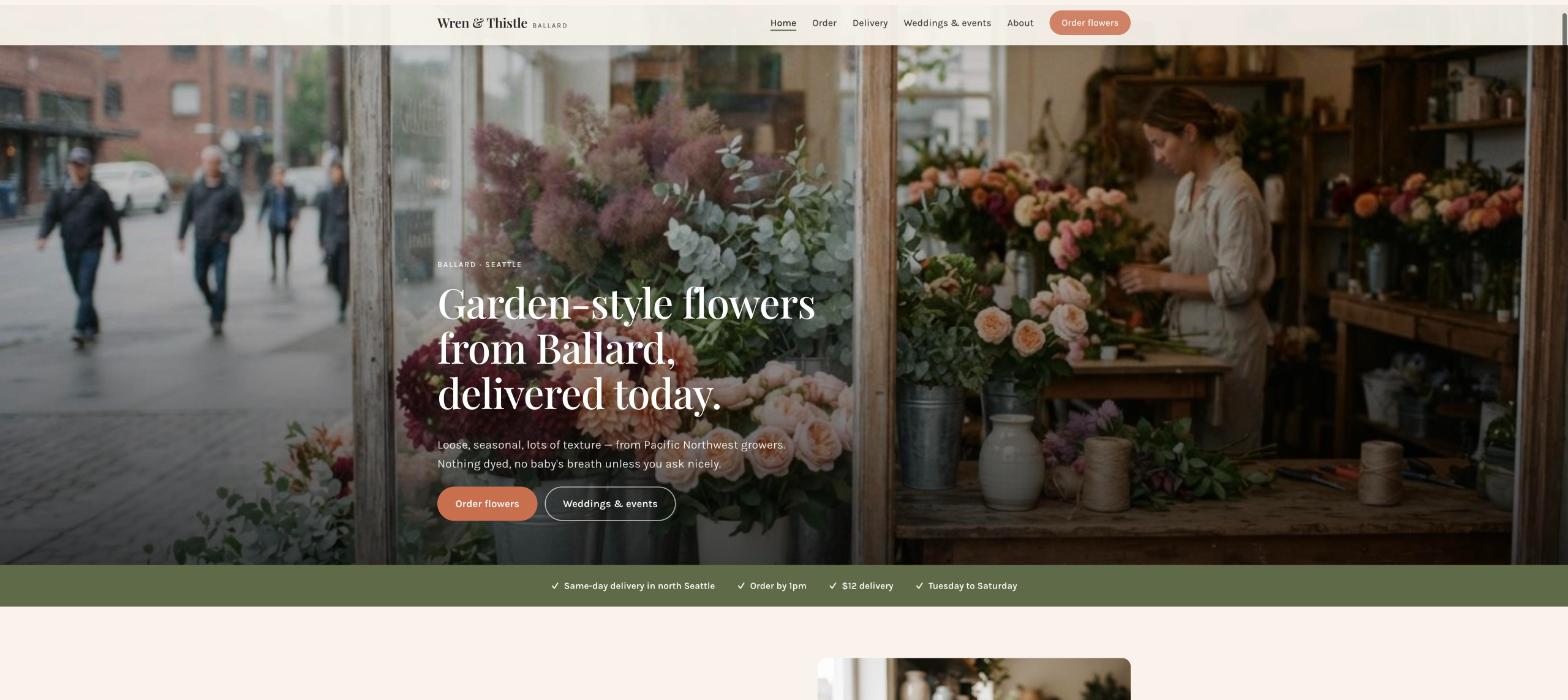
Wren & Thistle is a fictional neighbourhood flower shop in Ballard, Seattle — Ingrid Solberg, garden-style arrangements from Pacific Northwest growers, same-day delivery across north Seattle, a dozen weddings a year, open since 2018. It was built in Ullbek from a description much like the kickoff prompt below, and it's live. Every prompt in this guide is written for Wren & Thistle, so you can see the result of each one.
Wren & Thistle
Live example
Seattle flower shop · bouquet menu, same-day delivery, weddings & events, seasonal specials · designed and built with Ullbek
Homepage — this week's buckets, not last spring's peonies
The prompt library
Work through these in order the first time you build. After launch, jump straight to the tier you need — the seasonal switch, a delivery change, a new wedding — and paste the matching prompt.
Tier 1Kick off the whole site
Start with one rich description. Lead with the facts and your style — the style is what a wire-service template can't give you, and it's what Ullbek designs around. Give it the flowers, the neighbourhood, the delivery rules, and tell it what not to invent.
Capability: full site from plain language
Kickoff — full flower-shop site
Build a website for my flower shop, Wren & Thistle, at 5412 Ballard Ave NW, Seattle, WA 98107, phone (206) 555-0163. I'm Ingrid Solberg; I opened in 2018. Garden-style arrangements — loose, seasonal, lots of texture — from Pacific Northwest growers, nothing dyed, no baby's breath unless you ask nicely. We sell designer's-choice bouquets in three sizes ($65, $95, $150), a few signature arrangements, and we do around a dozen weddings and events a year. Same-day delivery across Ballard, Fremont, Wallingford, Phinney, Greenwood and Queen Anne for orders placed by 1pm, $12 delivery. Open Tuesday–Saturday 10–6, Sunday 11–4, closed Monday. Tone: warm, unfussy, a little Scandinavian, never twee. Pages: Home, Order, Delivery, Weddings & Events, About, and Contact. The homepage needs two clear buttons: “Order flowers” and “Weddings & events”. Palette: soft cream, a mossy green and a dusty terracotta; a graceful serif for headings, clean body text on a phone. Don't invent reviews, awards or arrangements I haven't given you; leave the bouquet menu as a placeholder I'll fill next.
Tier 2Shape the homepage
Once the shell exists, tighten the order of things. A florist's homepage serves the panicking, the planning and the browsing in that order — not a slideshow.
Capability: restructure layout by describing intent
Structure — homepage sections
Rebuild the Wren & Thistle homepage with these sections in order: (1) a hero with a photo of this week's buckets in the window, the line “Garden-style flowers from Ballard, delivered today.”, and two buttons — Order flowers, Weddings & events; (2) a slim strip: “Same-day delivery in north Seattle — order by 1pm · $12 · Tue–Sat”; (3) “This week in the buckets” — one paragraph I'll change weekly and three photos; (4) “Designer's choice” — the three sizes with prices and an Order button; (5) “Weddings & events” — one photo, three sentences, a link; (6) “The shop” — hours, address, a maps link; (7) a seasonal block I'll switch four times a year, currently empty. Keep every section short enough to read on a phone in a hurry.
Tier 3The bouquet menu (the hard problem, solved)
This is where florist sites go wrong: a catalogue of someone else's arrangements. Your menu is three sizes of designer's choice, a few signatures, and a note on what's in season. Ullbek lays it out in your style, and the weekly note is a one-line edit.
Capability: structured menu you can change weekly
Order — the bouquet menu
Build the Order page for Wren & Thistle: at the top, “Designer's choice” — Small $65 (a hand-tied posy, about 12 stems), Medium $95 (our most popular, a generous hand-tied bouquet), Large $150 (a vase arrangement, statement-sized); mark Medium “Most people choose this”. Then “Signature arrangements” — The Ballard — $85 (dahlias, foliage, something unexpected), Low & wide table arrangement — $120, Sympathy arrangement — from $110 (we'll call to talk it through). Then a “This week” note I'll change weekly: “Right now: café-au-lait dahlias, smoke bush, the last of the sweet peas.” Under everything: “Choose a size, tell us the occasion and the colours you love or hate, and we'll do the rest. Order by 1pm for same-day delivery.” Each item has an Order button that opens the order form.
Order — the form
On the Order page for Wren & Thistle, add an “Order flowers” form: Your name, Phone, Email, What would you like? (Designer's choice Small / Medium / Large, The Ballard, Table arrangement, Sympathy, Something else), Occasion, Colours you love or hate, Card message, Delivery or pick-up, Delivery address and neighbourhood, Delivery date, Recipient's phone. Use Ullbek's built-in form handling so orders email me with spam filtering. Above it: “We confirm by text within the hour during opening hours and take payment by phone. Same-day: order by 1pm.” Beside it, the phone number large: “In a hurry? Call (206) 555-0163.”
Order — if you already sell online
We take online orders through [Shopify / Square / your shop URL]. Make every Order button open [your shop link] in a new tab, keep the bouquet menu as it is, and keep the form on the Contact page only for custom and sympathy requests.
Order — this week's note
Update the “This week” note on the Order page and the homepage to: “Right now: garden roses, scabiosa, copper beech, the first chrysanthemums.” Replace, don't stack.
Tier 4Delivery, specifically
The page people check before anything else. Neighbourhoods as a real list, the cost, the cut-off, what happens if nobody's home. Honest here wins the order.
Capability: local content, structured for search
Delivery — where, when, how much
Build the Delivery page for Wren & Thistle: “Same-day delivery, Tuesday to Saturday, for orders by 1pm.” Then a clear list of neighbourhoods at $12: Ballard, Fremont, Wallingford, Phinney Ridge, Greenwood, Queen Anne, Magnolia, Green Lake; at $18: Capitol Hill, Downtown, University District, Northgate; “further afield — call us.” Then the rules in plain words: we deliver between 11 and 5, we'll text the recipient first if you'd like, if nobody's home we leave flowers somewhere shaded and text a photo, hospitals and offices by 3pm. Pick-up is free from the shop. Keep the neighbourhoods as plain text so search engines read them as places.
Delivery — a change
Add Shoreline and Lake Forest Park at $18, and move the same-day cut-off to 12 noon everywhere it's mentioned — the Delivery page, the homepage strip and the Order page. Nothing else changes.
Tier 5Weddings and events, as a conversation
Ullbek has a built-in form backend: ask for the fields you want and enquiries are spam-checked and sent to your inbox — no plugin, no form service. A wedding page is your style, a starting budget, three real weddings, and a form that asks the date and the venue first.
Capability: built-in forms → your inbox
Weddings — the page
Build the Weddings & Events page for Wren & Thistle: a short “How we work” (a call, a mood board, a proposal within a week, a dozen weddings a year so we're never stretched), a starting budget line (“Most of our weddings fall between $2,500 and $8,000; elopement bouquets from $250”), three real weddings as cards with a few photos and two sentences each — [paste venue, season, what the couple wanted; photos uploaded by name] — with photographer credits, and an enquiry form: Names, Email, Wedding date, Venue, Rough guest count, Rough budget (dropdown), What are you picturing?. Use Ullbek's built-in form handling. Above the form: “We reply within three working days and tell you straight away if the date's taken.” Add a short “Events & weekly flowers” note for restaurants and offices with a link to Contact.
Weddings — add a recent one
Add a fourth wedding card: Golden Gardens, September — 80 guests, dahlias and grasses in copper, a loose arch; photographer [name + link]; photos in the folder “golden-gardens”. Put it first; bump the oldest off the page if there are more than four.
Where orders and enquiries go
Form messages land in the email on your Ullbek account and in your dashboard — no extra tool to learn. Full walkthrough: Contact forms & submissions.
Tier 6Photos of real flowers
A florist's site lives or dies on its photographs, and only yours will do. Phone photos of this week's buckets, in window light, beat any stock shoot — and they prove the flowers are real.
Capability: your uploads · stock · AI images
Images — place your own photos
I've uploaded photos. Use the window-buckets shot as the homepage hero, the three bouquet photos (small, medium, large by file name) on the designer's-choice sizes, The Ballard and the table arrangement on their cards, the wedding photos on the wedding cards. Crop so stems aren't cut off at the bottom, optimise for the web, keep the soft natural light — no saturation boost.
Images — stock only as a stopgap
I don't have good photos yet. Find realistic photos of loose, garden-style arrangements — dahlias, garden roses, foliage, in natural light, nothing tight or supermarket-looking. Use them as placeholders on Home and Order only, keep the tone consistent, and note in the site brief which ones to replace with my own this week — customers need to see real flowers.
Tier 7The seasonal switch
This is the ongoing win. Valentine's, Mother's Day, the holidays, a slow August — a block that switches four times a year in one sentence, and a banner for the cut-off.
Capability: ongoing edits without a developer
Season — Mother's Day
Fill the seasonal block on the homepage with “Mother's Day — Sunday 10 May”: three pre-order options — Posy $65, Hand-tied $95, Vase $150 — with “Order by Thursday 7 May for Saturday or Sunday delivery; no same-day that weekend.” and an Order button. Add a slim banner across every page with the same cut-off. Leave a note in the site brief to clear both on the Monday after.
Season — clear it
Mother's Day is over. Empty the seasonal block on the homepage, remove the banner, and put the same-day cut-off back to normal everywhere it's mentioned.
Tier 8Polish for phones and search
Almost every order starts on a phone, often in a hurry. A few targeted asks before you publish go a long way.
Capability: responsive design + on-page SEO
Polish — mobile & SEO basics
Review the whole Wren & Thistle site on a phone: the phone number must be tap-to-call in the header, the Order button visible without scrolling, the delivery strip readable at a glance, no photo cropping the flowers. Give every page a title and meta description that mention florist Ballard Seattle and “same-day delivery” naturally where they fit — don't stuff keywords. Add alt text to every photo naming the flowers. Make the address plain text so maps can read it.
Tier 9Publish and go live
When it looks right, publish. You get a free *.ullbek.site address immediately, with HTTPS. Connect your own domain when you're ready — or buy one in the chat.
Capability: one-click publish · free address · your own domain
Launch — publish checklist
I'm ready to publish Wren & Thistle. Do a final pass: every page has a title and meta description, prices match everywhere they appear, the delivery cut-off is identical on every page, the order and wedding forms send to my email, every wedding photo credits its photographer, and there are no placeholder or TODO notes left. Then publish to a free Ullbek address. After that, tell me how to put the site on wrenandthistle.com.
“A florist's website is never finished. The buckets change on Tuesday, the season turns four times a year, Mother's Day needs a cut-off — and the site should say so before the first panicked call.”
After launch: the updates that used to be painful
The real product for a florist isn't the first build — it's every Tuesday when the buckets change, and four times a year when the season does. Here's how the common jobs map to what you've already learned:
Common florist updates → what to do in Ullbek
This week's flowers
The Tier 3 this-week's-note prompt — one sentence, replaced not stacked.
Seasonal push
The Tier 7 Mother's Day prompt in, the clear-it prompt out.
Delivery change
The Tier 4 delivery-change prompt — neighbourhoods and cut-off everywhere at once.
A new wedding
The Tier 5 add-a-recent-one prompt — card first, photographer credited.
New photos
Upload from your phone → ask Ullbek to place and crop them (Tier 6).
Three sizes and a weekly note is honest, it's how you actually work, and it's the easiest thing in the world to keep current.
Say the cut-off everywhere
Homepage strip, Order page, Delivery page, the banner at holidays. The panicking customer needs to see it before they read anything else.
Only ever show your own flowers
A stock peony tells people you don't have peonies. A phone photo of today's buckets tells them to order.
Credit every photographer
On the wedding cards, every time. Photographers send couples to florists who do.
Republish after every change
Edits in the builder aren't live until you publish again. This week's flowers, a holiday block, a delivery change — publish, then check the live site on your phone.
Preview ≠ live
The preview shows your working site. Customers only see what you've published. After the weekly note or a holiday cut-off changes, publish again so the world sees it.