A practical guide for wedding and event planners. What your site needs, copy-ready prompts you can paste into Ullbek, and how the jobs that used to need a developer — packages, real-wedding galleries, the process page, the enquiry form — become a conversation. The worked example is a real Hudson Valley planner built with Ullbek.
Why wedding planner websites are harder than they look
A planner's website is read by two people at once, late at night, with a spreadsheet open. They've seen forty Instagram feeds. What they can't tell from Instagram is what you actually do, what it costs, whether you're the kind of person they want around on the most stressful day of their year, and whether you're free on their date. Most planner sites answer none of this — a slideshow of other people's weddings, a “contact for pricing” wall, and a form that asks for their life story.
The old way
Pick a wedding template. Fill it with your best photos. Discover the packages block can't say “from” or “most couples choose”. Ask the designer to add last September's wedding. Wait. Pay. Leave 2024's availability note up through 2026.
With Ullbek
Describe how you work and the weddings you love. Get a site designed around it — packages that are honest about price, real weddings as stories, a process page in your voice, an enquiry form that asks the right four questions. Add a wedding by saying so.
This guide does two jobs. It tells you what a strong planner website includes, and it shows you how to get each piece built in Ullbek — in plain language, with your own weddings and prices, using prompts you can copy.
How to use the prompts
Every prompt below is written for Juniper & Vale, the Hudson Valley planner shown in the worked example. Swap the bold details for your name, your region, your packages and your couples. Hit Copy, paste into the Ullbek chat, and adjust anything that doesn't fit. You're not a template — neither is your work, and neither should its website be.
What a great wedding planner website needs
You don't need a dozen pages. You need the few things a couple checks before they send the enquiry — and a way to keep them current between seasons.
A homepage that feels like your weddings
One photograph that says what kind of day you make, one line about who you're for, and two buttons: Check your date and See real weddings.
Packages that are honest about price
Full planning, partial, month-of — what's included, who it suits, and a starting price. “Contact for pricing” loses the couple with the spreadsheet.
Real weddings as stories
Six to ten weddings, each with a few photos, the venue, the season, and three sentences about what the couple wanted. Not a gallery — a portfolio of decisions.
The process, step by step
First call, the plan, the timeline, the month before, the day. The page that makes a nervous couple exhale.
About you, as a person
Who you are, how you got here, how you behave at 6pm when the florist is late. Couples hire the person.
An enquiry form that asks four things
Names, date, venue or region, rough guest count, how they found you. Spam-checked and in your inbox — no plugin.
Vendors and venues you trust
A short list of partners with links. It helps couples, it helps Google, and venues return the favour.
The worked example: Juniper & Vale
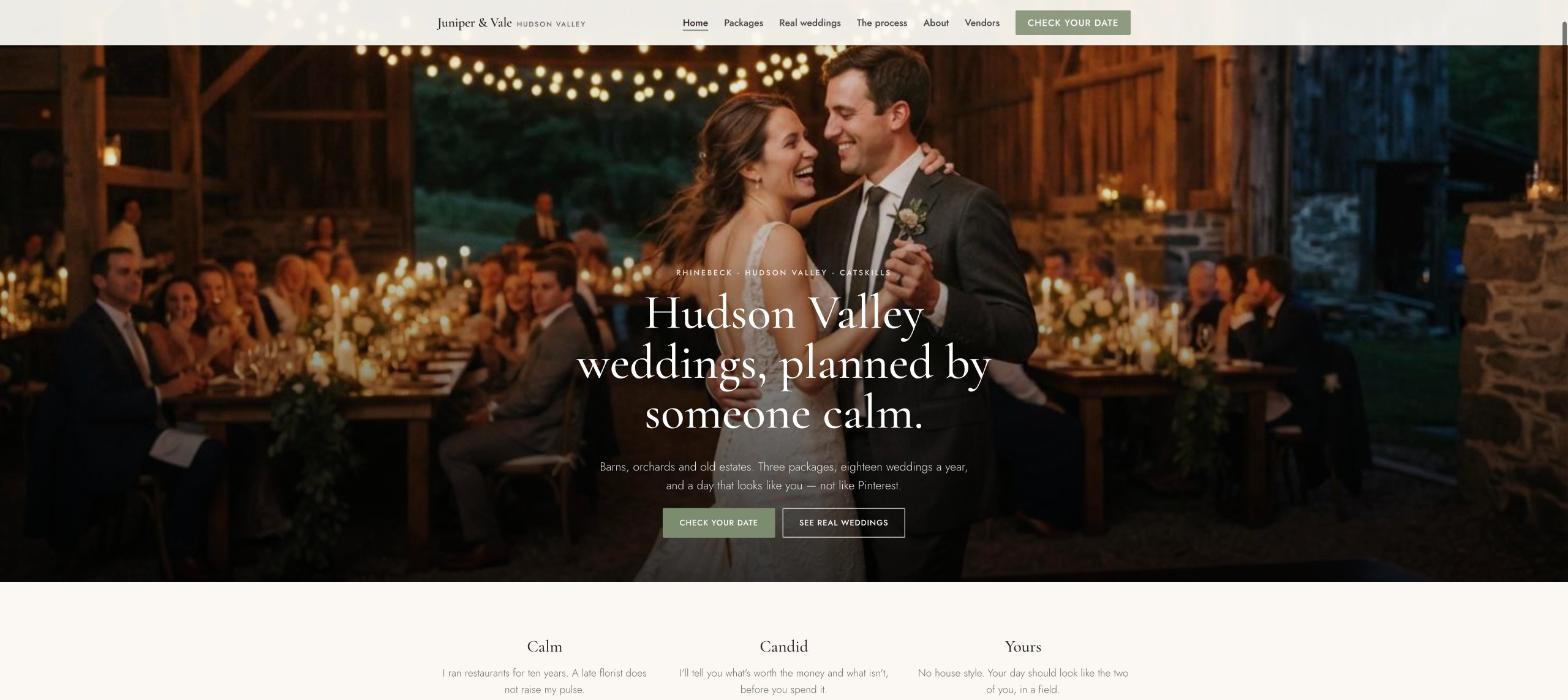
Juniper & Vale is a fictional planning studio in the Hudson Valley, New York — Elise Marchetti, planning barn, orchard and estate weddings since 2017, three packages, around eighteen weddings a year, with a real-weddings portfolio and a vendor list. It was built in Ullbek from a description much like the kickoff prompt below, and it's live. Every prompt in this guide is written for Juniper & Vale, so you can see the result of each one.
Juniper & Vale
Live example
Hudson Valley wedding planner · packages, real weddings, the process, enquiries · designed and built with Ullbek
Homepage — one photograph that says what kind of day you make
The prompt library
Work through these in order the first time you build. After launch, jump straight to the tier you need — a new real wedding, a package change, next season's availability — and paste the matching prompt.
Tier 1Kick off the whole site
Start with one rich description. Lead with the facts and the mood — the mood is what a template can't give you, and it's what Ullbek designs around. Give it the region, the kind of weddings, the packages, the person, and tell it what not to invent.
Capability: full site from plain language
Kickoff — full planner site
Build a website for my wedding planning studio, Juniper & Vale, based in Rhinebeck, New York, planning weddings across the Hudson Valley and the Catskills. I'm Elise Marchetti, planning since 2017, about eighteen weddings a year — barns, orchards, old estates, a lot of September and October. Three packages: Full planning from $9,500, Partial planning from $5,200, Month-of coordination from $2,800. Couples come to me for calm, candour and a day that looks like them rather than Pinterest. The mood: unhurried, warm, a little wry, never saccharine — think linen and late light, not glitter. Pages: Home, Packages, Real Weddings, The Process, About, Vendors, and Enquire. The homepage needs two clear buttons: “Check your date” and “See real weddings”. Palette: warm ivory, sage and a deep ink for text; type with an elegant serif for headings and clean, readable body text on a phone. Don't invent weddings, venues, reviews or press I haven't given you; leave the real-weddings section as a placeholder I'll fill next.
Tier 2Shape the homepage
Once the shell exists, tighten the order of things. A planner's homepage is a short argument for sending the enquiry — not an entire portfolio.
Capability: restructure layout by describing intent
Structure — homepage sections
Rebuild the Juniper & Vale homepage with these sections in order: (1) a full-width hero with a photo of a couple under barn string lights at dusk, the line “Hudson Valley weddings, planned by someone who stays calm.”, and two buttons — Check your date, See real weddings; (2) “How I work” — three short lines (calm, candid, a day that looks like you); (3) “Three ways to work together” — the three packages with starting prices and a link to Packages; (4) “Real weddings” — four cards (venue, season, a photo) linking to the stories; (5) “Kind words” — three reviews I'll give you; (6) “Still booking” — a note on which months next year are open, linking to Enquire; (7) a short enquiry strip with the four-question form. Keep every section short enough to read on a phone in bed.
Tier 3Packages that are honest about price
This is where planner sites hide. Couples with a spreadsheet leave at “contact for pricing”. Three packages, what's in each, who it suits and a starting price — and a line that says most couples choose the middle one. Ullbek lays it out like a menu, not a contract.
Capability: structured packages you can edit in a sentence
Packages — three ways to work together
Build the Packages page for Juniper & Vale with three columns: Full planning — from $9,500: for couples who want a partner from the first venue visit to the last dance; venue and vendor search, budget, design, timeline, every meeting, the day itself with two coordinators. Partial planning — from $5,200: for couples who've booked the venue and want help with the rest; vendor recommendations, design direction, monthly check-ins, the final six weeks, the day. Month-of coordination — from $2,800: for couples who've planned it and want it to run without them; handover meeting, vendor confirmations, timeline, rehearsal, the day. Mark Partial as “Most couples choose this”. Under the columns: “Every package includes unlimited email, a shared planning document, and me — not an associate — on the day. Travel beyond 60 miles of Rhinebeck is quoted separately.” Then a short FAQ: Do you do elopements? (yes, from $1,800), Do you work outside the Hudson Valley? (Catskills and Berkshires, yes), Do you take weekday weddings? (gladly).
Packages — next year's prices
From January, Full planning is from $10,500, Partial from $5,800, Month-of from $3,200, elopements from $2,000. Update the Packages page and the three homepage cards; keep every description exactly as it is.
Tier 4Real weddings, as stories
Not a gallery — a portfolio of decisions. Each wedding gets a few photos, the venue, the season, and three sentences about what the couple wanted and what you did about it. This is the page that makes the right couples feel seen.
Capability: galleries + stories from your uploads
Real weddings — the portfolio
Build the Real Weddings page for Juniper & Vale: an index of cards, each opening a story page with a small gallery, the venue, the season, the photographer credit and three sentences. Start with these six (photos uploaded in folders by name; use only the facts I give): Maya & Daniel — Hayfield Barn, Rhinebeck, October: 140 guests, a long-table dinner in the field, rain plan used for twenty minutes and nobody noticed. Priya & Tom — Stone Ridge Orchard, September: 90 guests, ceremony between the apple rows, her grandmother's sari as the aisle runner. Jess & Anna — Wilderstein, Rhinebeck, June: 60 guests, a porch ceremony, dancing in the library. [three more in the same shape]. Each story page needs a “Plan something like this” button to Enquire. Credit every photographer by name with a link.
Real weddings — add last weekend's
Add a new real wedding: Sofia & Marcus — Blue Hill Farm, Catskills, late September, 110 guests, a tent on the ridge, a bluegrass trio, the dog as ring bearer; photographer [name + link]; photos in the uploaded folder “sofia-marcus”. Put it first on the index and in the homepage “Real weddings” cards, bumping the oldest off the homepage. Nothing else changes.
Tier 5The process, and enquiries that ask the right things
Ullbek has a built-in form backend: ask for the fields you want and enquiries are spam-checked and sent to your inbox — no plugin, no form service. The process page and the enquiry form belong together: one makes the couple exhale, the other asks only what you need to say yes or no.
Capability: built-in forms → your inbox
The process — step by step
Write The Process page for Juniper & Vale in Elise's calm, slightly wry voice, as six steps: (1) a 30-minute call — your date, your venue if you have one, what you're dreading; (2) a proposal within three days, one package, no upsell; (3) the plan — budget, vendor shortlist, a shared document you can see at 2am; (4) the middle months — monthly check-ins, design decisions made once and not revisited; (5) the six weeks before — timeline, vendor confirmations, the rehearsal; (6) the day — I'm there from the florist's arrival to the last car; you don't see your phone. End with “Check your date” linking to Enquire. No invented statistics.
Enquire — four questions
On the Enquire page for Juniper & Vale, add a short form: Your names, Email, Wedding date (or “not set yet”), Venue or region, Rough guest count, Which package are you leaning towards? (Full, Partial, Month-of, Elopement, Not sure), How did you find me? and a note. Use Ullbek's built-in form handling so enquiries email me with spam filtering. Above it: “I reply within two working days, and I'll tell you straight away if the date's taken.” Beside it, the email elise@juniperandvale.com and a line about Rhinebeck, the Hudson Valley and the Catskills.
Where enquiries go
Form messages land in the email on your Ullbek account and in your dashboard — no extra tool to learn. Full walkthrough: Contact forms & submissions.
Tier 6About, kind words, and vendors
Couples hire the person. A short true story, three real reviews with names, and a list of the florists and venues you trust — in your voice, with nothing invented.
Capability: brand voice from your real story
About — Elise, in facts
Write the About page for Juniper & Vale from these facts only — don't invent press, awards or numbers: Elise Marchetti grew up in Kingston, NY; ten years in restaurant management in Brooklyn, including opening two places; moved back upriver in 2016 and planned a friend's barn wedding that turned into a business in 2017; named the studio after the two trees at the end of her road; still runs the day with a restaurant-manager's clipboard. Structure: a portrait, “Why a restaurant manager makes a good planner”, a short timeline, “What I'm like on the day”, and a line about the dog. Tone: calm, wry, warm.
Kind words — real quotes only
Add a “Kind words” section on the homepage and the About page using only these real reviews (do not invent any): [paste three with first names, venue and year]. If I haven't given you enough, use one and a button “Read more on The Knot” linking to [your profile URL]. Never fabricate quotes, press or awards.
Vendors — people I trust
Build a Vendors page for Juniper & Vale titled “People I'd trust with my own wedding”: grouped by Venues, Photographers, Florists, Food & drink, Music, each with a name, one line and a link — [paste your list]. A note at the top: “No kickbacks, no exclusives — just people who've been great to work with.”
Tier 7Availability, seasons, the things that change
This is the ongoing win. Which months are open next year, a last-minute Friday in June, a new venue you're now working with — update it yourself in a sentence instead of waiting on a ticket.
Capability: ongoing edits without a developer
Availability — still booking
Update the “Still booking” block on the homepage and the Enquire page to: “Taking enquiries for May, June and late September 2027. October 2027 is full. A handful of 2026 weekday and winter dates remain.” Date the note. When I give you new availability, replace it rather than stacking.
Seasonal — a slim banner
Add a slim banner across the top of every page: “Planning a 2027 autumn wedding? Those dates go first — check yours now.” linking to Enquire. Keep it compact; if a banner already exists, replace it. Leave a note in the site brief to remove it in March.
Tier 8Polish for phones and search
Couples read you on a phone, in bed, next to each other. A few targeted asks before you publish go a long way.
Capability: responsive design + on-page SEO
Polish — mobile & SEO basics
Review the whole Juniper & Vale site on a phone: the two homepage buttons must be visible without scrolling, real-wedding galleries must swipe cleanly, no photo should crop a face. Give every page a title and meta description that mention Hudson Valley wedding planner naturally where it fits — don't stuff keywords. Add alt text to every photo, with the venue name where it applies. Credit every photographer in the galleries.
Tier 9Publish and go live
When it looks right, publish. You get a free *.ullbek.site address immediately, with HTTPS. Connect your own domain when you're ready — or buy one in the chat.
Capability: one-click publish · free address · your own domain
Launch — publish checklist
I'm ready to publish Juniper & Vale. Do a final pass: every page has a title and meta description, the package prices match everywhere they appear, every real wedding credits its photographer, the enquiry form sends to my email, the availability note is current, and there are no placeholder or TODO notes left. Then publish to a free Ullbek address. After that, tell me how to put the site on juniperandvale.com.
“A planner's website is never finished. A wedding every other weekend, prices that move in January, an October that fills by March — and the site should say so before the next enquiry.”
After launch: the updates that used to be painful
The real product for a planner isn't the first build — it's the Monday after every wedding. Here's how the common jobs map to what you've already learned:
Common planner-site updates → what to do in Ullbek
A new real wedding
The Tier 4 add-last-weekend's prompt — story page, index, homepage cards, photographer credit.
Price change
The Tier 3 next-year's-prices prompt — Packages page and homepage cards together.
Availability
The Tier 7 still-booking prompt — replace the note, date it.
A new vendor
Add a line to the Vendors page (Tier 6) — name, one line, link.
Seasonal push
The Tier 7 banner prompt — one line across every page, removed when the season's booked.
The couple with the spreadsheet is your best client. “Contact for pricing” sends them to someone who answered.
Tell the story, not just the gallery
Three sentences about what the couple wanted does more than thirty photos. It shows how you think.
Keep availability honest and dated
A note that says “October 2027 is full” builds more urgency than any countdown, and it's true.
Credit every photographer
It's right, it's expected, and photographers send couples to planners who do it.
Republish after every wedding
Edits in the builder aren't live until you publish again. New wedding, new prices, new dates — publish, then check the live site on your phone.
Preview ≠ live
The preview shows your working site. Couples only see what you've published. After a new wedding or a price change, publish again so the world sees it.