A practical guide for dentists and practice managers. What your site needs, copy-ready prompts you can paste into Ullbek, and how the jobs that used to need a developer — the treatment list, the fee guide, the team page, new-patient info, appointment requests — become a conversation. The worked example is a real Edinburgh practice built with Ullbek.
Why dental practice websites are harder than they look
Nobody browses a dentist's website for fun. People arrive with a toothache, a new postcode, or a child who needs a first check-up, and they want four things fast: are you taking new patients, what does it cost, who will I see, and how do I book. Most practice sites bury all four under a stock photo of someone laughing with perfect teeth, a “patient journey” page nobody asked for, and a fee guide that's a scanned PDF from three years ago.
The old way
Pick a dental template. Swap the stock smile. Discover the fees block can't do “from” or “NHS band 2”. Ask the web company to add the new hygienist. Wait. Pay. Keep the “not accepting new patients” banner up long after you are.
With Ullbek
Describe your practice and how you treat people. Get a site designed around it — treatments in plain English, a fee guide that's readable, the team as real people, an appointment request that lands with reception. Change a fee by saying so.
This guide does two jobs. It tells you what a strong practice website includes, and it shows you how to get each piece built in Ullbek — in plain language, with your own fees and team, using prompts you can copy.
How to use the prompts
Every prompt below is written for Stockbridge Dental, the Edinburgh practice shown in the worked example. Swap the bold details for your name, your street, your dentists and your fees. Hit Copy, paste into the Ullbek chat, and adjust anything that doesn't fit. You're not a template — neither is your practice, and neither should its website be.
What a great dental practice website needs
You don't need a dozen pages. You need the few things a new patient checks before they ring — and a way to keep them current without anyone's help.
A homepage that answers the four questions
New patients yes or no, a fee guide link, the team, and a Request an appointment button. Plus the phone number and an emergency line, visible on a phone.
Treatments in plain English
Check-ups, hygiene, fillings, crowns, whitening, Invisalign, implants — what it is, who it's for, what to expect. No “comprehensive smile solutions”.
A fee guide you can actually read
A table on the page, not a PDF: examinations, hygiene, fillings, crowns, whitening — with “from” where it depends and NHS bands where they apply. Dated.
The team as real people
Dentists, hygienists, nurses and reception, with GDC numbers for clinicians, a photo and three honest sentences. People choose a dentist, not a practice.
New-patient information
What happens at a first visit, what to bring, registration forms, parking, step-free access, nervous-patient notes. The page that lowers the heart rate.
Emergencies, clearly
What counts, what to do today, the out-of-hours number. Written for someone in pain at 9pm.
Appointment requests that reach reception
Name, phone, email, new or existing patient, what it's about, preferred days. Spam-checked and in the inbox — no plugin.
The worked example: Stockbridge Dental
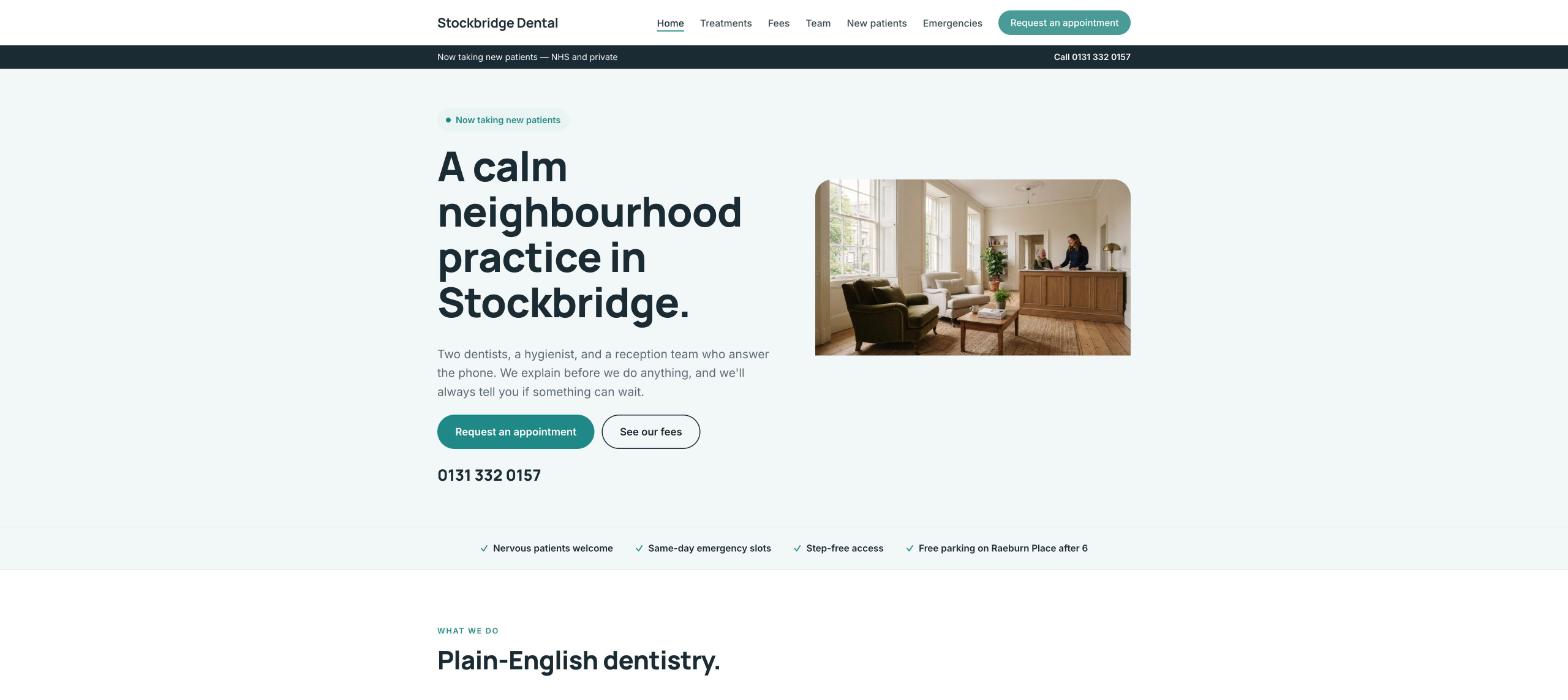
Stockbridge Dental is a fictional two-dentist practice in a Georgian townhouse in Stockbridge, Edinburgh — Dr Hannah McLeod and Dr Ewan Fraser, a hygienist, mixed NHS and private, taking new patients, with a readable fee guide and a nervous-patient promise. It was built in Ullbek from a description much like the kickoff prompt below, and it's live. Every prompt in this guide is written for Stockbridge Dental, so you can see the result of each one.
Stockbridge Dental
Live example
Edinburgh dental practice · treatments, fee guide, team, new patients, appointment requests · designed and built with Ullbek
Homepage — the four questions answered above the fold; the stock smile left out
The prompt library
Work through these in order the first time you build. After launch, jump straight to the tier you need — a fee change, a new hygienist, holiday hours — and paste the matching prompt.
Tier 1Kick off the whole site
Start with one rich description. Lead with the facts and the tone — calm, plain, unhurried — because that's what a dental template can't give you and it's what Ullbek designs around. Give it the team, the treatments, how you treat nervous patients, and tell it what not to invent.
Capability: full site from plain language
Kickoff — full practice site
Build a website for my dental practice, Stockbridge Dental, at 14 Raeburn Place, Stockbridge, Edinburgh EH4 1HN, phone 0131 332 0157. Two dentists — Dr Hannah McLeod (principal, GDC 178234) and Dr Ewan Fraser (GDC 214591) — a hygienist, Claire Donnelly, two nurses and a reception team. Mixed NHS and private; we are currently taking new patients. Treatments: check-ups, hygiene, fillings, crowns and bridges, root canal, extractions, whitening, Invisalign, implants (referred), children's dentistry, emergency appointments. We're known for being calm with nervous patients and for explaining before we do anything. Tone: plain, warm, unhurried — no “smile makeover” language. Pages: Home, Treatments, Fees, Team, New Patients, Emergencies, and Contact & Appointments. The homepage needs a “Request an appointment” button and the phone number visible on every page. Palette: soft white, a calm teal and a deep slate for text; clean, readable type, large enough for older patients on a phone. Don't invent reviews, awards, fees or staff I haven't given you; leave the fee guide as a placeholder I'll fill next. Put GDC numbers next to each clinician and a line about our regulator (Healthcare Improvement Scotland) in the footer.
Tier 2Shape the homepage
Once the shell exists, tighten the order of things. A practice homepage answers four questions above the fold — it isn't a tour.
Capability: restructure layout by describing intent
Structure — homepage sections
Rebuild the Stockbridge Dental homepage with these sections in order: (1) a hero with a photo of the reception room, the line “A calm neighbourhood practice in Stockbridge”, a small pill “Now taking new patients — NHS and private”, the phone number, and two buttons — Request an appointment, See our fees; (2) a strip of four facts: Nervous patients welcome · Same-day emergency slots · Step-free access · Free parking on Raeburn Place after 6; (3) “What we do” — six treatment cards linking to Treatments; (4) “Who you'll see” — the two dentists and the hygienist with a photo, name, GDC number and one line each; (5) “Your first visit” — three sentences and a link to New Patients; (6) “What patients say” — three reviews I'll give you; (7) opening hours, address, a maps link and the emergency line. Keep every section short enough to read on a phone in a waiting room.
Tier 3Treatments and the fee guide (the hard problem, solved)
This is where practice sites hide behind a PDF. A fee guide on the page, dated, with “from” where it depends and NHS bands where they apply, is what a new patient actually wants. Ullbek lays it out as a readable table and keeps the download in sync.
Two ways to give Ullbek your fees
Paste the fees straight into the prompt, or drag your current fee-guide PDF into the chat and say “use this”. Ullbek can read the PDF, lay the fees out on the page, and keep the file as a download. See Working with assets.
Capability: structured fee table + PDF download
Treatments — plain English, one page
Build the Treatments page for Stockbridge Dental with one short section per treatment, each with “What it is”, “Who it's for” and “What to expect” in plain English, two to three sentences each: Check-ups, Hygiene, Fillings (white as standard), Crowns & bridges, Root canal, Extractions, Whitening (home kits), Invisalign, Implants (we assess, then refer to a specialist we trust), Children's dentistry (NHS, free under 18 in Scotland), Emergency appointments. A note at the top: “We explain before we do anything, and we'll always tell you if something can wait.” Link each section to the Fees page.
Fees — a guide you can read
Build the Fees page for Stockbridge Dental as a readable table, dated today, in two groups. Private: New patient examination £65, Routine examination £45, Hygiene (30 min) £72, Hygiene (45 min) £95, White filling from £120, Crown from £695, Root canal from £450, Extraction from £140, Home whitening £325, Invisalign from £2,400, Emergency appointment £85. NHS: a short note explaining that NHS treatment is free for under-18s and for those who are exempt, with a link to the NHS Scotland charges page, and that we'll tell you which category you're in before treatment. Under the table: “Fees are a guide; we confirm the exact cost in writing before any treatment begins. 0% finance available over £500.” Add a “Download the fee guide (PDF)” button using the file I've uploaded.
Fees — the April change
New fees from 1 April: Routine examination £48, Hygiene 30 min £76, Crown from £725. Update the Fees table, change the date at the top, and replace the fee-guide PDF with the new file I've uploaded. Keep everything else exactly as it is.
Tier 4Appointment requests that reach reception
Ullbek has a built-in form backend: ask for the fields you want and requests are spam-checked and sent to your inbox — no plugin, no form service. If you already use an online booking system like Dentally or SOE, link to it and keep the form for new-patient enquiries.
Capability: built-in forms → your inbox
Appointments — the request form
On the Contact & Appointments page for Stockbridge Dental, add a “Request an appointment” form with: Name, Phone (required), Email, Are you a new or existing patient?, NHS or private (or not sure), What's it about? (Check-up, Hygiene, Toothache or pain, Broken tooth or filling, Whitening or cosmetic, Invisalign consultation, Children's check-up, Something else), Preferred days, and a note. Use Ullbek's built-in form handling so requests email reception with spam filtering. Above the form: “Reception confirms by phone or email within one working day. If you're in pain now, please ring us — don't wait for a reply.” Beside it: phone, address, hours, parking and step-free access notes, and the emergency line.
Appointments — if you already book online
We book existing patients through [Dentally / SOE / your system]. Make every “Request an appointment” button for existing patients open [your booking link] in a new tab. Keep the form on the Contact page for new patients only, titled “New patient enquiry”, with Name, Phone, Email, NHS or private, and a note.
Where requests go
Form messages land in the email on your Ullbek account and in your dashboard — reception can watch one inbox. Full walkthrough: Contact forms & submissions.
Tier 5New patients, nervous patients, emergencies
The pages people read at 9pm with a toothache or a new postcode. Plain, kind, specific. These are also the pages Google shows for “dentist taking new patients Edinburgh”.
Capability: long-form pages in your voice
New patients — your first visit
Write the New Patients page for Stockbridge Dental in a calm, plain voice: (1) “Yes, we're taking new patients — NHS and private” at the top; (2) what happens at a first visit — a chat first, an examination, X-rays if needed, a written plan, no treatment on the day unless you're in pain; (3) what to bring — a list of medications, your NHS exemption if you have one; (4) registration — the form is here (link to the appointment form) or do it at reception; (5) practical — Raeburn Place, buses 24, 29 and 42, free parking after 6pm, step-free access, a downstairs surgery; (6) “Nervous? So are a lot of our patients.” — three sentences on how we handle it: longer first appointments, a stop signal, nothing without explanation. Don't invent statistics.
Emergencies — what to do today
Write the Emergencies page for Stockbridge Dental for someone in pain: (1) “Ring us: 0131 332 0157. We keep same-day slots for genuine emergencies, Monday to Friday.”; (2) what counts — severe pain, swelling, a knocked-out or broken tooth, bleeding that won't stop; (3) what to do while you wait — a short list for each; (4) out of hours — NHS 24 on 111, with the line that we'll see you first thing. Keep it short, large type, the phone number tap-to-call at the top and bottom.
Tier 6The team, as real people
People choose a dentist, not a practice. A photo, a GDC number, and three honest sentences each — including the nurses and reception — do more than any “award-winning” line.
Capability: brand voice from your real people
Team — everyone, with GDC numbers
Build the Team page for Stockbridge Dental from these facts only — don't invent qualifications or awards: Dr Hannah McLeod, Principal Dentist, GDC 178234 — Glasgow graduate 2009, took over the practice in 2018, special interest in nervous patients and restorative work. Dr Ewan Fraser, Associate Dentist, GDC 214591 — Dundee 2014, joined 2020, Invisalign-trained, children's dentistry. Claire Donnelly, Hygienist, GDC 165320 — joined 2019, gentle, thorough, will not lecture you. Morag Wilson and Amira Hassan, Dental Nurses. Fiona Reid, Practice Manager & Reception — the voice on the phone since 2012. One portrait slot each (I'll upload), two to three sentences each in a warm, plain tone, GDC numbers beside each clinician.
Team — a new hygienist
Jamie Park, Hygienist, GDC 289011, joins us on Monday — Edinburgh 2021, previously in Leith, calm with teenagers. Add to the Team page in the same style, and add a line to the homepage “Who you'll see” section. I'll upload the portrait.
Tier 7Hours, holidays, the things that change
This is the ongoing win. Christmas hours, a closed Friday for training, a new-patient pause when the books fill — update it yourself in a sentence instead of waiting on a ticket.
Capability: ongoing edits without a developer
Hours — set them everywhere
Set Stockbridge Dental's hours to Monday–Thursday 8:30–17:30, Friday 8:30–13:00, Saturday and Sunday closed. Show them on the homepage, the Contact page and the footer, with the emergency line beside them.
Closures — a slim banner
Add a slim banner across the top of every page: “Closed Friday 14th for staff training. For emergencies that day call NHS 24 on 111.” Keep it compact; if a banner already exists, replace it. Leave a note in the site brief to remove it on the Monday.
New patients — pause and resume
We've paused new NHS registrations. Change the homepage pill to “New private patients welcome · NHS list currently full” and update the top of the New Patients page to match, with “join our NHS waiting list” linking to the form. When I say we're open again, switch it back.
Tier 8Polish for phones and search
Most patients find you on a phone, often in pain. Larger type, a tap-to-call number on every page, and page titles that say what Google needs to hear.
Capability: responsive design + on-page SEO
Polish — mobile & SEO basics
Review the whole Stockbridge Dental site on a phone: the phone number must be tap-to-call in the header of every page, the Request an appointment button visible without scrolling, the fee table readable without pinching, body text large enough for older patients. Give every page a title and meta description that mention dentist Stockbridge Edinburgh and “taking new patients” naturally — don't stuff keywords. Add alt text to every photo. Make sure GDC numbers and the regulator line are plain text in the footer.
Tier 9Publish and go live
When it looks right, publish. You get a free *.ullbek.site address immediately, with HTTPS. Connect your own domain when you're ready — or buy one in the chat.
Capability: one-click publish · free address · your own domain
Launch — publish checklist
I'm ready to publish Stockbridge Dental. Do a final pass: every page has a title and meta description, the fee table matches the PDF and is dated, every clinician shows a GDC number, the appointment form sends to reception's email, the phone and emergency line are identical everywhere, and there are no placeholder or TODO notes left. Then publish to a free Ullbek address. After that, tell me how to put the site on stockbridgedental.co.uk.
“A practice website is never finished. Fees move in April, a hygienist joins in June, the NHS list fills in September — and the site should say so before the next phone call.”
After launch: the updates that used to be painful
The real product for a practice manager isn't the first build — it's April, when the fees change and the web company takes three weeks. Here's how the common jobs map to what you've already learned:
Common practice updates → what to do in Ullbek
Fee change
Paste the changes or drag in the new PDF → the Tier 3 April-change prompt. Table, date and download update together.
New clinician
The Tier 6 new-hygienist prompt — Team page and homepage in one go, GDC number included.
Closure or training day
The Tier 7 banner prompt — one line across every page, with a reminder to take it down.
New-patient status
The Tier 7 pause-and-resume prompt — homepage pill and New Patients page together.
Switching to online booking
The Tier 4 booking-system prompt — buttons repointed, form kept for new patients.
New patients, fees, who, how to book. Everything else on the homepage is optional.
Put the fees on the page, dated
A readable table beats a PDF, and a date on it is what makes patients trust it. Keep the PDF as a download for the ones who want it.
Write for the person in pain
Short sentences, large type, the number at the top. The Emergencies page is read by someone who can't concentrate.
Never invent reviews or qualifications
Ask for placeholders instead. Regulators notice, and so do patients.
Republish after every change
Edits in the builder aren't live until you publish again. Fees, hours, a new clinician — publish, then check the live site on your phone.
Preview ≠ live
The preview shows your working site. Patients only see what you've published. After a fee change or a closure notice, publish again so the world sees it.