A practical guide for therapists, counsellors and psychologists in private practice. What your site needs, copy-ready prompts you can paste into Ullbek, and how the jobs that used to need a developer — your approach, who you work with, fees, the first session, the enquiry form — become a conversation. The worked example is a real Vancouver counselling practice built with Ullbek.
Why therapist websites are harder than they look
A therapist's website is read by someone who has been meaning to do this for months. They are checking, quietly, whether you work with people like them, what you're like, what it costs, and whether the first step is small enough to take tonight. Most practice websites answer with a stock photo of a sunrise, a list of modalities in acronyms, and a contact form that feels like a commitment. The person closes the tab and waits another month.
The old way
Pick a wellness template. Keep the sunrise. Discover the fees block can't say “sliding scale, ask me”. Ask the web person to add that you now see couples. Wait. Pay. Leave “accepting new clients” up after your books close.
With Ullbek
Describe who you work with and how you are in the room. Get a site designed around it — your approach in plain words, who you see and who you don't, fees and insurance stated gently, what the first session is like, an enquiry form that asks almost nothing. Close or open your books by saying so.
This guide does two jobs. It tells you what a strong practice website includes, and it shows you how to get each piece built in Ullbek — in plain language, with your own approach and fees, using prompts you can copy.
How to use the prompts
Every prompt below is written for Harbour Counselling, the Vancouver practice shown in the worked example. Swap the bold details for your name, your registration, your approach and your fees. Hit Copy, paste into the Ullbek chat, and adjust anything that doesn't fit. You're not a template — neither is your practice, and neither should its website be. One note: advertising rules differ by regulator; have the final copy checked against yours.
What a great therapist website needs
You don't need a dozen pages. You need the few things a hesitant person checks before they send the first message — and a way to keep them current without anyone's help.
A homepage that says who you're for, gently
Your face, one sentence about who you work with and what for, and one soft button: Get in touch. No sunrise, no acronyms.
Your approach, in plain words
What a session is like, what you believe helps, which methods you draw on — explained, not listed. The page that tells them what you're like in the room.
Who you work with, and who you don't
Anxiety, grief, relationships, life transitions — in the words people use. And the honest line about what's outside your scope, with where to go instead.
Fees, insurance and the sliding scale
A session fee, the length, what receipts cover, whether you offer reduced-fee places. Stated plainly; the hesitant person won't ask.
The first session, explained
What happens, how long, how to book, that it's fine not to know what to say. The page that lowers the heart rate.
An enquiry form that asks almost nothing
Name, email or phone, and “anything you'd like me to know (optional)”. A confidentiality note and a reply time. Spam-checked and in your inbox — no plugin.
Credentials and crisis lines
Registration number and body, training, supervision. And a clear line: if you're in crisis right now, here's who to call.
The worked example: Harbour Counselling
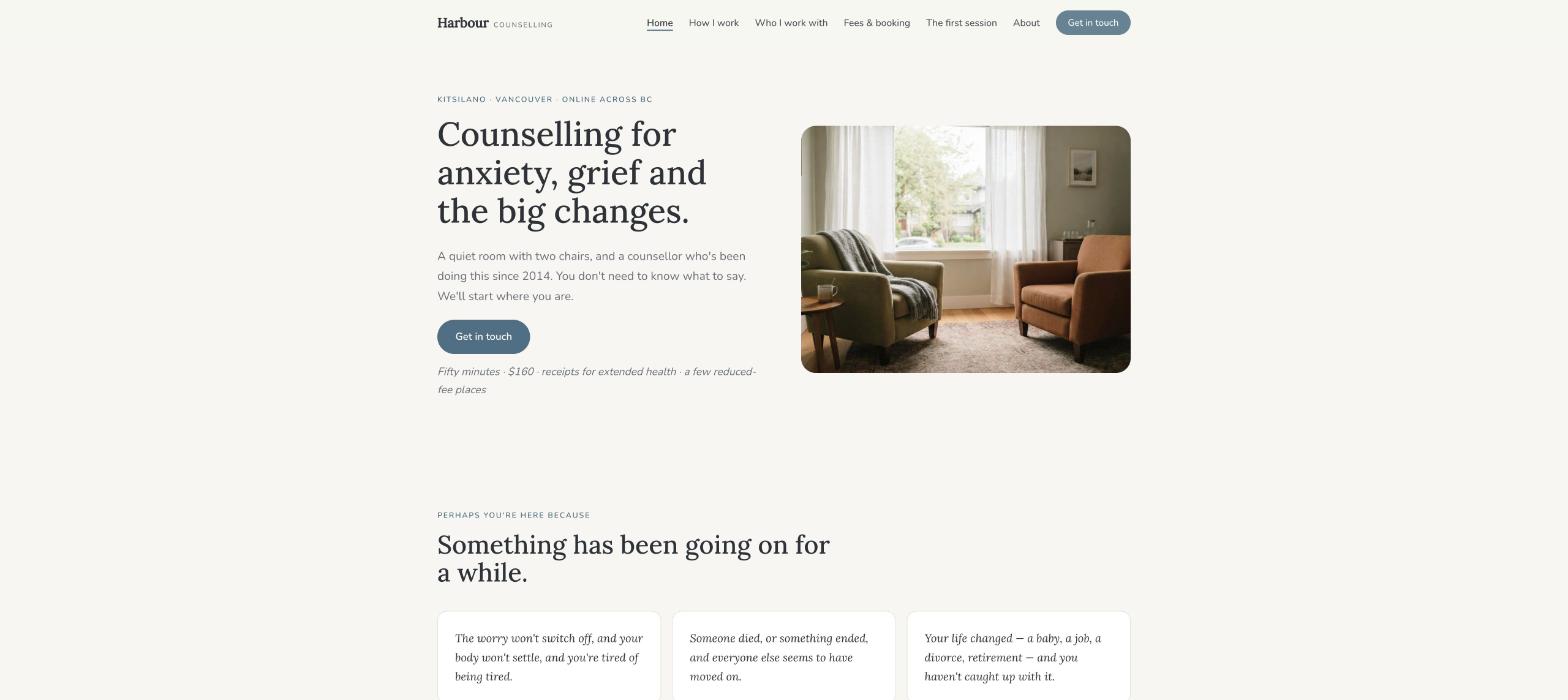
Harbour Counselling is a fictional solo practice in Vancouver's Kitsilano — Naomi Lindqvist, RCC, a Registered Clinical Counsellor since 2014, working with adults on anxiety, grief and life transitions, in person and online, with a few reduced-fee places. It was built in Ullbek from a description much like the kickoff prompt below, and it's live. Every prompt in this guide is written for Harbour, so you can see the result of each one.
Harbour Counselling
Live example
Vancouver counselling practice · approach, who I work with, fees, the first session, enquiries · designed and built with Ullbek
Homepage — one quiet sentence about who you're for; the sunrise left out
The prompt library
Work through these in order the first time you build. After launch, jump straight to the tier you need — a fee change, closing your books, a new group — and paste the matching prompt.
Tier 1Kick off the whole site
Start with one rich description. Lead with who you work with and the tone — quiet, warm, unhurried — because that's what a wellness template can't give you and it's what Ullbek designs around. Give it your registration and your fees, and tell it what not to invent.
Capability: full site from plain language
Kickoff — full practice site
Build a website for my counselling practice, Harbour Counselling, in Kitsilano, Vancouver. I'm Naomi Lindqvist, a Registered Clinical Counsellor (RCC #4471, BC Association of Clinical Counsellors) in practice since 2014. I work with adults on anxiety, grief and loss, and life transitions — new parents, career changes, the years after a divorce. In person at 2168 West 4th Avenue and online across BC. Sessions are 50 minutes, $160, receipts for extended health plans; I keep three reduced-fee places at $90. Approach: relational, drawing on ACT and EMDR, explained in plain words — no acronyms without a sentence that says what they mean. Tone: quiet, warm, unhurried — no “journey”, no “holistic”, no sunrise. Pages: Home, How I Work, Who I Work With, Fees & Booking, The First Session, About, and Contact. The homepage needs one soft button: “Get in touch”. Palette: a soft off-white, a muted sea-blue and a warm grey for text; a gentle serif for headings, calm readable body text on a phone. Don't invent testimonials, outcomes or credentials I haven't given you. Put my registration, a “this site is information, not therapy” line, and the crisis line (call or text 9-8-8) in the footer of every page.
Tier 2Shape the homepage
Once the shell exists, tighten the order of things. A practice homepage is a quiet invitation to one small step — not a tour.
Capability: restructure layout by describing intent
Structure — homepage sections
Rebuild the Harbour Counselling homepage with these sections in order: (1) a hero with a photo of the room — two chairs, daylight — the line “Counselling for anxiety, grief and the big changes, in Kitsilano and online.”, one line under it (“You don't need to know what to say. We'll start where you are.”), and one button — Get in touch; (2) “Perhaps you're here because” — three short cards in the person's words: the worry won't switch off; someone died and everyone else has moved on; your life changed and you haven't caught up; (3) “How I work” — four sentences and a link; (4) “The practical bits” — 50 minutes, $160, receipts, in person or online, a few reduced-fee places, a link to Fees; (5) “The first session” — three sentences and a link; (6) “About Naomi” — a portrait, three sentences, a link; (7) a soft contact strip with the three-field form. Keep every section short enough to read on a phone at midnight.
Tier 3How you work, in plain words
This is where practice sites hide behind acronyms. What a session is like, what you believe helps, and which methods you draw on — each explained in a sentence a nervous person understands.
Capability: long-form pages in your voice
How I Work — the page
Write the How I Work page for Harbour Counselling in Naomi's quiet, plain voice: (1) “What a session is like” — 50 minutes, a room with two chairs, you talk, I listen and ask, nothing is required of you; (2) “What I believe helps” — being understood by someone steady; small changes that stick; naming the thing; (3) “What I draw on” — relational therapy (the relationship itself as the work), ACT (acceptance and commitment therapy — learning to make room for hard feelings and act on what matters), EMDR (a structured way of processing memories that stay too loud) — each explained in one sentence, no jargon left standing alone; (4) “What I'm not” — not a crisis service, not a prescriber, not a quick fix. End with “Get in touch”. No invented outcomes or statistics.
Who I Work With — and who I don't
Write the Who I Work With page for Harbour Counselling: three sections in the person's words — Anxiety (the worry that won't switch off, the body that won't settle, the sleep); Grief and loss (a death, a diagnosis, a relationship ending; the months after everyone else has moved on); Life transitions (new parents, career change, the years after a divorce, retirement). Then “Who I don't work with, and where to go” — I don't see children or under-18s, couples, or people needing crisis or addiction-specific care — with a warm line and a referral for each: [paste your referrals]. Tone: quiet, specific, kind.
Tier 4Fees, insurance, and the first session
The hesitant person won't ask about money. Say it plainly: the fee, the length, what receipts cover, the reduced-fee places, cancellation. And describe the first session so there's nothing left to fear.
Capability: structured content you can update anytime
Fees & Booking — stated gently
Build the Fees & Booking page for Harbour Counselling: “Sessions are 50 minutes, $160, in person or online. I provide receipts as an RCC, which most extended health plans accept — check your plan for ‘Registered Clinical Counsellor'.” Then “Reduced-fee places” — I keep three at $90 for people who couldn't otherwise come; currently [open / full]; ask, there's no form to fill in. Then “Cancellations” — 48 hours' notice, otherwise the full fee, with exceptions for illness. Then “Booking” — email or the form, I reply within two working days, first sessions are usually within two weeks. Date the page.
The First Session — the page
Write The First Session page for Harbour Counselling in Naomi's voice, for someone who's nervous: (1) before — a short email exchange, a consent form, nothing else; (2) arriving — the building, the buzzer, the waiting chair, or the video link; (3) the hour — I'll ask what brings you here; it's fine to say “I don't know”; we'll talk about what you want to be different; (4) after — you decide whether to come back; no pressure, no package; (5) “If you're not sure I'm the right fit” — say so, I'll suggest someone. End with “Get in touch”.
Fees — a change
From 1 September the session fee is $170; reduced-fee places stay at $90. Update the Fees page, the homepage “practical bits” and the date; keep everything else exactly as it is.
Tier 5An enquiry form that asks almost nothing
Ullbek has a built-in form backend: ask for the fields you want and messages are spam-checked and sent to your inbox — no plugin, no form service. For a therapist, the form should be three fields and a promise.
Capability: built-in forms → your inbox
Contact — three fields and a promise
On the Contact page for Harbour Counselling, add a “Get in touch” form with only: Name, Email or phone, and “Anything you'd like me to know (optional)”. Use Ullbek's built-in form handling so messages email me with spam filtering. Above it: “You don't need to explain anything here. I reply within two working days, usually to suggest a time to talk for fifteen minutes on the phone, free, so you can see if I'm the right fit.” Below it: “This form isn't monitored around the clock. If you're in crisis, call or text 9-8-8, or go to your nearest emergency department.” Beside it, the address, the online option, and my email naomi@harbourcounselling.ca.
Contact — if you use a booking system
I book through [Jane App / Owl Practice / your link]. Make the “Get in touch” buttons on the Fees and First Session pages open [your booking link] in a new tab, and keep the three-field form on the Contact page for people who'd rather write first.
Where messages go
Form messages land in the email on your Ullbek account and in your dashboard. Full walkthrough: Contact forms & submissions.
Tier 6About, credentials, and what the rules allow
People choose the person. A short true story and the real credentials, with the registration number where it can be checked — and nothing a regulator would object to. Most counselling bodies restrict testimonials; this guide assumes you use none.
Capability: credibility from your real facts
About — Naomi, in facts
Write the About page for Harbour Counselling from these facts only — don't invent training, outcomes or testimonials: Naomi Lindqvist, MA Counselling Psychology (UBC, 2013), Registered Clinical Counsellor since 2014 (RCC #4471, BCACC); eight years at a community mental-health agency in East Vancouver before private practice in 2022; trained in EMDR (EMDRIA-approved) and ACT; in regular clinical supervision; grew up in Nanaimo; swims at Kits pool most mornings. Structure: a portrait, “Why I do this work” (three sentences), “Training and registration” as a plain list with the registration number and a link to the BCACC register, “Outside the room” (one line). Tone: quiet, warm. No testimonials — our regulator restricts them.
Tier 7Open books, closed books, a new group
This is the ongoing win. Your books close in October and open in January; you start a grief group; you move to Thursdays online — update it yourself in a sentence instead of waiting on a ticket.
Capability: ongoing edits without a developer
Availability — closing and opening the books
My books are full. Change the homepage button to “Join the waiting list”, add a quiet line under the hero: “I'm not taking new clients just now. You're welcome to join the waiting list — I'll be in touch when a place opens, usually within two months.” Update the Fees & Booking page to match. When I say I'm open again, switch it all back.
A group — slim banner and a block
Add a slim banner across the top of every page: “An eight-week grief group starts Thursday 12 February, 6–7:30pm, in person — six places.” linking to a new short block on the Who I Work With page: what the group is, who it's for, the fee ($320 for eight weeks), and “Ask me” linking to Contact. Leave a note in the site brief to remove both when it's full.
Tier 8Polish for phones and search
Hesitant people read you on a phone, late. Calm type, no clutter, and page titles that say what Google needs to hear.
Capability: responsive design + on-page SEO
Polish — mobile & SEO basics
Review the whole Harbour Counselling site on a phone: the Get in touch button reachable without scrolling far, body text calm and large enough, no section crowded. Give every page a title and meta description that mention counsellor Kitsilano Vancouver and “anxiety”, “grief” naturally where it fits — don't stuff keywords. Add alt text to every photo. Make sure the registration line, the “information, not therapy” line and the 9-8-8 crisis line are plain text in the footer of every page.
Tier 9Publish and go live
When it looks right, publish. You get a free *.ullbek.site address immediately, with HTTPS. Connect your own domain when you're ready — or buy one in the chat.
Capability: one-click publish · free address · your own domain
Launch — publish checklist
I'm ready to publish Harbour Counselling. Do a final pass: every page has a title and meta description, the fee matches everywhere it appears and is dated, there are no testimonials anywhere, the registration number and crisis line are in every footer, the contact form sends to my email and carries the not-monitored note, and there are no placeholder or TODO notes left. Then publish to a free Ullbek address. After that, tell me how to put the site on harbourcounselling.ca.
“A practice website is never finished. The books close in October, a group starts in February, the fee moves in September — and the site should say so before the next person finally reaches out.”
After launch: the updates that used to be painful
The real product for a therapist isn't the first build — it's October, when the books close and the site still says “accepting new clients”. Here's how the common jobs map to what you've already learned:
Common practice updates → what to do in Ullbek
Books closed or open
The Tier 7 availability prompt — button, hero line and Fees page together.
Fee change
The Tier 4 fee-change prompt — Fees page, homepage and the date.
A group or workshop
The Tier 7 group prompt — banner plus a block, removed when full.
New training or registration
Add a line to the About credentials list (Tier 6).
Switching to a booking system
The Tier 5 booking-system prompt — buttons repointed, the three-field form kept.
Short sentences, plain words, “you don't need to know what to say”. The site's job is to make the first message feel small.
Explain every acronym in the same sentence
ACT, EMDR, CBT — one sentence each, in the person's words. Or leave them out.
Say the fee
The hesitant person won't ask. A number, the length, and what receipts cover answers the question that stops them.
Check your regulator's rules on testimonials
Many counselling bodies restrict them. Leave them off and let the writing do the work.
Republish after every change
Edits in the builder aren't live until you publish again. Books closed, fee changed, group starting — publish, then check the live site on your phone.
Preview ≠ live
The preview shows your working site. Clients only see what you've published. After closing your books or changing a fee, publish again so the world sees it.