A practical guide for independent agents and small brokerages. What your site needs, copy-ready prompts you can paste into Ullbek, and how the jobs that used to need a developer — featured listings, neighbourhood pages, the seller guide, the enquiry form — become a conversation. The worked example is a real independent agent's site built with Ullbek.
Why real estate websites are harder than they look
An agent's website has a strange job. The listings themselves live on the portals — Zillow, Realtor.com, Rightmove, Domain — so nobody comes to your site to search. They come to decide whether to call you: after a friend's recommendation, after your sign on a lawn, after seeing your name on a listing. In that moment they want to know who you are, which neighbourhoods you actually know, what you've sold, and how to reach you. Most agent sites are a brokerage template with a headshot swapped in — and a listings widget that says “no results found”.
The old way
Pick a brokerage template. Swap the headshot. Discover the “neighbourhoods” page is one paragraph for the whole city. Ask the web person to add your three recent sales. Wait. Pay. Leave the “just listed” banner up after it's sold.
With Ullbek
Describe who you are and where you work. Get a site designed around it — your neighbourhoods as real pages, recent sales as proof, seller and buyer guides in your voice, an enquiry form that lands in your inbox. Mark a home as sold by saying so.
This guide does two jobs. It tells you what a strong agent website includes, and it shows you how to get each piece built in Ullbek — in plain language, with your own neighbourhoods and sales, using prompts you can copy.
How to use the prompts
Every prompt below is written for Linden Hill Realty, the Asheville agent shown in the worked example. Swap the bold details for your name, your area, your licence and your sales. Hit Copy, paste into the Ullbek chat, and adjust anything that doesn't fit. You're not a template — neither is your business, and neither should its website be.
What a great real estate agent website needs
You don't need a search engine for listings — the portals do that. You need the few things a prospective client checks before they call — and a way to keep them current without anyone's help.
A homepage that sells you, not inventory
Your face, your neighbourhoods, one line about how you work, and two buttons: Thinking of selling? and Looking to buy?
Neighbourhood pages you actually know
One page per area with the honest version: the streets, the schools, what sells, what it costs. This is how you show up for “homes in West Asheville”.
Featured listings and recent sales
A handful of current homes with a link to the full listing, and a “Recently sold” strip with real prices. Proof beats adjectives.
Seller and buyer guides
What happens, step by step, in your words. The pages people read at 11pm before they decide to ring an agent.
Real reviews with names
Three clients, first names and a street or neighbourhood, nothing invented. Link to your Zillow or Google reviews for the rest.
An enquiry form that reaches you
Name, phone, email, “selling / buying / both”, the neighbourhood, a note. Spam-checked and in your inbox — no plugin.
The legal bits, quietly
Licence number, brokerage, equal-housing notice, where you're licensed. In the footer, correct, every page.
The worked example: Linden Hill Realty
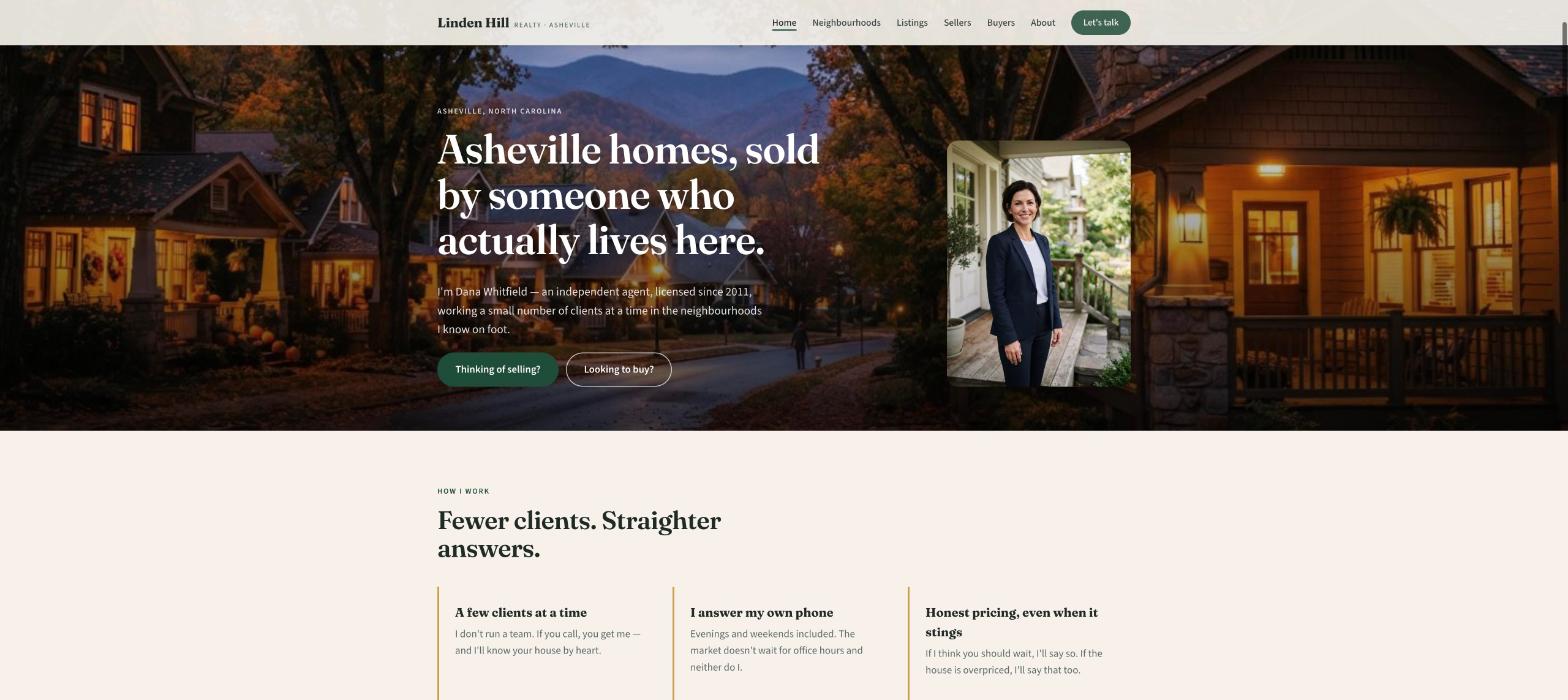
Linden Hill Realty is a fictional one-agent brokerage in Asheville, North Carolina — Dana Whitfield, licensed since 2011, working West Asheville, North Asheville, Montford and Black Mountain, with a few featured listings and a decade of recent sales. It was built in Ullbek from a description much like the kickoff prompt below, and it's live. Every prompt in this guide is written for Linden Hill, so you can see the result of each one.
Linden Hill Realty
Live example
Independent agent in Asheville, NC · neighbourhoods, featured listings, seller & buyer guides, enquiries · designed and built with Ullbek
Homepage — the agent and the neighbourhoods are the hero; the portals can keep the search box
The prompt library
Work through these in order the first time you build. After launch, jump straight to the tier you need — a new listing, a sale to add, a neighbourhood page — and paste the matching prompt.
Tier 1Kick off the whole site
Start with one rich description. Lead with the facts and the tone — local, candid, unhurried — because that's what a brokerage template can't give you and it's what Ullbek designs around. Give it the areas, the licence, how you work, and tell it what not to invent.
Capability: full site from plain language
Kickoff — full agent site
Build a website for my real estate business, Linden Hill Realty, in Asheville, North Carolina. I'm Dana Whitfield, an independent agent licensed since 2011 (NC licence #287641), working West Asheville, North Asheville, Montford and Black Mountain. I mostly help first-time sellers and people relocating to the mountains; I work a small number of clients at a time and answer my own phone: (828) 555-0142, dana@lindenhillrealty.com. Tone: local, candid, unhurried — never “luxury”, never a hard sell. Pages: Home, Neighbourhoods (one sub-page each), Listings (featured + recently sold), Sellers, Buyers, About, and Contact. The homepage needs two clear buttons: “Thinking of selling?” and “Looking to buy?”. Palette: deep forest green, warm stone and a soft gold accent; type that feels like a good local magazine — a confident serif for headings, clean body text on a phone. Don't invent listings, prices, reviews or awards I haven't given you; leave the listings as placeholders I'll fill next. Put the equal-housing notice and my licence in the footer of every page.
Tier 2Shape the homepage
Once the shell exists, tighten the order of things. An agent's homepage is a short argument for calling you — not a search box.
Capability: restructure layout by describing intent
Structure — homepage sections
Rebuild the Linden Hill Realty homepage with these sections in order: (1) a hero with a photo of a West Asheville street at dusk, my portrait, the line “Asheville homes, sold by someone who actually lives here.”, and two buttons — Thinking of selling?, Looking to buy?; (2) “How I work” — three short promises (a small number of clients at a time, I answer my own phone, honest pricing advice even when it's not what you hoped); (3) “Neighbourhoods I know” — four cards linking to the neighbourhood pages; (4) “Featured homes” — three listing cards with price, beds, baths, and a link to the full listing; (5) “Recently sold” — a strip of six sales with street, neighbourhood and price; (6) “What clients say” — three reviews I'll give you; (7) a contact strip with the phone, email and a short form. Keep every section short enough to read on a phone in a parking lot.
Tier 3Neighbourhood pages (the hard problem, solved)
This is where brokerage templates give up: one “Areas we serve” paragraph for a whole city. A real neighbourhood page — the streets, the schools, what sells, what it costs — is what makes someone searching “homes in Montford” land on you instead of a portal. Ullbek builds one page per area from your knowledge.
Capability: local SEO pages from your own knowledge
Neighbourhoods — one honest page per area
Build a Neighbourhoods section for Linden Hill Realty with an index page and one sub-page each for West Asheville, North Asheville, Montford and Black Mountain. For each sub-page use these facts and nothing invented: [paste 6–10 facts per area — the feel, typical homes and era, price range you actually see, schools, the coffee shop, commute, what buyers ask about]. For West Asheville: 1920s bungalows and new infill, Haywood Road for coffee and music, most sales between $425K and $700K this year, ten minutes to downtown, buyers ask about flood zones near the river. Structure each page: a hero photo, “The feel”, “What you'll find” (homes and prices), “Getting around”, “Who it suits”, and a short “Ask me about [area]” form. Give each page a title like “Homes in West Asheville — Linden Hill Realty”.
Neighbourhoods — add an area
Add a fifth neighbourhood page, Weaverville: small-town main street, newer subdivisions and older farmhouses, most sales $380K–$600K, fifteen minutes north on I-26, buyers ask about well and septic. Same structure as the others, add it to the Neighbourhoods index and the homepage cards. Nothing else changes.
Tier 4Listings and recent sales
Your site doesn't need to be a search engine. It needs a handful of featured homes that link to the full listing, and a recently-sold strip that proves you close. Both change often, so each is a one-line edit.
Capability: structured cards you can update in a sentence
Listings — featured homes
On the Listings page and the homepage “Featured homes” section for Linden Hill Realty, set these three listings, each as a card with a photo (I'll upload), price, beds, baths, square feet, neighbourhood and a “View full listing” button to the MLS link: 42 Vermont Ave, West Asheville — $585,000 — 3 bd 2 ba 1,640 sq ft; 118 Cumberland Circle, Montford — $925,000 — 4 bd 3 ba 2,900 sq ft; 9 Laurel Ridge, Black Mountain — $468,000 — 3 bd 2 ba 1,520 sq ft. Add a small “Just listed” tag on Vermont Ave. Below, a line: “Looking for something not here? Tell me what you want and I'll watch the market for you.” linking to the contact form.
Listings — mark a sale and update the strip
42 Vermont Ave has sold for $592,000. Move it from Featured homes to “Recently sold” with the sold price and “Sold in 9 days”, remove the Just listed tag, and keep the other two featured listings as they are. The sold strip should show the six most recent sales, newest first.
Tier 5Seller and buyer guides
The pages people read at 11pm before they decide to call. Written in your voice, step by step, without the brochure fluff — this is the content that turns a visit into a phone call.
Capability: long-form pages in your voice
Sellers — what actually happens
Write the Sellers page for Linden Hill Realty as a plain step-by-step guide in Dana's candid voice: (1) a walk-through and an honest pricing conversation — including when I think you should wait; (2) prep that's worth it and prep that isn't; (3) photos, a floor plan and the listing going live on a Thursday; (4) showings and offers — what I negotiate and what I'll tell you not to fight over; (5) inspection to closing, with the usual Asheville surprises (radon, old wiring, well tests). Then a short “What it costs” section explaining commission and typical closing costs in plain words, without quoting a percentage — tell them to ask me. End with the “Thinking of selling?” form: Name, Phone, Email, Address, When are you thinking of moving? Don't invent statistics.
Buyers — relocating to the mountains
Write the Buyers page for Linden Hill Realty, aimed at people relocating to Asheville: (1) start with the neighbourhood, not the house — link the four neighbourhood pages; (2) what a realistic budget looks like here right now (no numbers I haven't given you); (3) pre-approval and why I won't show homes without it; (4) touring remotely — video walk-throughs, what I check that a camera can't; (5) offers in a competitive week; (6) inspection, appraisal, closing. End with the “Looking to buy?” form: Name, Phone, Email, Where are you moving from?, Budget range (dropdown), Timeline. Tone: candid, warm, no hype.
Tier 6About, and proof
People hire the agent, not the brokerage. A short, true story and three real reviews with names do more than any “top producer” badge. Never let the site invent a review or a sales figure.
Capability: credibility from your real facts
About — Dana, in facts
Write the About page for Linden Hill Realty from these facts only — don't invent awards, rankings or volumes: Dana Whitfield grew up in Black Mountain, spent eight years in Charlotte in commercial leasing, came home in 2011 and got licensed; independent since 2016 after five years at a large brokerage; works a small number of clients at a time on purpose; lives in West Asheville with two dogs and an old Volvo; on the board of a local land trust. Structure: a portrait, “Why I work this way”, a short timeline (Black Mountain, Charlotte, 2011, 2016, today), “Outside work”. Tone: candid, a little dry, no brochure words. Footer line: NC Real Estate Licence #287641 · Linden Hill Realty LLC · Equal Housing Opportunity.
Proof — real reviews only
Add a “What clients say” section on the homepage using only these real reviews (do not invent any): [paste three real reviews with first name and neighbourhood or street]. If I haven't given you enough, use one and a button “Read my Zillow reviews” linking to [your Zillow or Google profile URL]. Never fabricate star ratings, sales volumes or “#1 agent” claims.
Tier 7Photos: the streets, the homes, you
Agent sites are full of stock skylines. Your own streets, your own listings, your own face are what make someone call you instead of the next agent. Upload a batch and tell Ullbek where they belong.
Capability: your uploads · stock · AI images
Images — place your own photos
I've uploaded photos. Use the dusk shot of Haywood Road as the homepage hero, my portrait on the hero and the About page, and the four street photos as the neighbourhood page heroes (file names match the areas). Use the listing photos on the matching listing cards. Crop so houses and faces aren't cut off, optimise for the web, keep the colours natural — no HDR look.
Images — stock until you shoot your own
I don't have good photos yet. Find realistic photos of Asheville and the Blue Ridge — a bungalow street in soft light, a mountain view with a town below, a craftsman porch — nothing with visible signs or faces. Use them as placeholders on Home and the neighbourhood pages, keep the tone consistent, and note in the site brief which ones to replace with my own.
Tier 8The things that change
This is the ongoing win. A new listing on Thursday, a sale on Friday, an open house this weekend, a market note each month — update it yourself in a sentence instead of waiting on a ticket.
Capability: ongoing edits without a developer
Open house — this weekend
Add a slim banner across the top of every page: “Open house — 118 Cumberland Circle, Montford — Sunday 2–4pm.” linking to that listing card. Keep it compact so I can swap it next week; if a banner already exists, replace it rather than stacking. Leave a note in the site brief to remove it Monday.
Market note — this month
Add a short “This month in Asheville” block on the homepage under “Recently sold”: three sentences I'll give you now — [paste your plain-English take on the month: what's moving, what's sitting, what you're telling sellers]. Date it. When I give you next month's, replace it rather than stacking.
Tier 9Polish for phones and search
Most people land on your site from a phone, often standing outside a house with your sign on it. A few targeted asks before you publish go a long way.
Capability: responsive design + on-page SEO
Polish — mobile & SEO basics
Review the whole Linden Hill Realty site on a phone: the phone number must be tap-to-call in the header on every page, the two homepage buttons must be visible without scrolling, listing cards must stack cleanly. Give every page a title and meta description that mention Asheville real estate agent and the neighbourhood names naturally — don't stuff keywords. Add alt text to every photo. Make sure the licence number and equal-housing notice are plain text in the footer of every page.
Tier 10Publish and go live
When it looks right, publish. You get a free *.ullbek.site address immediately, with HTTPS. Connect your own domain when you're ready — or buy one in the chat.
Capability: one-click publish · free address · your own domain
Launch — publish checklist
I'm ready to publish Linden Hill Realty. Do a final pass: every page has a title and meta description, the listings match their MLS links, the sold strip has real prices only, both forms send to my email, the licence and equal-housing notice are in every footer, and there are no placeholder or TODO notes left. Then publish to a free Ullbek address. After that, tell me how to put the site on lindenhillrealty.com.
“An agent's website is never finished. A listing on Thursday, a sale on Friday, an open house on Sunday — and the site should say so before the sign goes in the lawn.”
After launch: the updates that used to be painful
The real product for an agent isn't the first build — it's every week, when something lists and something sells. Here's how the common jobs map to what you've already learned:
Common agent-site updates → what to do in Ullbek
New listing
The Tier 4 listings prompt — add a card with price, beds, baths and the MLS link.
A sale
The Tier 4 mark-a-sale prompt — card moves to Recently sold with the real price.
Open house
The Tier 8 banner prompt — one line across every page, gone on Monday.
New neighbourhood
The Tier 3 add-an-area prompt — page, index and homepage cards.
Monthly market note
The Tier 8 market note prompt — replace, don't stack.