A practical guide for plumbers, electricians and every trade that lives on the phone. What your site needs, copy-ready prompts you can paste into Ullbek, and how the jobs that used to need a developer — the services list, the service area, the quote form, the reviews — become a conversation. The worked example is a real family plumbing firm built with Ullbek.
Why plumber websites are harder than they look
A plumber's website has one job: get the phone to ring. The person reading it has water on the floor, no hot water on a Sunday, or a landlord's email in their inbox — and they are on a phone, in a hurry, comparing three tabs. They need to know, in seconds, that you do the job, that you cover their suburb, that you'll actually turn up, and what number to call. Most trade sites bury the number under a slideshow and leave the service area to a guess.
The old way
Pick a “tradie” template. Swap the stock photo of a stranger in a hi-vis vest. Discover the service area is a paragraph, not a list Google can read. Ask the developer to add “heat pump installs”. Wait. Pay. Hope the phone number is still right in the footer.
With Ullbek
Describe your business and how you work. Get a site designed around it — the number everywhere it should be, services as clear cards, suburbs as a real list, a quote form that lands in your inbox. Add a service by saying so.
This guide does two jobs. It tells you what a strong trade website includes, and it shows you how to get each piece built in Ullbek — in plain language, with your own suburbs and licence number, using prompts you can copy.
How to use the prompts
Every prompt below is written for Hartley Plumbing, the family firm shown in the worked example. Swap the bold details for your name, your area, your licence and your services. Hit Copy, paste into the Ullbek chat, and adjust anything that doesn't fit. You're not a template — neither is your business, and neither should its website be.
What a great plumber website needs
You don't need a dozen pages. You need the few things a stressed customer checks before they dial — and a way to keep them current without anyone's help.
A phone number you can't miss
In the header, in the hero, in the footer, as a tap-to-call button on phones. Plus the hours and whether you do after-hours.
Services as plain cards
Blocked drains, hot water, leaks, bathrooms, gas, maintenance — one card each, with what you actually do and what's included. No jargon, no “solutions”.
A service area Google can read
A real list of suburbs, not a vague “the north side”. This is how you show up for “plumber Preston” rather than only your own name.
Emergency, stated plainly
What counts as an emergency, whether there's a night roster, what to do while you wait. Honesty here wins the call.
Trust in facts, not adjectives
Licence number, insurance, years in business, who answers the phone. Real reviews with first names and suburbs.
A quote form that reaches you
Name, phone, suburb, job type, details, a photo if they have one. Spam-checked and in your inbox — no plugin.
The family, in one honest paragraph
Who started it, who runs it now, how you work. People hire the neighbour, not the call centre.
The worked example: Hartley Plumbing
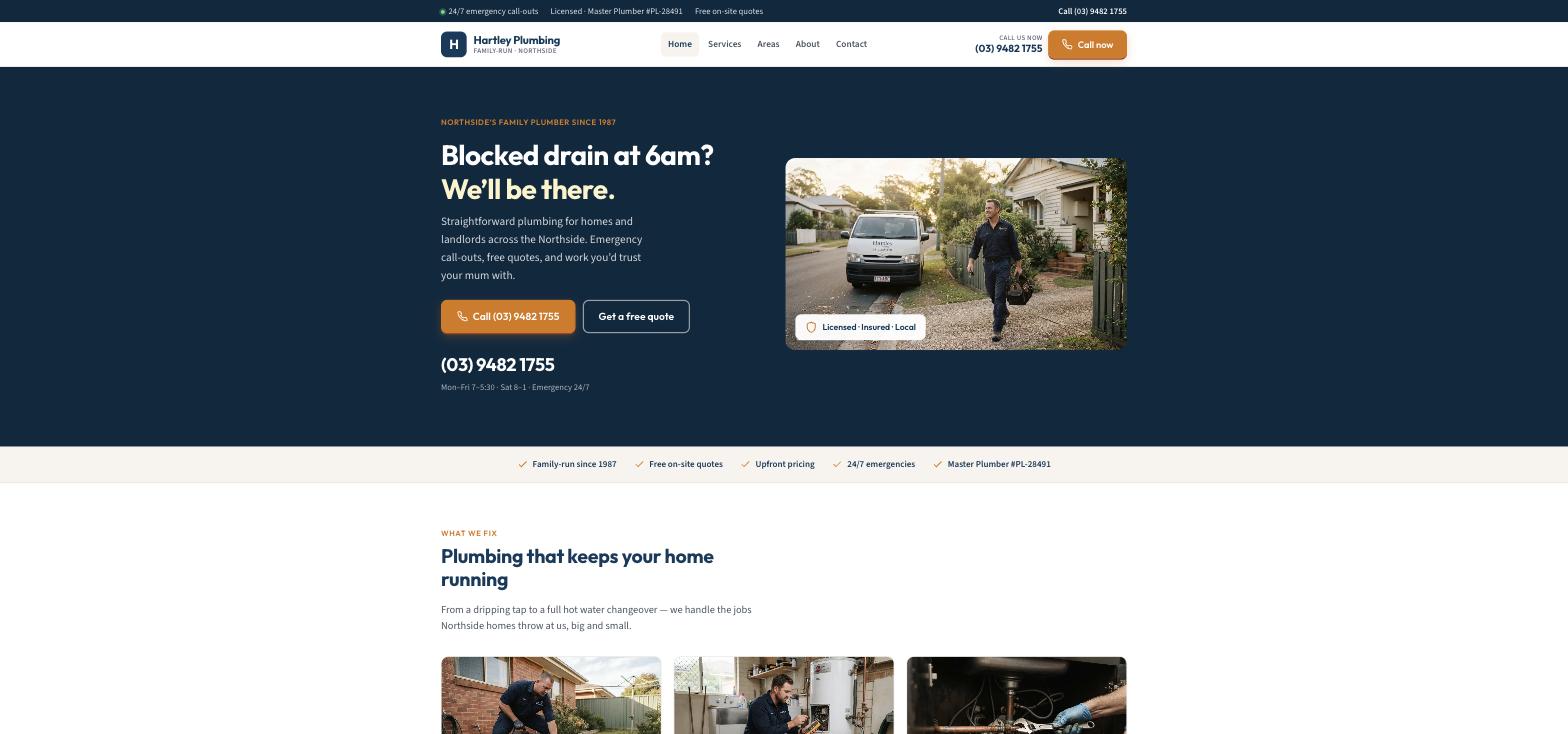
Hartley Plumbing is a fictional family-run plumber on the north side of Melbourne — started by Bill Hartley with one van in 1987, run today by his son Tom and daughter-in-law Sarah, with a 24/7 emergency roster, free on-site quotes, and a service area of eighteen suburbs. It was built in Ullbek from a description much like the kickoff prompt below, and it's live. Every prompt in this guide is written for Hartley, so you can see the result of each one.
Hartley Plumbing
Live example
Northside family plumber · services, areas, emergency call-outs, free quotes · designed and built with Ullbek
Homepage — the number is the hero; everything else supports the call
The prompt library
Work through these in order the first time you build. After launch, jump straight to the tier you need — a new service, a new suburb, a review to add — and paste the matching prompt.
Tier 1Kick off the whole site
Start with one rich description. Lead with the facts and the tone — straight-talking, local, trustworthy — because that's what a template can't give you and it's what Ullbek designs around. Give it the number, the area, the family, and tell it what not to invent.
Capability: full site from plain language
Kickoff — full plumbing site
Build a website for my plumbing business, Hartley Plumbing, a family-run plumber covering the north side of Melbourne since 1987. Phone (03) 9482 1755 — this number must be impossible to miss: header, hero, footer, and a tap-to-call button on phones. We do blocked drains, hot water systems, leaks and burst pipes, bathrooms and kitchens, gas fitting, and maintenance for landlords. 24/7 emergency call-outs, free on-site quotes, upfront pricing. Licensed: Master Plumber #PL-28491, fully insured. Based in Reservoir, working across Preston, Thornbury, Northcote, Coburg, Brunswick, Heidelberg, Ivanhoe, Bundoora and Epping. The tone: straight-talking and local — “we'll be there” — never corporate, never salesy. Pages: Home, Services, Areas, About, and Contact & Quotes. Palette: deep navy, a warm orange for the call buttons, off-white; bold, plain type that reads at a glance on a phone. Don't invent reviews, awards or prices I haven't given you.
Tier 2Shape the homepage
Once the shell exists, tighten the order of things. A trade homepage is a short argument for picking up the phone — not a brochure.
Capability: restructure layout by describing intent
Structure — homepage sections
Rebuild the Hartley Plumbing homepage with these sections in order: (1) a thin top bar: “24/7 emergency call-outs · Licensed · Master Plumber #PL-28491 · Free on-site quotes” with the phone on the right; (2) a hero with the headline “Blocked drain at 6am? We'll be there.”, two buttons — Call (03) 9482 1755 and Get a free quote — the number large underneath with “Mon–Fri 7–5:30 · Sat 8–1 · Emergency 24/7”, and a photo of Tom at the van; (3) a trust strip: Family-run since 1987 · Free on-site quotes · Upfront pricing · 24/7 emergencies · Licence number; (4) “What we fix” — six service cards; (5) “Why Hartley” — four plain promises (real person answers, upfront pricing, clean shoes and tidy work, same-day when we can); (6) an emergency block: “Burst pipe? No hot water? Don't wait.” with Call now and Request a callback; (7) “What locals say” — three reviews I'll give you; (8) “Service area” — the suburb list with a link to the full page; (9) footer with hours, number, email, workshop address and licence. Short enough to read on a phone with wet socks.
Tier 3Services, as plain cards
This is where generic templates get vague. A trade services page isn't a list of nouns — it's what you actually do, what's included, and when it's urgent. Give Ullbek the real jobs and the details that win the call.
Capability: structured service pages you can grow
Services — six cards with the details that matter
Build the Services page for Hartley Plumbing with six services, each with a two-sentence plain-English description and three small facts: Blocked drains — kitchen, bathroom, stormwater; we clear it then find out why (Often same-day · CCTV when needed · Homes & rentals). Hot water systems — repair and replace electric, gas continuous-flow and heat pump; a straight comparison before you pay (Emergency priority · Electric, gas, heat pump · Free quote on replacement). Leaks & burst pipes — isolate, stop the damage, repair copper, PEX and poly (24/7 emergency · Under-sink to mains · Insurance photos on request). Bathrooms & kitchens — taps, toilets, mixers, vanities, full rough-in for renovations (Renovations · Like-for-like swaps · Free on-site quote). Gas fitting — cooktops, heaters, gas hot water, pressure-tested, certificates included (Gasfitting endorsed · Safety certificates · Cooktops & heaters). Maintenance & landlords — routine checks, tenant call-outs, photo updates, tidy invoices (Landlord accounts · Photo updates · Priority bookings). End with “Not sure what you need? Describe it. We'll sort it.” and the call and quote buttons.
Services — add a service
We now do heat pump hot water installs with the government rebate. Add a seventh service card, “Heat pump hot water”, in the same style: two sentences in our tone, three facts (Rebate-eligible · Free assessment · Electric to heat pump changeovers). Add it to the “What we fix” grid on the homepage and to the job-type list on the quote form. Don't touch anything else.
Tier 4The service area Google can read
“Plumber near me” is decided by the suburbs on your page. A real list beats a paragraph; a short honest note about response times beats a promise you can't keep.
Capability: local SEO content, structured for search
Areas — the suburb list
Build the Areas page for Hartley Plumbing: a short intro (“Based in Reservoir, we work the northern suburbs daily. If you're nearby and not listed, call — we'll tell you if we can get there.”), then a clear grid of suburbs: Reservoir, Preston, Thornbury, Northcote, Coburg, Brunswick, Pascoe Vale, Heidelberg, Ivanhoe, Rosanna, Bundoora, Kingsbury, Mill Park, Epping, South Morang, Lalor, Thomastown, Fairfield. Add a “How far we go” note: core suburbs are often same-day for emergencies, the extended area is booked visits and quotes. Mark the suburbs as plain text, one per item, so search engines read them as places. Give the page a title like “Plumber in Reservoir, Preston, Thornbury & the Northside”.
Areas — we've grown
Add Alphington, Clifton Hill and Fawkner to the suburb grid on the Areas page, in alphabetical order with the others, and add them to the short suburb list on the homepage. Update the page title and description to include Fawkner. Nothing else changes.
Tier 5Quotes and callbacks that reach you
Ullbek has a built-in form backend: ask for the fields you want and requests are spam-checked and sent to your inbox — no plugin, no form service. For a trade, the form is the second phone line: keep it short, ask for the suburb and the job type, and let people attach a photo.
Capability: built-in forms → your inbox
Contact — the free-quote form
On the Contact & Quotes page for Hartley Plumbing, add a “Request a free quote” form with: Name, Phone (required), Email, Suburb (required), What do you need? (Blocked drain, Hot water problem, Leak or burst pipe, Bathroom or kitchen, Gas fitting, Landlord / maintenance, Something else), Details, and an optional photo upload. Use Ullbek's built-in form handling so requests email me with spam filtering. Above the form: “For emergencies, ring us now. For planned work, send a message — we reply the same business day.” Beside it, the phone, email, hours, workshop address (“by appointment — not a walk-in shopfront”) and the licence line.
Contact — the after-hours callback
Add a small “Request a callback” form to the emergency block on the homepage: Name, Phone, Suburb, one line “What's happening?”. Same built-in handling. Under it: “If it's after hours we'll tell you straight whether we can get there tonight.”
Where requests go
Form messages land in the email on your Ullbek account and in your dashboard — no extra tool to learn. Full walkthrough: Contact forms & submissions.
Tier 6Trust: licence, family, real reviews
People hire the neighbour, not the call centre. A licence number, a short true story and three real reviews with suburbs do more than any “professional, reliable, affordable” line. Never let the site invent a review.
Capability: credibility from your real facts
About — the family, in facts
Write the About page for Hartley Plumbing from these facts only — don't invent awards or staff: Bill Hartley started the business in 1987 after years on the tools with bigger firms; he wanted a small book of local customers he could look after properly. Today his son Tom Hartley (Master Plumber) and daughter-in-law Sarah run it — Sarah keeps bookings, quotes and landlord updates running. Bill still drops by the workshop with advice about copper. Structure: a short opening, “From Bill's toolbox to today”, then “What ‘we'll be there' actually means” — three promises: real people on the line, straight pricing (we'll say if a repair isn't worth it), licensed and insured. Finish with the credentials line: Master Plumber Licence #PL-28491 · Gasfitting endorsed · Fully insured · ABN 48 172 663 901. Tone: plain, warm, a little dry.
Trust — real reviews only
Add a “What locals say” section on the homepage using only these real reviews (do not invent any): [paste two or three real reviews with a first name and suburb]. Show five stars only where the reviewer gave five. If I haven't given you enough, use one quote and a button “Read our Google reviews” linking to [your Google Business Profile URL]. Never fabricate star ratings.
Tier 7Photos of the van, the work, the people
Trade sites are full of strangers in hi-vis. Your own van, your own work, your own face on the About page is what makes someone call you instead of the next tab. Upload a handful of honest phone photos and tell Ullbek where they belong.
Capability: your uploads · stock · AI images
Images — place your own photos
I've uploaded photos. Use the one of Tom walking from the van as the homepage hero image, with a small “Licensed · Insured · Local” badge over the corner. Use the drain-clearing, hot-water-unit and under-sink photos on the matching service cards. Put the family photo on the About page. Crop so faces and the van aren't cut off, optimise for the web, keep them natural — no heavy filters.
Images — stock until you take your own
I don't have photos yet. Find realistic stock photos of plumbing work — a plumber at a hot water unit, clearing a drain, under a kitchen sink, a tidy van on a suburban street — nothing staged or American-looking, no hi-vis-and-thumbs-up. Use them as placeholders, keep the tone consistent, and note in the site brief which ones to replace with our own.
Tier 8Seasons, offers, the things that change
This is the ongoing win. A winter hot-water check, a landlord pre-tenancy package, a note that you're fully booked this week — update it yourself in a sentence instead of waiting on a ticket.
Capability: ongoing edits without a developer
Seasonal — a winter banner
Add a slim banner across the top of every page: “Winter: no hot water? We prioritise hot water call-outs — ring (03) 9482 1755.” Keep it compact so I can swap it for a summer message later; if a banner already exists, replace it rather than stacking.
Offers — a landlord package
Add a “For landlords & property managers” block on the Services page under Maintenance: three sentences on what we do (pre-tenancy checks, tenant call-outs with photo updates, tidy invoices per property), and a button “Set up a landlord account” that opens the quote form with “Landlord / maintenance” pre-selected.
Tier 9Polish for phones and search
Almost everyone who finds you is on a phone, often standing in water. A few targeted asks before you publish go a long way.
Capability: responsive design + on-page SEO
Polish — mobile & SEO basics
Review the whole Hartley Plumbing site on a phone: the call button must be visible without scrolling on every page, the number must be tap-to-call everywhere it appears, and the quote form must be usable one-handed. Give every page a title and meta description that mention plumber Northside Melbourne and the main suburbs naturally — don't stuff keywords. Add alt text to every photo. Make the address, phone and licence number plain text, not images.
Tier 10Publish and go live
When it looks right, publish. You get a free *.ullbek.site address immediately, with HTTPS. Connect your own domain when you're ready — or buy one in the chat.
Capability: one-click publish · free address · your own domain
Launch — publish checklist
I'm ready to publish Hartley Plumbing. Do a final pass: every page has a title and meta description, the phone number is identical everywhere and tap-to-call on phones, the quote and callback forms send to my email, the suburb list matches the Areas page, the licence number appears in the footer of every page, and there are no placeholder or TODO notes left. Then publish to a free Ullbek address. After that, tell me how to put the site on hartleyplumbing.com.au.
“A trade website is never finished. A new suburb, a new service, a review worth sharing — and the site should say so before the next call.”
After launch: the updates that used to be painful
The real product for a tradesperson isn't the first build — it's month three, when you add heat pumps and three new suburbs. Here's how the common jobs map to what you've already learned:
Common trade-site updates → what to do in Ullbek
New service
The Tier 3 add-a-service prompt — card, homepage grid and quote-form option in one go.
New suburbs
The Tier 4 we've-grown prompt — Areas grid, homepage list, page title.
A review to add
Paste it with a first name and suburb → the Tier 6 reviews prompt. Real ones only.
Seasonal message
The Tier 8 banner prompt — one line across every page, swapped when the season turns.
New photos
Upload from your phone → ask Ullbek to place and crop them (Tier 7).
Not a slideshow, not a slogan. The phone, the hours, and whether you do after-hours. Everything else on the page exists to make that call feel safe.
List suburbs, don't describe them
A real grid of place names is what gets you found for “plumber Preston”. Keep it honest — only places you actually drive to.
Say what an emergency is
“Burst pipe, no hot water, sewage backing up — call now. A dripping tap can wait for a quote.” People trust the business that tells them the difference.
Never invent reviews
Ask for placeholders instead. A neighbour will spot a fake quote before Google does.
Republish after every change
Edits in the builder aren't live until you publish again. New suburb, new service, new number — publish, then check the live site on your phone.
Preview ≠ live
The preview shows your working site. Customers only see what you've published. After a new service or a changed number, publish again so the world sees it.