A practical guide for salon owners and independent stylists. What your site needs, copy-ready prompts you can paste into Ullbek, and how the jobs that used to need a developer — the price list, the team page, the gallery, booking enquiries — become a conversation. The worked example is a real Chelsea salon built with Ullbek.
Why salon websites are harder than they look
A salon website has to do something most sites don't: it has to feel like the chair. People choose a salon on trust and taste before they ever read a price. Then, in the same twenty seconds, they want three plain facts — what you do, what it costs, and how to get an appointment. Most salon sites nail one of those and lose the other two: a beautiful homepage with a price list that's two years old, or a booking button with no sense of the place at all.
The old way
Pick a salon template. Swap the stock photo of a blow-dry. Discover the price table can't show “from £165” next to “on quote”. Ask the developer to add your new colourist. Wait. Change your Sunday hours on Google and forget the site.
With Ullbek
Describe your salon and its mood. Get a site designed around it — the price list laid out like a menu card, the team as real people, a booking enquiry that lands in your inbox. Change a price by saying so.
This guide does two jobs. It tells you what a strong salon website includes, and it shows you how to get each piece built in Ullbek — in plain language, with your own prices and photos, using prompts you can copy.
How to use the prompts
Every prompt below is written for Golden Hour, the Chelsea salon shown in the worked example. Swap the bold details for your name, your street, your stylists and your prices. Hit Copy, paste into the Ullbek chat, and adjust anything that doesn't fit. You're not a template — neither is your salon, and neither should its website be.
What a great salon website needs
You don't need a dozen pages. You need the few things a new client checks before they book — and a way to keep them current without anyone's help.
A homepage that feels like your chairs
One photo of the room in good light, one line that says who you're for, and two buttons: Book and Services. Nothing else above the fold.
A price list that reads like a menu card
Cut, colour, blow-dry, treatments, bridal — grouped, priced, with “from” where it depends on length and “on quote” where it should. Readable on a phone.
Your team as real people
A photo, a title, three honest sentences each. Clients book a person, not a salon — and they'll ask for the stylist whose bio sounded like them.
Booking that reaches you
A short enquiry form with the service, a preferred stylist and a preferred day — or a clean link to the booking app you already use. No dead ends.
A gallery that moves
Real work in real light: colour, cuts, the room. A dozen honest phone photos beat one stock shoot.
Hours, address, how to find you
Which days you're closed, where to park, the nearest station. The page people screenshot on the way.
Policies without the lecture
Cancellation notice, consultations for new clients, patch tests for colour. Two lines, in your tone, where they're needed.
The worked example: Golden Hour
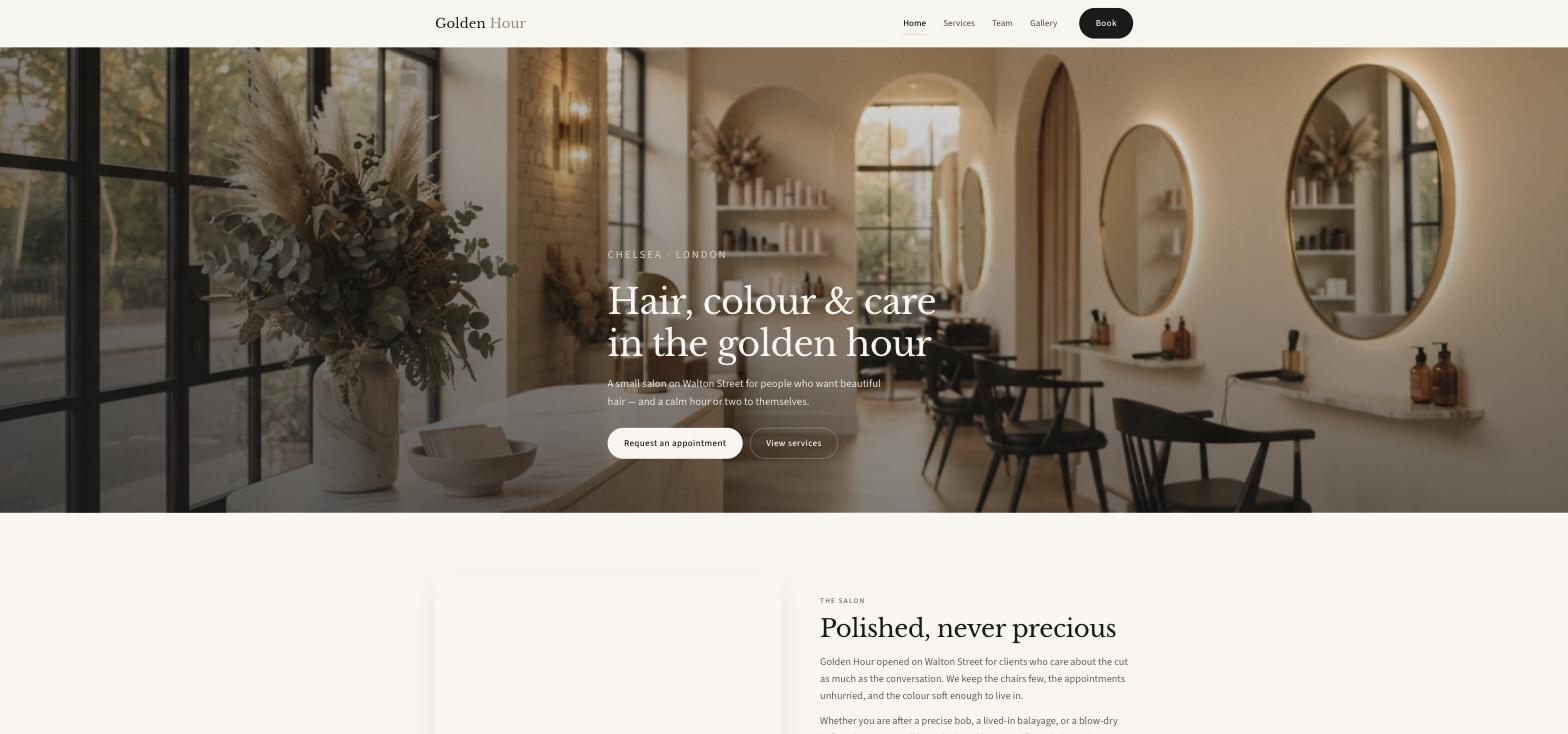
Golden Hour is a fictional boutique hair salon on Walton Street in Chelsea, London — four chairs, unhurried appointments, lived-in colour and a founder who left the loud Mayfair salons to open somewhere calmer. It was built in Ullbek from a description much like the kickoff prompt below, and it's live. Every prompt in this guide is written for Golden Hour, so you can see the result of each one.
Golden Hour
Live example
Chelsea hair salon · services & prices, team, gallery, booking enquiry · designed and built with Ullbek
Homepage — the room in its own light; two buttons do the rest
The prompt library
Work through these in order the first time you build. After launch, jump straight to the tier you need — a price change, a new stylist, Christmas hours — and paste the matching prompt.
Tier 1Kick off the whole site
Start with one rich description. Lead with the facts and the mood — the mood is what a template can't give you, and it's what Ullbek designs around. Give it the room, the kind of client, the people, and tell it what not to invent.
Capability: full site from plain language
Kickoff — full salon site
Build a website for my hair salon, Golden Hour, at 28 Walton Street, Chelsea, London SW3 1RE. We're a small boutique salon — four chairs, unhurried appointments, lived-in colour and cuts that grow out gracefully. Founder Maya Chen opened it after a decade in Mayfair salons that were beautiful but too loud. Clients are people who care about the cut as much as the conversation. The mood should feel like late-afternoon light — warm, calm, polished but never precious. Pages: Home, Services & Prices, Team, Gallery, and Book. The homepage needs two clear buttons: “Request an appointment” and “View services”. Palette: warm cream, soft gold and a deep brown for text; type that feels like a good menu card — elegant serif headings, clean readable body text on a phone. Don't invent reviews, awards, stylists or prices I haven't given you; leave the price list as a placeholder I'll fill next.
Tier 2Shape the homepage
Once the shell exists, tighten the order of things. A salon homepage is a short argument for booking a chair — not a tour of every service.
Capability: restructure layout by describing intent
Structure — homepage sections
Rebuild the Golden Hour homepage with these sections in order: (1) a full-width hero with a photo of the salon in daylight, the line “Hair, colour & care in the golden hour”, and two buttons — Request an appointment, View services; (2) “The salon” — three sentences on who we are and a link to the team; (3) “What we do” — three cards: Cut & finish from £75, Colour from £75, Blow-dry & events from £40, each linking to the full price list; (4) “The chairs” — the four stylists with a photo, title and one line each; (5) “Recent work” — six gallery photos and a link to the gallery; (6) “Visit us” — opening hours, address and a maps link; (7) a short “Ready when you are” booking strip. Keep every section short enough to read on a phone while walking.
Tier 3The price list (the hard problem, solved)
This is where template builders fall over. A salon price list isn't a table — it has groups, a “from” here and an “on quote” there, add-ons, and it changes twice a year. Ullbek designs the page around your list: give it the services, or drag in the PDF your printer made, and tell it how the page should behave.
Two ways to give Ullbek your prices
Paste the services and prices straight into the prompt, or drag your current price list PDF into the chat and say “use this”. Ullbek can read the PDF, lay the services out on the page, and keep the file as a download. See Working with assets.
Capability: structured price list + PDF download
Prices — a page that reads like a menu card
Build the Services & Prices page for Golden Hour with these groups in order: Cut & finish, Blow-dry, Colour, Treatments, Bridal & events. Here are the services with prices: [paste yours — name, one-line description, price]. For Golden Hour: Restyle £95, Cut & finish £75, Men's cut £48, Fringe trim £20, Children's cut £28; Blow-dry £40, long/thick £50, add curls +£15; Root tint £75, Full head colour from £110, Half head highlights from £120, Full head highlights from £155, Balayage from £165, Toner/gloss £45, Colour correction on quote; Bond builder £35, Deep conditioning £30, Scalp treatment £40; Bridal trial £95, Bridal day styling £150, Event styling from £75. Show “from” and “on quote” exactly as written. Put a one-line note under each group where it helps (e.g. “All colour includes a bond-care step”) and a footer line: “Prices include VAT. 24 hours' notice appreciated for cancellations.” Prices right-aligned, easy to scan on a phone.
Prices — from the PDF you already have
I've uploaded our current price list as a PDF. Read it and build the on-page price list from it, keeping the same groups and order. Add a “Download the price list (PDF)” button that uses this file — rename it golden-hour-prices.pdf if the filename is messy. If anything in the PDF is unclear, ask me rather than guessing.
Prices — the twice-a-year change
New prices from the 1st. On the Services & Prices page: change Cut & finish to £80, Balayage to from £175, and add “Gloss & blow-dry — £70” under Colour with a “New” tag. Replace the price list PDF download with the new file I've uploaded. Keep everything else exactly as it is.
Tier 4Bookings that reach you
Ullbek has a built-in form backend: ask for the fields you want and enquiries are spam-checked and sent to your inbox — no plugin, no third-party form service. If you already take bookings through an app like Fresha, Treatwell or Square, link to it instead and keep the form for bridal and consultations.
Capability: built-in forms → your inbox
Booking — request-an-appointment form
On the Book page for Golden Hour, add a “Booking enquiry” form with: Name, Email, Phone (optional), Service (Cut & finish, Restyle, Blow-dry, Root tint / full colour, Highlights, Balayage, Toner / gloss, Treatment, Bridal / event, Not sure yet), Preferred stylist (No preference, Maya Chen, James Okafor, Sofia Ricci, Priya Shah), Preferred day / time, and a note. Use Ullbek's built-in form handling so enquiries email me with spam filtering. Above the form: “This is a request — we confirm by email within one working day before anything is locked in.” Make every “Request an appointment” button on the site open this page.
Booking — if you already use a booking app
We take bookings through [Fresha / Treatwell / Square Appointments]. Make every “Book” button open [your booking link] in a new tab. Keep a short form on the Book page only for bridal enquiries and colour consultations, titled “Bridal & consultations”, with Name, Email, Phone, Date, and Notes.
Where enquiries go
Form messages land in the email on your Ullbek account and in your dashboard — no extra tool to learn. Full walkthrough: Contact forms & submissions.
Tier 5The team, as real people
Clients book a person. A photo, a title and three honest sentences do more than any “award-winning team” line. Give Ullbek the real facts and tell it the tone.
Capability: brand voice from your real people
Team — four chairs, four hands
Build the Team page for Golden Hour from these facts only — don't invent training, awards or clients: Maya Chen, Founder & Creative Director — a decade in Mayfair, opened Golden Hour for fewer chairs and longer consultations, known for soft lived-in colour and low-maintenance blondes. James Okafor, Senior Stylist — trained in London and New York, precision cuts across every texture, calm chair, honest advice, great men's cuts. Sofia Ricci, Colour Specialist — grew up between Milan and London, balayage, dimensional blondes, rich brunettes, never lets colour leave without a gloss. Priya Shah, Stylist — trained under Maya, soft waves, bridal work, the gentlest hands in Chelsea. One portrait slot each (I'll upload), a two-paragraph bio in a warm, plain-spoken tone, and a line at the bottom: “Mention a stylist in your enquiry, or leave it open.”
Team — add a new stylist
Leo Martins joins us on Tuesday as a Stylist: trained at Sassoon, five years in Shoreditch, loves textured crops and curly cuts, quiet and precise. Add him to the Team page in the same style as the others, add him to the “Preferred stylist” list on the booking form, and add a one-line “New chair” mention on the homepage. I'll upload his portrait.
Tier 6The gallery
A salon site lives or dies on its photographs. Real colour under your own lights beats a perfect stock shoot. Upload a batch and tell Ullbek how the page should behave; when you have none yet, ask for warm, honest stock as a placeholder and label it so you remember to replace it.
Capability: your uploads · stock · AI images
Gallery — your own work
I've uploaded twenty photos of recent work and the salon. Build the Gallery page as a tidy masonry grid, portrait photos kept portrait, no cropping of faces, with a light-box on tap. Use the three best colour shots on the homepage “Recent work” strip. Optimise everything for the web and keep the warm daylight look that matches the cream-and-gold palette. Add a short line at the top: “Hair that moves in real light, and the rooms where it happens.”
Gallery — stock until you have your own
I don't have professional photos yet. Find warm, realistic stock photos for a small boutique salon — a chair by a window in soft daylight, a stylist mid-blow-dry, lived-in balayage, a cut being finished — and use them as placeholders on Home and Gallery. Keep them consistent in tone, prefer photographs over illustrations, and note in the site brief which ones to replace when my own photos arrive.
Tier 7Hours, address, and getting there
Hours are the fact people check most and trust least. Put them on the homepage and the Book page, and tell people how to actually arrive.
Capability: structured content you can update anytime
Visit — hours, address, directions
Set Golden Hour's address to 28 Walton Street, Chelsea, London SW3 1RE, phone 020 7584 3920, email hello@goldenhour.co.uk. Hours: Monday closed, Tuesday–Friday 9:00–19:00, Saturday 9:00–17:00, Sunday 10:00–16:00. Show the hours in the homepage “Visit us” block, on the Book page and in the footer. Add a “Getting here” note: a short walk from South Kensington or Knightsbridge, metered parking on nearby streets. Include an “Open in Google Maps” button using the address.
Visit — Christmas hours banner
Add a slim banner across the top of every page: “Christmas week — open Monday 22nd, closed 25th–27th, back on Sunday 28th from 10 AM. Book early for party season.” Update the hours block for that week only, and leave a note in the site brief to remove the banner in January.
Tier 8Offers, policies, the things that change
This is the ongoing win. A new-client offer, a product you now stock, a patch-test reminder, a wait-list for Saturdays — update it yourself in a sentence instead of waiting on a ticket.
Capability: ongoing edits without a developer
Offers — a new-client strip
Add a quiet “New here?” strip on the homepage under “What we do”: “First visit? Book a complimentary 15-minute consultation with any stylist — we'd rather talk before we cut.” Link it to the Book page. Keep it compact so I can swap the offer later without redesigning the page; if a strip already exists, replace it rather than stacking.
Policies — two lines, your tone
Add a short “Good to know” block at the bottom of the Services & Prices page with three lines, in our warm tone, not a legal one: new colour clients need a patch test 48 hours before; please give 24 hours' notice to cancel so we can offer the chair to the wait list; children are welcome on weekday mornings. No pop-ups, no bold warnings.
Tier 9Polish for phones and search
Almost everyone who finds you is on a phone, often outside your door or on the Tube. A few targeted asks before you publish go a long way.
Capability: responsive design + on-page SEO
Polish — mobile & SEO basics
Review the whole Golden Hour site on a phone: the Book button and today's hours must be reachable without scrolling on the homepage, the price list must stay aligned and readable, and no photo should crop a face. Give every page a title and meta description that mention hair salon Chelsea naturally where it fits — don't stuff keywords. Add alt text to every photo. Make sure the address and phone number are plain text so a phone can tap to call and tap to navigate.
Tier 10Publish and go live
When it looks right, publish. You get a free *.ullbek.site address immediately, with HTTPS. Connect your own domain when you're ready — or buy one in the chat.
Capability: one-click publish · free address · your own domain
Launch — publish checklist
I'm ready to publish Golden Hour. Do a final pass: every page has a title and meta description, the price list matches the PDF, the booking form is wired up and sends to my email, hours and phone are correct everywhere they appear, every Book button goes to the right place, and there are no placeholder or TODO notes left. Then publish to a free Ullbek address. After that, tell me how to put the site on goldenhour.co.uk.
“A salon website is never finished. Prices move, a chair changes hands, Saturdays fill for a reason — and the site should say so by Monday.”
After launch: the updates that used to be painful
The real product for a salon owner isn't the first build — it's month four, when the prices move and a new stylist starts. Here's how the common jobs map to what you've already learned:
Common salon updates → what to do in Ullbek
Price change
Paste the changes or drag in the new PDF → the Tier 3 price-change prompt. The page and the download update together.
New stylist
The Tier 5 add-a-stylist prompt — Team page, booking form and homepage mention in one go.
New photos
Upload from your phone → ask Ullbek to place and crop them (Tier 6).
Holiday hours
The Tier 7 banner prompt — banner plus the hours block, with a reminder to take it down.
Switching to a booking app
The Tier 4 booking-app prompt — every Book button repointed, the form kept for bridal.
“Calm, late-afternoon light, polished but never precious” gets you a site that feels like your salon. “Modern and clean” gets you everyone's. Ullbek handles the design; you supply the mood.
Keep the price list in one place you control
A PDF on your phone, or a note with services and prices. When it changes, paste or drag — one prompt, page and download in sync.
Let the team page do the selling
Honest bios bring the right clients to the right chair. Skip the superlatives; say what each stylist is actually known for.
Never invent reviews or awards
Ask for placeholders instead. A regular will notice a fake quote before Google does.
Republish after every change
Edits in the builder aren't live until you publish again. Prices, hours, a new stylist — publish, then check the live site on your phone.
Preview ≠ live
The preview shows your working site. Clients only see what you've published. After a price change or new hours, publish again so the world sees it.