A practical guide for bakery owners. What your site needs, copy-ready prompts you can paste into Ullbek, and how the jobs that used to need a developer — the daily bake, this week's specials, the hours, pre-orders and wholesale — become a conversation. The worked example is a real neighbourhood bakery built with Ullbek.
Why bakery websites are harder than they look
A bakery website is mostly read at 6:50 in the morning by someone deciding whether to walk over. They want to know what's in the case today, whether you're open yet, where you are, and if the sticky buns are a Saturday thing. The trouble is that the answer changes every week, and most bakery sites were last updated the week they launched. A beautiful homepage with last spring's specials on it is worse than no specials at all.
The old way
Pick a bakery template. Drop in a stock croissant. Discover the “menu” block can't do “Saturday only” or “until we sell out”. Email the developer every time the specials change. Stop emailing. Leave the galette up all winter.
With Ullbek
Describe your bakery and its mornings. Get a site designed around it — the daily bake and this week's specials laid out so they're easy to change, hours that say “until we sell out”, a pre-order form that lands in your inbox. Change the board by saying so.
This guide does two jobs. It tells you what a strong bakery website includes, and it shows you how to get each piece built in Ullbek — in plain language, with your own loaves and photos, using prompts you can copy.
How to use the prompts
Every prompt below is written for Rosie & Bean, the Portland bakery shown in the worked example. Swap the bold details for your name, your street, your hours and your bake. Hit Copy, paste into the Ullbek chat, and adjust anything that doesn't fit. You're not a template — neither is your bakery, and neither should its website be.
What a great bakery website needs
You don't need a dozen pages. You need the few things a hungry neighbour checks before they walk over — and a way to change them every week without anyone's help.
A homepage that smells like the case
One photo of the bread, one line that says what you are, and two buttons: This week's specials and Find us. Nothing else above the fold.
The daily bake, in plain words
What's always there — the country loaf, the croissants, the rotating rye. Short, honest, no prices if they change too often.
This week's specials, easy to change
Three items, each with a day, a sentence and an “out of the oven at 7:30” note. The section you'll touch most, so it has to be a one-line edit.
Hours that tell the truth
“Open 7am, until we sell out — often earlier on weekends.” Which day you're closed. The page people check on the walk over.
Pre-orders, catering and wholesale
A short form for holding a loaf, a catering tray or a café account. Spam-checked and in your inbox — no plugin.
Your story, told once and true
Who bakes, how long the dough rests, why the starter has a name. Trust lives here — and so does the mood of the whole site.
Find us, really
The address, the cross streets, the sage-green storefront, the bike racks. A maps button. People navigate by landmarks.
The worked example: Rosie & Bean
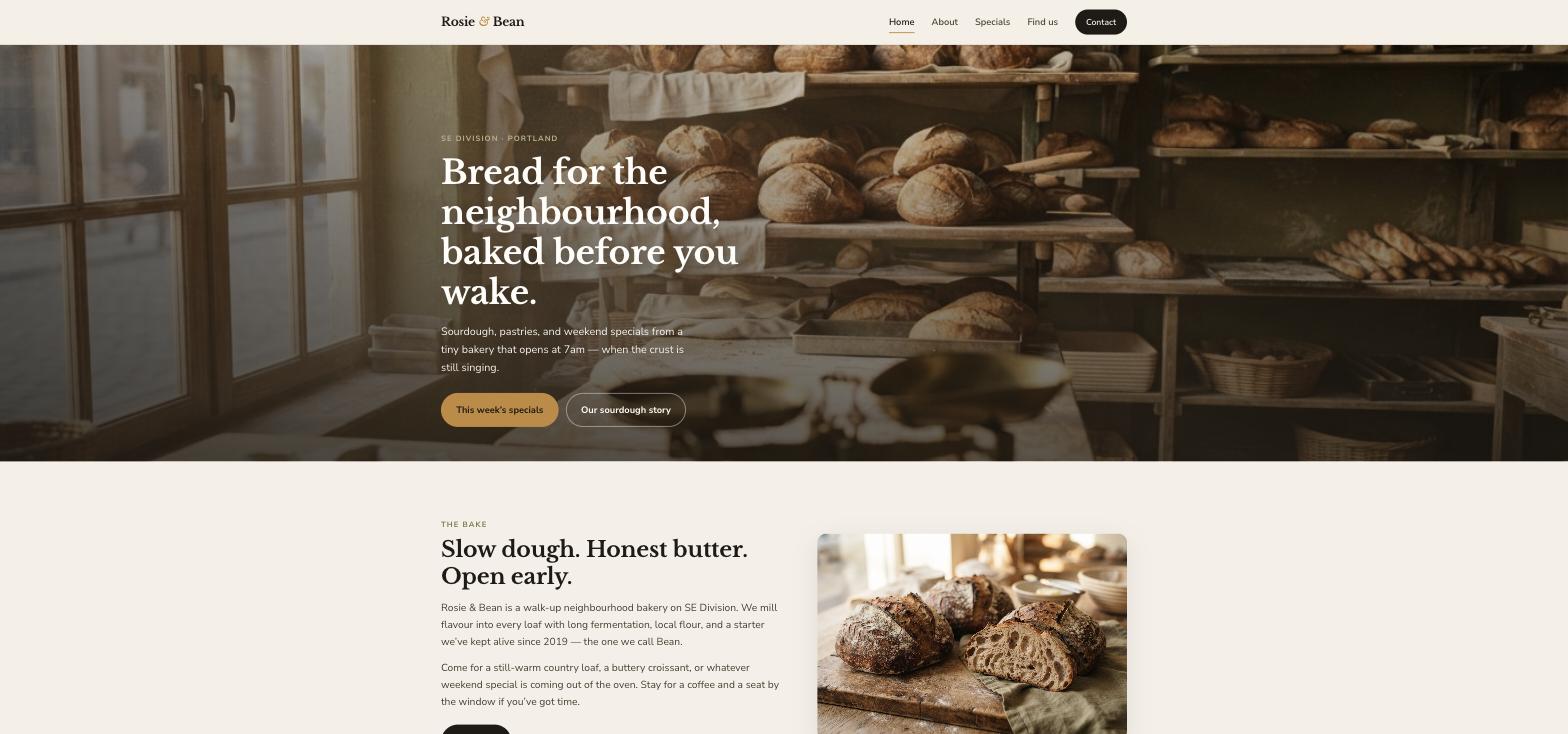
Rosie & Bean is a fictional walk-up neighbourhood bakery on SE Division in Portland — sourdough from a starter named Bean that's been alive since 2019, laminated pastries, three weekly specials, doors at 7am until they sell out. It was built in Ullbek from a description much like the kickoff prompt below, and it's live. Every prompt in this guide is written for Rosie & Bean, so you can see the result of each one.
Rosie & Bean
Live example
Portland neighbourhood bakery · daily bake, weekly specials, hours, catering enquiries · designed and built with Ullbek
Homepage — the bread is the hero; specials and the story are one tap away
The prompt library
Work through these in order the first time you build. After launch, jump straight to the tier you need — this week's specials, holiday hours, a wholesale enquiry — and paste the matching prompt.
Tier 1Kick off the whole site
Start with one rich description. Lead with the facts and the mood — the mood is what a template can't give you, and it's what Ullbek designs around. Give it the bake, the hours, the people, and tell it what not to invent.
Capability: full site from plain language
Kickoff — full bakery site
Build a website for my bakery, Rosie & Bean, a small walk-up neighbourhood bakery at 2847 SE Division St, Portland, OR 97202. Head baker Rosie Hale bakes sourdough from a starter named Bean that she's kept alive since 2019; co-founder Beatrice Okonkwo runs the pastry and the counter. Country loaves, seeded loaves, a rotating rye, croissants, pain au chocolat, fruit danishes, and three weekend specials that change every week. Doors open at 7am Tuesday to Sunday and we bake until we sell out. The mood should feel like early morning — warm, floury, unhurried, a little funny, never twee. Pages: Home, About, and Contact (with Find us). Specials live on the homepage so they're easy to change. The homepage needs two clear buttons: “This week's specials” and “Our sourdough story”. Palette: warm cream, toasted wheat and a deep brown for text; type that feels hand-set — a friendly serif for headings, clean readable body text on a phone. Don't invent reviews, awards, prices or items I haven't given you.
Tier 2Shape the homepage
Once the shell exists, tighten the order of things. A bakery homepage is a short argument for walking over this morning — not a brand story.
Capability: restructure layout by describing intent
Structure — homepage sections
Rebuild the Rosie & Bean homepage with these sections in order: (1) a full-width hero with a photo of the loaves on the shelf, the line “Bread for the neighbourhood, baked before you wake.”, and two buttons — This week's specials, Our sourdough story; (2) “The bake” — three sentences on the sourdough, the starter and the pastries, with a photo; (3) “This week's specials” — three cards, each with a day label, a name, a sentence and a note on when it comes out of the oven; (4) “Every day” — the laminated layers and daily loaves, one short paragraph; (5) “Visit” — hours (“Doors open at 7am. We bake until we sell out — often earlier on weekends.”), the closed day, the address with cross streets and a maps button; (6) a footer with address, hours and a “Catering & questions” link. Keep every section short enough to read on a phone while walking over.
Tier 3The specials board (the hard problem, solved)
This is where template builders fall over. Specials aren't a menu — they're three things that change every week, each tied to a day and a time, and the moment they're stale the whole site looks abandoned. Ullbek designs the section so a change is one sentence.
Capability: structured content you can change every week
Specials — this week's board
On the Rosie & Bean homepage, set “This week's specials” to exactly these three: Saturday morning — Pecan sticky buns: soft dough, dark caramel, toasted pecans; out of the oven around 7:30, rarely last past 10. Friday lunch — Tomato & rosemary focaccia: olive-oil rich, dimpled and salted; perfect torn into a late breakfast. Sunday — Berry galette: free-form pastry with Pacific Northwest berries and a whisper of lemon; slices go with afternoon coffee. Add a one-line note under the cards: “Specials change with the season and the mood of the kitchen. Ask at the counter if you're planning a visit.”
Specials — next week's change
New board for next week. On the homepage specials: replace the berry galette with Sunday — Apple & brown butter tart: Hood River apples, brown butter custard, flaky base; out around 8. Keep the sticky buns and the focaccia exactly as they are. Nothing else changes.
The daily bake — what's always in the case
Write the “Every day” section for the homepage from these facts: croissants, pain au chocolat and fruit danishes share the case with the country sourdough, seeded loaves and a rotating rye; everything is mixed, folded and baked on site; we open at 7am Tuesday through Sunday; whole loaves go by midday on weekends so early is best. One short paragraph in our warm, slightly funny tone. No prices.
Tier 4Pre-orders, catering and wholesale
Ullbek has a built-in form backend: ask for the fields you want and messages are spam-checked and sent to your inbox — no plugin, no form service. For a bakery the form is the “can you hold a loaf for me Saturday?” note on the counter, made tidy.
Capability: built-in forms → your inbox
Contact — one form, four reasons
On the Contact page for Rosie & Bean, add a “Send a message” form with: Name, Email, Topic (General question, Hold a loaf, Catering, Wholesale, Private event, Other), and Message. Use Ullbek's built-in form handling so messages email me with spam filtering. Above it: “Catering trays, wholesale loaves, private bake days, or a simple hello — send a note and we'll reply as soon as we're out of the oven.” Beside the form: the address, phone (503) 555-0184, email hello@rosieandbean.com, hours, and an “Open in Google Maps” button.
Pre-orders — holiday loaves
Add a “Holiday pre-orders” block at the top of the Contact page for the next three weeks: “Thanksgiving loaves and pies — order by Sunday the 23rd, pick up Wednesday from 7am.” with a short form: Name, Phone, What would you like? (Country loaf, Seeded loaf, Rye, Apple tart, Pecan pie), Quantity, Pick-up day. Same built-in handling. Leave a note in the site brief to remove the block after the holiday.
Wholesale — for the cafés
Add a quiet “Wholesale” section at the bottom of the Contact page: three sentences — we supply a handful of cafés with country and seeded loaves, delivered before 7am Tuesday to Saturday, minimum six loaves, a week's notice to start. A button “Ask about a café account” that opens the form with Wholesale pre-selected. No prices.
Where messages go
Form messages land in the email on your Ullbek account and in your dashboard — no extra tool to learn. Full walkthrough: Contact forms & submissions.
Tier 5Hours, and finding you
Bakery hours are peculiar: you open early, you close when the bread's gone, and you're shut one weekday. Say all three plainly, everywhere the hours appear, and tell people how to spot the door.
Capability: structured content you can update anytime
Visit — hours, address, how to find us
Set Rosie & Bean's address to 2847 SE Division St, Portland, OR 97202, phone (503) 555-0184. Hours: Monday closed, Tuesday–Friday 7:00am–3:00pm, Saturday–Sunday 7:00am–2:00pm, with the line “Doors open at 7am. We bake until we sell out — often earlier on weekends.” Show the hours on the homepage Visit block, the Contact page and the footer. Add a “How to find us” note: the sage-green storefront between 28th and 29th on SE Division, bike racks out front, street parking nearby — “if the sidewalk chalkboard is out, we're open.” Include an “Open in Google Maps” button using the address.
Visit — holiday hours banner
Add a slim banner across the top of every page: “Holiday week — open Tuesday to Wednesday 7am–1pm, closed Thursday to Sunday. Back Tuesday the 2nd with a new board.” Update the hours block for that week only, and leave a note in the site brief to remove the banner afterwards.
Tier 6Photos of the bread, the case, the people
A bakery site lives or dies on its photographs. Real loaves under your own window light beat perfect stock. Upload a handful and tell Ullbek where each belongs; when you have none yet, ask for warm, honest stock as a placeholder and label it so you remember to replace it.
Capability: your uploads · stock · AI images
Images — place your own photos
I've uploaded photos from the bakery. Use the wide shot of the loaves on the shelf as the homepage hero — keep it warm, darken the edges slightly so the headline reads. Put the cut country loaf on “The bake”, the sticky buns, focaccia and galette on the three specials cards, and the portrait of Rosie at the deck oven on the About page. Crop so the crust isn't cut off, optimise everything for the web, and keep the early-morning window-light look that matches the cream-and-wheat palette.
Images — stock until the light is right
I don't have good photos yet. Find warm, realistic stock photos for a small neighbourhood bakery — sourdough loaves on a wooden shelf, a croissant being laminated, a pastry case in morning light, a cup of coffee by a window — nothing glossy or staged. Use them as placeholders on Home and About, keep them consistent in tone, prefer photographs over illustrations, and note in the site brief which ones to replace when my own arrive.
Tier 7Your story, and trust
People walk to a bakery because of the people in it. A short, true story — who bakes, how long the dough rests, why the starter has a name — does more than any “artisan” line. Never let the site invent reviews.
Capability: brand voice from your real story
About — real facts only
Write the About page for Rosie & Bean from these facts only — don't invent awards, press or staff: Rosie Hale grew up in a house where Sunday loaves cooled on tea towels and neighbours dropped by for a slice; after years on restaurant lines in Portland she wanted something slower; in 2019 she started a sourdough culture in a salvaged jam jar and named it Bean; loaves for friends became a subscription list, then a pop-up, then a lease on SE Division in 2023. Beatrice “Bean” Okonkwo, co-founder, runs laminated doughs, seasonal sweets and the counter — yes, she's also called Bean; the starter came first. Dough is mixed by hand, folded through the day, cold-proofed overnight; nothing is trucked in frozen. Structure: “Named for a baker and a jar of living dough”, Meet the baker, The other Bean, The craft, On Division. Include this quote from Rosie: “We didn't set out to open a bakery. We just ran out of fridge space for all the bread the neighbours wanted.” Tone: warm, plain, a little funny. Leave two portrait slots.
Trust — real quotes only
Add a quiet “From the neighbourhood” strip on the homepage using only these real quotes (do not invent any): [paste two or three real reviews with first names]. If I haven't given you enough, use one quote and a button “Read our reviews” linking to [your Google Business Profile URL]. Never fabricate star ratings or press mentions.
Tier 8Polish for phones and search
Almost everyone who finds you is on a phone, half-awake, a few blocks away. A few targeted asks before you publish go a long way.
Capability: responsive design + on-page SEO
Polish — mobile & SEO basics
Review the whole Rosie & Bean site on a phone: today's hours and the specials must be reachable without scrolling far on the homepage, the Find us block must be one tap from the top, and no photo should crop a loaf. Give every page a title and meta description that mention bakery SE Division Portland naturally where it fits — don't stuff keywords. Add alt text to every photo. Make sure the address and phone number are plain text, so a phone can tap to call and tap to navigate.
Tier 9Publish and go live
When it looks right, publish. You get a free *.ullbek.site address immediately, with HTTPS. Connect your own domain when you're ready — or buy one in the chat.
Capability: one-click publish · free address · your own domain
Launch — publish checklist
I'm ready to publish Rosie & Bean. Do a final pass: every page has a title and meta description, this week's specials are current, the contact form is wired up and sends to my email, hours and the closed day are correct everywhere they appear, and there are no placeholder or TODO notes left. Then publish to a free Ullbek address. After that, tell me how to put the site on rosieandbean.com.
“A bakery website is never finished. The board changes on Thursday, the galette becomes a tart, the holidays move the hours — and the site should say so by Friday.”
After launch: the updates that used to be painful
The real product for a baker isn't the first build — it's every Thursday, when the board changes. Here's how the common jobs map to what you've already learned:
Common bakery updates → what to do in Ullbek
This week's specials
The Tier 3 next-week prompt — swap one card, keep the rest. Thirty seconds.
Holiday hours
The Tier 5 banner prompt — banner plus the hours block, with a reminder to take it down.
Holiday pre-orders
The Tier 4 pre-orders prompt — a short form at the top of Contact, removed after pick-up day.
New photos
Upload from your phone → ask Ullbek to place and crop them (Tier 6).
A new café account
The Tier 4 wholesale section already points them at the form; add the café's name to the About page if you like.
“Early, floury, unhurried, a little funny” gets you a site that feels like your counter. “Rustic and artisan” gets you everyone's. Ullbek handles the design; you supply the mood.
Keep the specials to three
Three cards you change weekly beat ten you never touch. The section should be a one-sentence edit, so make it one.
Say “until we sell out”
Honest hours build trust. Nobody minds that the sticky buns are gone by ten — they mind driving over at eleven to find out.
Never invent reviews or press
Ask for placeholders instead. A regular will notice a fake quote before Google does.
Republish after the board changes
Edits in the builder aren't live until you publish again. Specials, hours, a pre-order block — publish, then check the live site on your phone.
Preview ≠ live
The preview shows your working site. Neighbours only see what you've published. After the board changes or the hours move, publish again so the world sees it.