A practical guide for small nonprofits, charities and community groups. What your site needs, copy-ready prompts you can paste into Ullbek, and how the jobs that used to need a developer — the mission, the programmes, the impact numbers, donate and volunteer, events, the annual report — become a conversation. The worked example is a real community food collective built with Ullbek.
Why nonprofit websites are harder than they look
A small nonprofit's website has to serve three people at once: the person who needs help (where, when, what do I bring), the person who wants to give (is this real, where does the money go, how do I donate in thirty seconds), and the person who wants to show up (when's the next shift). Most nonprofit sites serve the board instead — a mission statement in the passive voice, a photo of a cheque, and a donate button three clicks deep.
The old way
Pick a charity template. Fill the hero with a stock photo of hands. Discover the impact block only does three numbers and they're from 2023. Ask the volunteer web person to add the winter schedule. Wait. Keep “Give to the Gala” up until spring.
With Ullbek
Describe what you do and who it's for. Get a site designed around it — the mission in one sentence, programmes with the practical details, impact numbers you update in a line, donate and volunteer one tap from everywhere, events that expire. Change the schedule by saying so.
This guide does two jobs. It tells you what a strong small-nonprofit website includes, and it shows you how to get each piece built in Ullbek — in plain language, with your own programmes and numbers, using prompts you can copy.
How to use the prompts
Every prompt below is written for Riverbend Food Collective, the Minneapolis organisation shown in the worked example. Swap the bold details for your name, your programmes, your numbers and your donation link. Hit Copy, paste into the Ullbek chat, and adjust anything that doesn't fit. You're not a template — neither is your organisation, and neither should its website be.
What a great small nonprofit website needs
You don't need a dozen pages. You need the few things each of your three readers checks — and a way to keep them current without a volunteer web person.
A homepage with three doors
One sentence that says what you do, then three clear buttons: Get food, Give, Volunteer. No mission statement above the fold.
Programmes with the practical details
Where, when, who it's for, what to bring, in plain words and in the languages your neighbours speak. The pages people who need help actually read.
Impact numbers that are current
Three or four honest numbers, dated — meals, households, volunteers, pounds rescued — updated in a line each quarter.
Donate in thirty seconds
A button on every page to your payment processor, what a gift buys, your charity number, where the money goes. No three-click maze.
Volunteer, with the next shift visible
What shifts exist, when, what you'll do, and a sign-up that lands in your inbox. Spam-checked — no plugin.
Events that expire
The next three, with dates, and a habit of removing them after. An out-of-date event is worse than none.
Who you are, and the proof
The people, the board, the charity registration, the annual report as a download. Trust is what turns a visit into a gift.
The worked example: Riverbend Food Collective
Riverbend Food Collective is a fictional neighbourhood food organisation in Minneapolis's Powderhorn — a free grocery market twice a week, a produce-rescue programme with local grocers, a community fridge, two staff and eighty volunteers, registered as a 501(c)(3) in 2019. It was built in Ullbek from a description much like the kickoff prompt below, and it's live. Every prompt in this guide is written for Riverbend, so you can see the result of each one.
Riverbend Food Collective
Live example
Minneapolis community food organisation · get food, give, volunteer, events, impact · designed and built with Ullbek
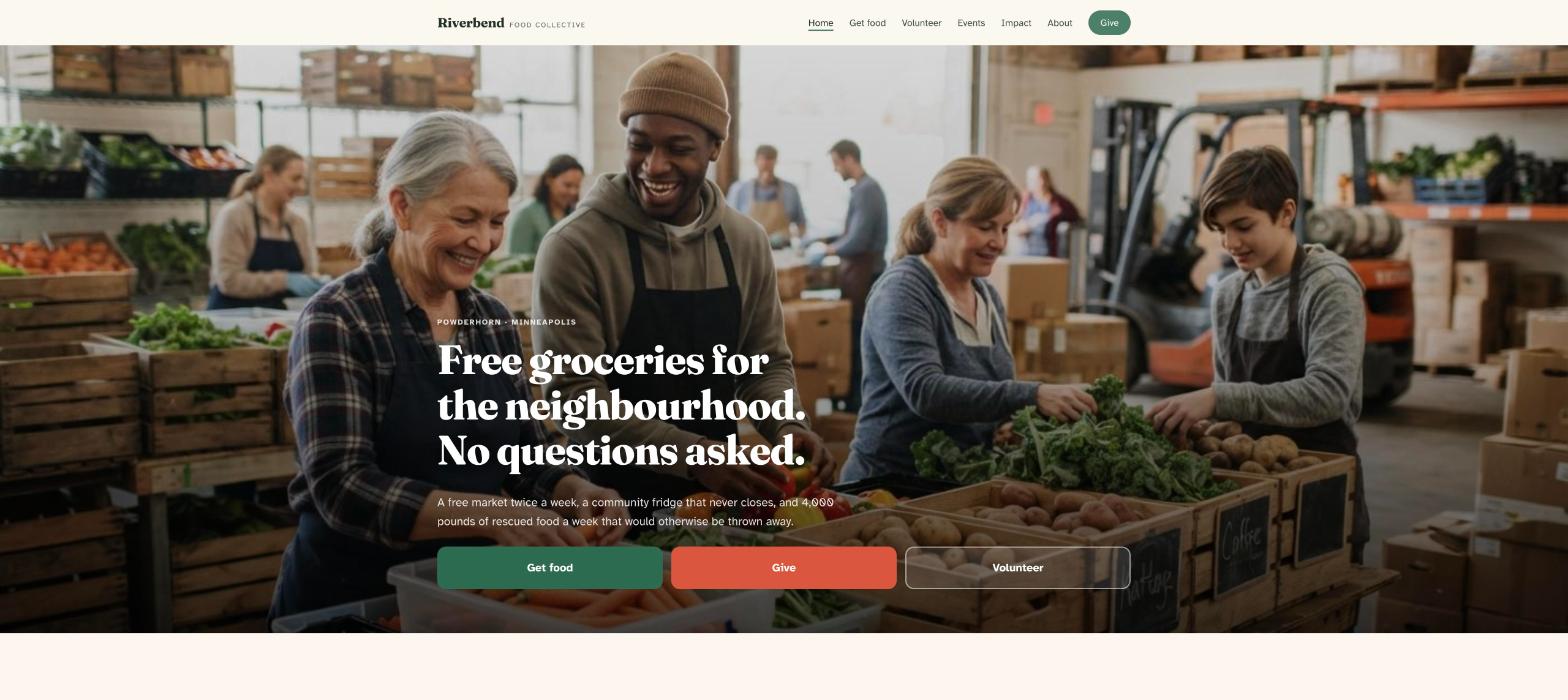
Homepage — three doors above the fold; the photo of the cheque left out
The prompt library
Work through these in order the first time you build. After launch, jump straight to the tier you need — the quarterly numbers, a new shift, the winter schedule — and paste the matching prompt.
Tier 1Kick off the whole site
Start with one rich description. Lead with what you do in one sentence and the tone — warm, plain, practical — because that's what a charity template can't give you and it's what Ullbek designs around. Give it the programmes, the numbers, the registration, and tell it what not to invent.
Capability: full site from plain language
Kickoff — full nonprofit site
Build a website for our nonprofit, Riverbend Food Collective, at 3010 Bloomington Avenue South, Minneapolis, MN 55407, phone (612) 555-0133, a 501(c)(3) since 2019 (EIN 84-2217654). What we do, in one sentence: free groceries for anyone in the Powderhorn and Phillips neighbourhoods, no questions asked. Programmes: the Free Market (Tuesdays 4–7pm and Saturdays 10am–1pm, walk in, bring bags), Produce Rescue (we collect from six grocers and two farms, about 4,000 lb a week), and the Community Fridge on the corner of 31st and Bloomington, open 24/7. Two staff (Rosa Delgado, director; Amal Hassan, programmes) and about eighty volunteers. Donations through [your Givebutter / Stripe / PayPal link]. Tone: warm, plain, practical — we talk like neighbours, not a foundation; no “empowering”, no “stakeholders”. Pages: Home, Get Food, Give, Volunteer, Events, About, and Impact. The homepage needs three clear buttons: “Get food”, “Give”, “Volunteer”. Get Food must also be available in Spanish and Somali. Palette: a warm cream, a deep river-green and a tomato-red accent; friendly, highly readable type on a phone. Don't invent numbers, partners, quotes or board members I haven't given you. Put the EIN and “donations are tax-deductible” in the footer of every page.
Tier 2Shape the homepage
Once the shell exists, tighten the order of things. A nonprofit homepage has three doors above the fold and the proof below — it isn't an annual report.
Capability: restructure layout by describing intent
Structure — homepage sections
Rebuild the Riverbend Food Collective homepage with these sections in order: (1) a hero with a photo of volunteers sorting produce in the warehouse, the line “Free groceries for the neighbourhood. No questions asked.”, and three buttons — Get food, Give, Volunteer; (2) “This week” — the Free Market times and the fridge location, large, with “bring bags”; (3) “What we do” — three programme cards; (4) “The numbers” — four impact figures, dated, linking to Impact; (5) “Give” — what $25, $50 and $100 buys, and a Give button; (6) “Next up” — the next three events; (7) “Who we are” — a photo, three sentences, a link; (8) a footer with address, hours, EIN and the tax-deductible line. Keep every section short enough to read on a phone at a bus stop.
Tier 3Programmes, in the languages people read
The Get Food page is read by the person who needs help, often in a hurry, often not in English. Where, when, what to bring, who's welcome — plainly, and in Spanish and Somali as well.
Capability: multilingual pages from one source
Get Food — the page, three languages
Build the Get Food page for Riverbend Food Collective with a language switch at the top (English, Español, Soomaali) and the same content in each, translated plainly: (1) “Everyone is welcome. No ID, no proof of address, no questions.”; (2) the Free Market — Tuesdays 4–7pm, Saturdays 10am–1pm, at 3010 Bloomington Ave S, walk in, bring your own bags, come as often as you need; (3) the Community Fridge — corner of 31st and Bloomington, open 24/7, take what you need; (4) “What you'll find” — fresh produce, bread, dairy, pantry staples, sometimes meat and eggs; (5) “Getting here” — bus routes 14 and 22, free parking on 31st, wheelchair accessible; (6) “Can't get here?” — a line about our partners for delivery with a phone number. Large type, short lines, the address and times tap-to-navigate. Keep the three versions in sync when I change one.
What we do — three programmes
Build the three programme cards on the homepage and a short section each on the About page for Riverbend: Free Market — two markets a week, set up like a grocery store, choose your own; Produce Rescue — six grocers and two farms, about 4,000 lb a week that would otherwise be thrown away, collected by volunteer drivers; Community Fridge — a fridge and pantry on the corner, stocked daily, open always. Two sentences each, plain, no jargon.
Tier 4Impact numbers you can keep current
Three or four honest numbers, dated, updated in a line each quarter. Out-of-date impact numbers are the most common sign of an abandoned site — Ullbek makes the refresh a sentence.
Capability: structured numbers you update in a sentence
Impact — the numbers, dated
Build the Impact page for Riverbend Food Collective and the homepage “The numbers” block from these figures only: Last year (2025): 212,000 lb of food rescued · 38,400 household visits · 1,100 fridge restocks · 83 active volunteers. Show them as four large figures with a label each, dated “2025”. Under them, a short “Where the money goes” section: a simple bar for Programmes 86% / Fundraising 6% / Admin 8%, and a line that the full accounts are in the annual report (link to the PDF I'll upload). A note: “We update these every quarter.”
Impact — the quarterly refresh
Update the numbers to “2026 so far”: 168,000 lb rescued · 29,700 household visits · 840 fridge restocks · 91 active volunteers. Change the date label on the Impact page and the homepage block; nothing else changes.
Tier 5Give, in thirty seconds
A donate button on every page to your payment processor, what a gift buys, the charity number, where the money goes. The Give page removes doubt; the button removes clicks.
Capability: links to your payment processor + trust content
Give — the page
Build the Give page for Riverbend Food Collective: (1) a Give button at the top that opens [your donation link] in a new tab, and the same button in the header of every page; (2) “What your gift does” — $25 stocks the fridge for a day, $50 covers a produce-rescue run, $100 feeds twelve households at a market, $500 keeps the market open for a week (these are our real costs); (3) “Where the money goes” — the 86/6/8 split and a link to the annual report; (4) “Other ways to give” — monthly giving, employer matching, food and bag donations (what we can and can't take), a cheque to the address; (5) “Tax” — 501(c)(3), EIN 84-2217654, donations are tax-deductible, receipts emailed. Keep it warm and short. No photos of cheques.
Annual report — the download
I've uploaded our 2025 annual report as a PDF. Add a “Read the 2025 annual report” button on the Impact and Give pages and in the About page's “Proof” section that opens the file — rename it riverbend-annual-report-2025.pdf. Next year I'll upload the new one; replace the link, keep the old one under a “Previous years” line.
Tier 6Volunteer, with the next shift visible
Ullbek has a built-in form backend: ask for the fields you want and sign-ups are spam-checked and sent to your inbox — no plugin, no form service. The Volunteer page shows the shifts; the form takes the sign-up.
Capability: built-in forms → your inbox
Volunteer — shifts and the sign-up
Build the Volunteer page for Riverbend Food Collective: (1) “What you'd do” — four shift types with what they involve: Market setup (Tue 2–4pm, Sat 8–10am), Market shift (Tue 4–7pm, Sat 10am–1pm), Produce rescue driver (weekday mornings, your car or ours, 2 hours), Fridge restock (daily, 30 minutes, flexible); (2) “Good to know” — no experience needed, 16+ (younger with a parent), we'll show you everything, bring a water bottle, Spanish and Somali speakers especially welcome; (3) a sign-up form: Name, Email, Phone, Which shifts interest you? (checkboxes), Availability (weekdays / Tuesdays / Saturdays / flexible), Can you drive?, Languages, Anything we should know?. Use Ullbek's built-in form handling so sign-ups email Amal with spam filtering. Above the form: “Amal replies within two days with the next open shift and where to meet.”
Volunteer — a new shift
Add a fifth shift type, Thursday evening pantry sort (6–8pm) — unpacking and sorting dry goods, good for groups and first-timers — to the Volunteer page and the checkboxes on the form. Nothing else changes.
Where sign-ups go
Form messages land in the email on your Ullbek account and in your dashboard — no extra tool to learn. Full walkthrough: Contact forms & submissions.
Tier 7Events that expire, and seasons
This is the ongoing win. A fundraiser, a volunteer orientation, the winter schedule, the holiday drive — added in a sentence and, crucially, removed in one.
Capability: ongoing edits without a developer
Events — the next three
Build the Events page for Riverbend Food Collective as a dated list, newest first, and show the next three on the homepage “Next up” block: Volunteer orientation — Saturday 18 October, 9am, at the warehouse; Fall Harvest Dinner (fundraiser) — Thursday 6 November, 6pm, Powderhorn Park building, tickets $60 at [link]; Holiday Food Drive — 1–20 December, drop-off at the warehouse and six partner grocers. Each with a one-line description. When an event's date passes, it should drop off the homepage; I'll tell you when to remove it from the Events page.
Events — tidy up
The orientation has happened. Remove it from the Events page and make sure the homepage shows the next three upcoming events only. Add the next orientation: Saturday 15 November, 9am.
Season — winter schedule banner
Add a slim banner across the top of every page: “Winter hours from 1 December — Saturday market 11am–1pm. Tuesdays unchanged.” Update the times on the Get Food page in all three languages and on the homepage “This week” block. Leave a note in the site brief to switch back in March.
Tier 8About, and the proof
Trust is what turns a visit into a gift. The people, the board, the registration, the partners, the annual report — in plain words, with nothing invented.
Capability: credibility from your real facts
About — people, board, proof
Write the About page for Riverbend Food Collective from these facts only — don't invent board members, partners or quotes: started in 2019 by neighbours in Powderhorn after a grocery store closed; a community fridge first, then the market in 2020, produce rescue in 2021; 501(c)(3) since 2019, EIN 84-2217654. Staff: Rosa Delgado, Executive Director, previously ten years at a Twin Cities food bank; Amal Hassan, Programmes & Volunteers, grew up three blocks away. Board: [paste names and one line each]. Partners: [paste the six grocers and two farms]. Structure: “How we started”, “Who we are”, “Board”, “Partners”, “Proof” — the EIN, a link to our GuideStar profile [URL], the annual report download. Tone: warm, plain, neighbourly.
Tier 9Polish for phones and search
All three of your readers are on a phone. Large type, the three doors on every page, and page titles that say what Google needs to hear.
Capability: responsive design + on-page SEO
Polish — mobile & SEO basics
Review the whole Riverbend Food Collective site on a phone: the three buttons visible without scrolling on the homepage, the Give button in the header of every page, the Get Food page readable in large type in all three languages, the address and times tap-to-navigate. Give every page a title and meta description that mention free food Powderhorn Minneapolis or food shelf Minneapolis naturally where it fits — don't stuff keywords. Add alt text to every photo. Make the EIN and the tax-deductible line plain text in every footer.
Tier 10Publish and go live
When it looks right, publish. You get a free *.ullbek.site address immediately, with HTTPS. Connect your own domain when you're ready — or buy one in the chat.
Capability: one-click publish · free address · your own domain
Launch — publish checklist
I'm ready to publish Riverbend Food Collective. Do a final pass: every page has a title and meta description, the Give button opens our donation link from every page, the market times are identical on the homepage and in all three Get Food languages, the impact numbers are dated, the volunteer form sends to Amal's email, no past events remain, the EIN is in every footer, and there are no placeholder or TODO notes left. Then publish to a free Ullbek address. After that, tell me how to put the site on riverbendfood.org.
“A nonprofit's website is never finished. The numbers change each quarter, winter moves the market, the drive ends on the 20th — and the site should say so before the next neighbour checks the time.”
After launch: the updates that used to be painful
The real product for a small nonprofit isn't the first build — it's every quarter, when the numbers change and the volunteer web person is busy. Here's how the common jobs map to what you've already learned:
Common nonprofit updates → what to do in Ullbek
Quarterly numbers
The Tier 4 quarterly-refresh prompt — Impact page and homepage block, with the date.
An event
The Tier 7 events prompts — add in a sentence, remove in one.
Schedule change
The Tier 7 winter prompt — banner plus Get Food in three languages plus the homepage block.
A new shift
The Tier 6 new-shift prompt — Volunteer page and the form's checkboxes.
Annual report
Upload the PDF → the Tier 5 report prompt. Once a year.
Get food, Give, Volunteer — above the fold, on every page. The mission is one sentence; the proof is below.
Date every number
“2025” or “2026 so far” next to the impact figures is what makes them believable. Undated numbers read as abandoned.
Write Get Food for the person in a hurry
Where, when, what to bring, who's welcome. Large type. In the languages your neighbours actually speak.
Remove events the day after
An event that's passed is the most common sign of a dead site. Make tidying up a Monday habit.
Republish after every change
Edits in the builder aren't live until you publish again. New numbers, a new shift, winter hours — publish, then check the live site on your phone.
Preview ≠ live
The preview shows your working site. Neighbours and donors only see what you've published. After a schedule change or new numbers, publish again so the world sees it.