A practical guide for restaurant owners. What your site needs, copy-ready prompts you can paste into Ullbek, and how the jobs that used to need a developer — the menu, reservations, hours, the mood of the room — become a conversation. The worked example is a real trattoria built with Ullbek.
Why restaurant websites are harder than they look
A restaurant website has one job: make someone decide to come in tonight. That decision happens on a phone, in about twenty seconds, and it rests on four things — what's on the menu, whether you're open, where you are, and what the room feels like. Most restaurant sites get the first three wrong by being out of date, and the fourth wrong by being a template: the same hero, the same three columns, the same stock photo of a tomato that every other place in town uses.
The old way
Pick a restaurant template. Drop your logo in. Discover the menu block can't show a seasonal tag. Email the developer when the winter menu lands. Wait. Pay. Hope the hours on Google still match.
With Ullbek
Describe your restaurant and its mood. Get a site designed around it — the menu laid out like a menu, the room in the photos, reservations that land in your inbox. Change the specials by saying so.
This guide does two jobs. It tells you what a strong restaurant website includes, and it shows you how to get each piece built in Ullbek — in plain language, with your own menu and photos, using prompts you can copy.
How to use the prompts
Every prompt below is written for Roma, the West Village trattoria shown in the worked example. Swap the bold details for your name, neighbourhood, hours and dishes. Hit Copy, paste into the Ullbek chat, and adjust anything that doesn't fit. You're not a template — neither is your restaurant, and neither should its website be.
What a great restaurant website needs
You don't need a dozen pages. You need the few things a hungry visitor looks for before they decide — and a way to keep them current without anyone's help.
A homepage that feels like the room
One photo that sells the evening, one line that says what you are, and two buttons: Reserve and Menu. Nothing else above the fold.
A menu that reads like a menu
Categories, dishes, prices, a “signature” or “seasonal” mark where it matters. Readable on a phone. A PDF for print and sharing, kept in sync.
Reservations that reach you
A request-a-table form with party size, date and time — or a clean link to the booking service you already use. Either way, no dead ends.
Hours, address, and how to get there
Tonight's hours visible from the homepage. The nearest train, the parking truth, a maps link. This is the page people screenshot on the way.
Photos of your plates, your room, your people
Real food, real candlelight, the chef at the pass. Phone photos beat stock when they're placed well.
Your story, told once and true
Where the recipes come from, who cooks, why this neighbourhood. Trust lives here — and so does the mood of the whole site.
Private dining, events, the extras
The back room for eighteen, the winemaker dinner, the holiday menu. Small sections you can switch on and off by asking.
The worked example: Roma
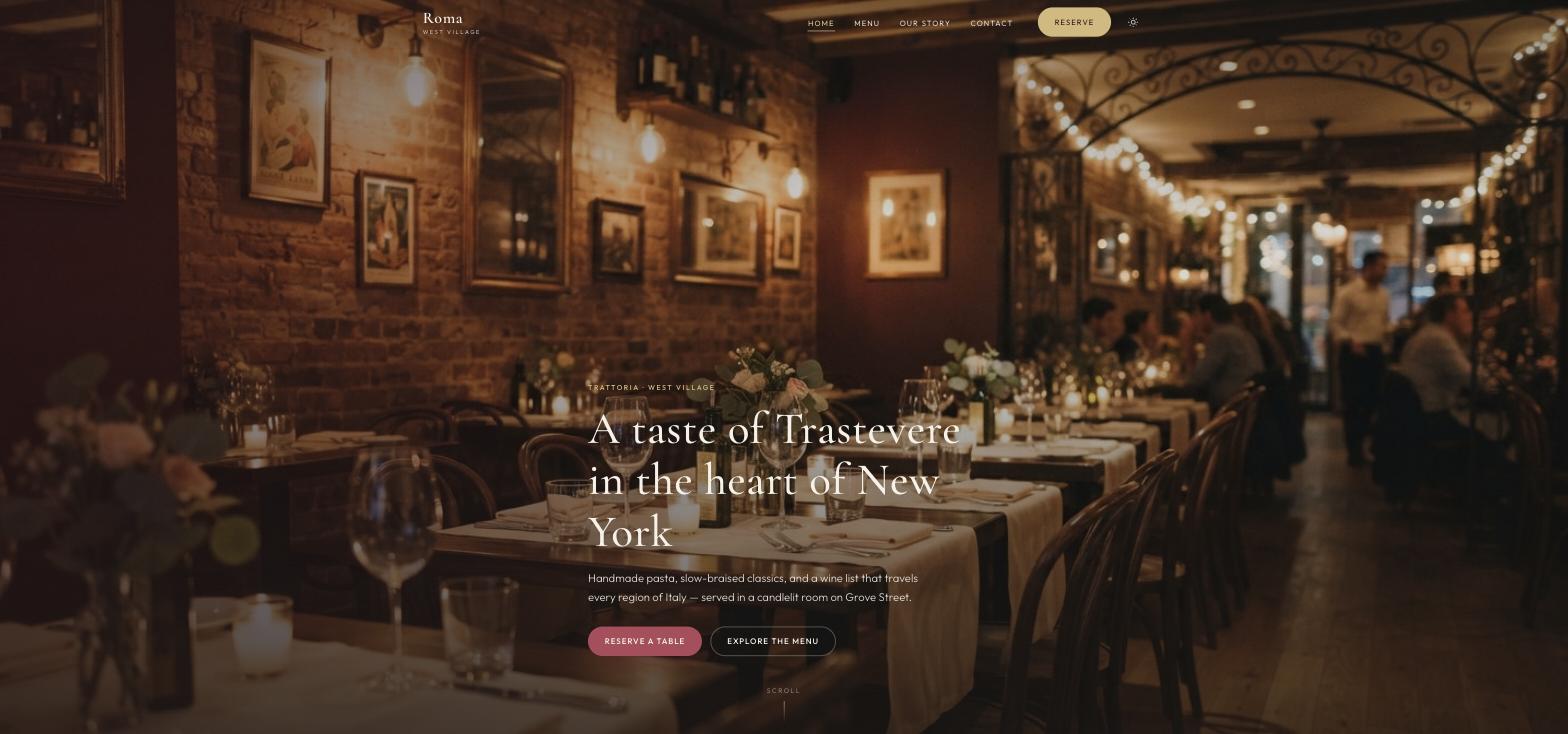
Roma Italian Restaurant is a fictional trattoria on Grove Street in New York's West Village — sixty seats, exposed brick, candlelight, handmade pasta, a wine list that starts in Piedmont and ends in Sicily. It was built in Ullbek from a description much like the kickoff prompt below, and it's live. Every prompt in this guide is written for Roma, so you can see the result of each one.
Roma Italian Restaurant
Live example
West Village trattoria · menu, story, hours, reservations · designed and built with Ullbek
Homepage — the room sells the evening; two buttons do the rest
The prompt library
Work through these in order the first time you build. After launch, jump straight to the tier you need — new menu, holiday hours, a winemaker dinner — and paste the matching prompt.
Tier 1Kick off the whole site
Start with one rich description. Lead with the facts and the mood — the mood is what a template can't give you, and it's what Ullbek designs around. Give it the room, the food, the people, and tell it what not to invent.
Capability: full site from plain language
Kickoff — full restaurant site
Build a website for my restaurant, Roma, an Italian trattoria at 48 Grove Street in New York's West Village. Chef-owner Marco Bellini grew up in Trastevere and cooks his Nonna's recipes — handmade pasta every morning, slow-braised classics, a wine list from every region of Italy. The room: sixty seats, exposed brick, low ceilings, candlelight, a bar worth lingering at. The mood should feel like a long, unhurried evening — warm, intimate, a little romantic, never flashy. Pages: Home, Menu, Our Story, and Reservations & Contact. The homepage needs two clear buttons, “Reserve a table” and “Explore the menu”. Use a palette of deep burgundy, candle-gold and cream, and type that feels like a good menu card — serif, elegant, readable on a phone. Don't invent reviews, awards or dishes I haven't given you; leave the menu as a placeholder I'll fill next.
Tier 2Shape the homepage
Once the shell exists, tighten the order of things. A restaurant homepage is a short argument for coming in tonight — not a tour of your services.
Capability: restructure layout by describing intent
Structure — homepage sections
Rebuild the Roma homepage with these sections in order: (1) a full-screen hero with a photo of the candlelit room, the line “A taste of Trastevere in the heart of New York”, and two buttons — Reserve a table, Explore the menu; (2) “Signature plates” — three dishes with a photo, a sentence and a price (Cacio e Pepe $28, Osso Buco $48, Tiramisu della Casa $16); (3) a short “Our story” blurb that links to the full story; (4) “The room” — one wide photo and a line about the sixty seats and the bar; (5) “Hours & location” with tonight's hours, the address and a maps link; (6) a footer with hours, address, phone and Instagram. Keep every section short enough to read on a phone while walking.
Tier 3The menu (the hard problem, solved)
This is where template builders fall over. A menu is not a list — it has categories, a rhythm, a “for two” here and a “seasonal” there, and it changes with the market. Ullbek designs the menu page around your menu: give it the dishes, or drag in the PDF your designer made, and tell it how the page should behave.
Two ways to give Ullbek your menu
Paste the dishes and prices straight into the prompt, or drag the menu PDF into the chat and say “use this”. Ullbek can read the PDF, lay the dishes out on the page, and keep the file as a download. See Working with assets.
Capability: structured menu page + PDF download
Menu — a page that reads like a menu
Build the Menu page for Roma with these categories in order: Antipasti, Primi, Secondi, Contorni, Dolci, Vini. Here are the dishes with prices: [paste your dishes — name, one-line description, price]. Mark Cacio e Pepe and Osso Buco as “Signature”, mark Burrata & Heirloom Tomato and Ravioli di Zucca as “Seasonal”, and mark the Bistecca alla Fiorentina as “For two”. Open the page with one featured dish — the Tagliere della Casa, $32 — with its photo and a sentence. Add a category list that stays visible as the page scrolls so people can jump straight to Dolci. Put a one-line note at the bottom: “The menu changes with the market.” Keep prices right-aligned and easy to scan on a phone.
Menu — from the PDF you already have
I've uploaded our current menu as a PDF. Read it and build the on-page menu from it, keeping the same categories and order. Add a “Download the menu (PDF)” button that uses this file — rename it roma-menu.pdf if the filename is messy. Where the PDF marks a dish as a special, show it as a small tag on the page. If anything in the PDF is unclear, ask me rather than guessing.
Menu — the seasonal change
The autumn menu starts Friday. On the Menu page: remove Burrata & Heirloom Tomato; add Ravioli di Zucca — roasted squash ravioli, brown butter, sage, amaretti crumble — $30 to Primi with a “Seasonal” tag; change the Osso Buco price to $52. Replace the menu PDF download with the new file I've uploaded. Keep everything else exactly as it is.
Tier 4Reservations that reach you
Ullbek has a built-in form backend: ask for the fields you want and submissions are spam-checked and sent to your inbox — no Formspree, no plugin. If you already take bookings through a service like OpenTable or Resy, link to it instead and keep the form for private dining.
Capability: built-in forms → your inbox
Reservations — request-a-table form
On the Reservations & Contact page for Roma, add a “Request a table” form with: Name, Email, Phone, Party size (1 to 8+), Preferred date, Preferred time (our dinner service runs 5:00 to 9:30 PM in half-hour steps, plus 12:00 to 2:00 PM at weekends), Occasion (Birthday, Anniversary, Date night, Business dinner, Private dining, Other) and Notes. Use Ullbek's built-in form handling so requests email me with spam filtering. Under the form: “We confirm within a few hours on business days. For same-day seating, please call (212) 555-0187.” Make the Reserve button in the header open this page.
Reservations — if you already use a booking service
We take bookings through [OpenTable / Resy / SevenRooms]. Make every “Reserve a table” button open [your booking link] in a new tab. Keep a short contact form on the Reservations page only for private dining and events, titled “Private dining & events”, with Name, Email, Phone, Date, Guests and Notes.
Private dining — the back room
Add a “Private dining” section to the Reservations page: our back room seats up to 18, full buyouts are available on select evenings, and guests should note the occasion in the form. One photo of the back room (I'll upload it), two sentences, and a link to the form. No prices — we quote by enquiry.
Where requests go
Form messages land in the email on your Ullbek account and in your dashboard — no extra tool to learn. Full walkthrough: Contact forms & submissions.
Tier 5Hours, address, and getting there
Hours are the fact people check most and trust least. Put tonight's hours on the homepage, the full week on the Visit section, and tell people how to actually arrive.
Capability: structured content you can update anytime
Visit — hours, address, directions
Set Roma's address to 48 Grove Street, West Village, New York, NY 10014, phone (212) 555-0187, email reservations@romanyc.com. Hours: Monday–Thursday 5:00–10:00 PM, Friday–Saturday 5:00–11:00 PM, Sunday 4:00–9:00 PM, weekend lunch 12:00–3:00 PM. Show tonight's hours in the homepage “Hours & location” block and the full week on the Reservations page. Add a “Getting here” note: five-minute walk from the 1 train at Christopher Street, street parking is limited so recommend the garages on 7th Avenue, coats are checked at the door. Include an “Open in Google Maps” button using the address.
Visit — holiday hours banner
Add a slim banner across the top of every page: “Thanksgiving week — closed Thursday, open Friday to Sunday from 4 PM. Christmas Eve menu now taking reservations.” Update the hours block for that week only, and leave a note in the site brief to remove the banner on the Monday after.
Tier 6Photos of the plates, the room, the people
A restaurant site lives or dies on its photographs. Real plates under your own lights beat perfect stock. Upload a handful and tell Ullbek where each belongs; when you have none yet, ask for warm, honest stock as a placeholder and label it so you remember to replace it.
Capability: your uploads · stock · AI images
Images — place your own photos
I've uploaded photos from the restaurant. Use the wide shot of the dining room at night as the homepage hero — keep the candles and the brick, darken the edges slightly so the headline reads. Put the cacio e pepe, osso buco and tiramisu photos on the three Signature plates. Use the tagliere board at the top of the Menu page. Put the portrait of Marco at the pass on the Our Story page. Crop so plates aren't cut off, optimise everything for the web, and keep a warm, low-light look that matches the burgundy-and-gold palette.
Images — stock until the photographer comes
I don't have professional photos yet. Find warm, realistic stock photos for an intimate Italian trattoria — a candlelit dining room with exposed brick, handmade pasta being rolled, a plate of cacio e pepe, a glass of red wine on a wooden table. Use them as placeholders on Home and Menu, keep them consistent in tone, and note in the site brief which ones to replace when my own photos arrive. Prefer photographs over illustrations.
Tier 7Your story, and trust
People book a table with people. A short, true story — where the recipes come from, who's at the pass — does more than any “award-winning cuisine” line. Never let the site invent reviews.
Capability: brand voice from your real story
Our Story — real facts only
Write the Our Story page for Roma from these facts only — don't invent awards, press or staff: Chef Marco Bellini was born in Rome in 1985 and learned to cook beside his Nonna Elena in Trastevere; culinary school in Rome, stages in Florence, moved to New York in 2006; opened Roma at 48 Grove Street in autumn 2012 — sixty seats, a wood-fired grill; expanded the cellar to 250 Italian labels in 2018 and started monthly winemaker dinners; the pasta is still rolled by hand every morning. Structure it as a short opening, a simple timeline (1985, 2006, 2012, 2018, Today), and a “How we cook” section with three principles: by hand, in season, with warmth. Tone: warm and plain-spoken. Leave a portrait slot for Marco.
Trust — real quotes only
Add a quiet “What guests say” strip on the homepage using only these real quotes (do not invent any): [paste two or three real reviews with first names]. If I haven't given you enough, use one quote and a button that says “Read our reviews” linking to [your Google Business Profile URL]. Never fabricate star ratings or press mentions.
Tier 8Specials, events, the things that change
This is the ongoing win. A winemaker dinner, a truffle week, the Christmas Eve menu, a sold-out Saturday — update it yourself in a sentence instead of waiting on a ticket.
Capability: ongoing edits without a developer
Events — this month at Roma
Add or update a “This month” section on the homepage, below Signature plates: Winemaker dinner with Produttori del Barbaresco — Thursday 23rd, 7 PM, five courses, $145, 24 seats; White truffle week — 10th to 16th, ask for the truffle supplement; Sunday lunch now from 12 PM. Keep it compact so it can change every month without redesigning the page, and if a “This month” section already exists, replace the items rather than stacking old ones.
Tier 9Polish for phones and search
Almost everyone who finds you is on a phone, often outside your door or on the train. A few targeted asks before you publish go a long way.
Capability: responsive design + on-page SEO
Polish — mobile & SEO basics
Review the whole Roma site on a phone: the Reserve button and tonight's hours must be reachable without scrolling on the homepage, menu prices must line up and stay readable, and no photo should crop a plate or a face. Give every page a title and meta description that mention Italian restaurant West Village naturally where it fits — don't stuff keywords. Add alt text to every photo. Make sure the address and phone number are plain text, so a phone can tap to call and tap to navigate.
Tier 10Publish and go live
When it looks right, publish. You get a free *.ullbek.site address immediately, with HTTPS. Connect your own domain when you're ready — or buy one in the chat.
Capability: one-click publish · free address · your own domain
Launch — publish checklist
I'm ready to publish Roma. Do a final pass: every page has a title and meta description, the menu matches the PDF, the reservation form is wired up and sends to my email, hours and phone are correct everywhere they appear, every Reserve button goes to the right place, and there are no placeholder or TODO notes left. Then publish to a free Ullbek address. After that, tell me how to put the site on romanyc.com.
“A restaurant website is never finished. The menu changes, the season changes, the room fills on a Thursday for a reason — and the site should say so by Friday.”
After launch: the updates that used to be painful
The real product for a restaurant owner isn't the first build — it's week six, when the menu turns. Here's how the common jobs map to what you've already learned:
Common restaurant updates → what to do in Ullbek
New menu
Paste the changes or drag in the PDF → the Tier 3 seasonal-change prompt. The page and the download update together.
Holiday hours
The holiday hours prompt — banner plus the hours block in one go, with a reminder to take it down.
New photos
Upload from your phone → ask Ullbek to place and crop them (Tier 6).
Winemaker dinner
Tier 8 — swap the items in “This month” without touching the rest of the homepage.
Switching to a booking service
The Tier 4 booking-link prompt — every Reserve button repointed, the form kept for private dining.
“Candlelit, exposed brick, unhurried, a little romantic” gets you a site that feels like your place. “Modern and clean” gets you everyone's. Ullbek handles the design; you supply the mood.
Keep the menu in one place you control
A PDF on your phone, or a note with the dishes and prices. When it changes, paste or drag — one prompt, page and download in sync.
Make hours impossible to miss
Tonight's hours on the homepage, the full week on Reservations, the same numbers on your Google Business Profile. Mismatched hours cost covers.
Never invent reviews, press or awards
Ask for placeholders instead. A regular will notice a fake quote before Google does.
Republish after the menu turns
Edits in the builder aren't live until you publish again. Menu, hours, specials — publish, then check the live site on your phone.
Preview ≠ live
The preview shows your working site. Guests only see what you've published. After a menu change or new hours, publish again so the world sees it.