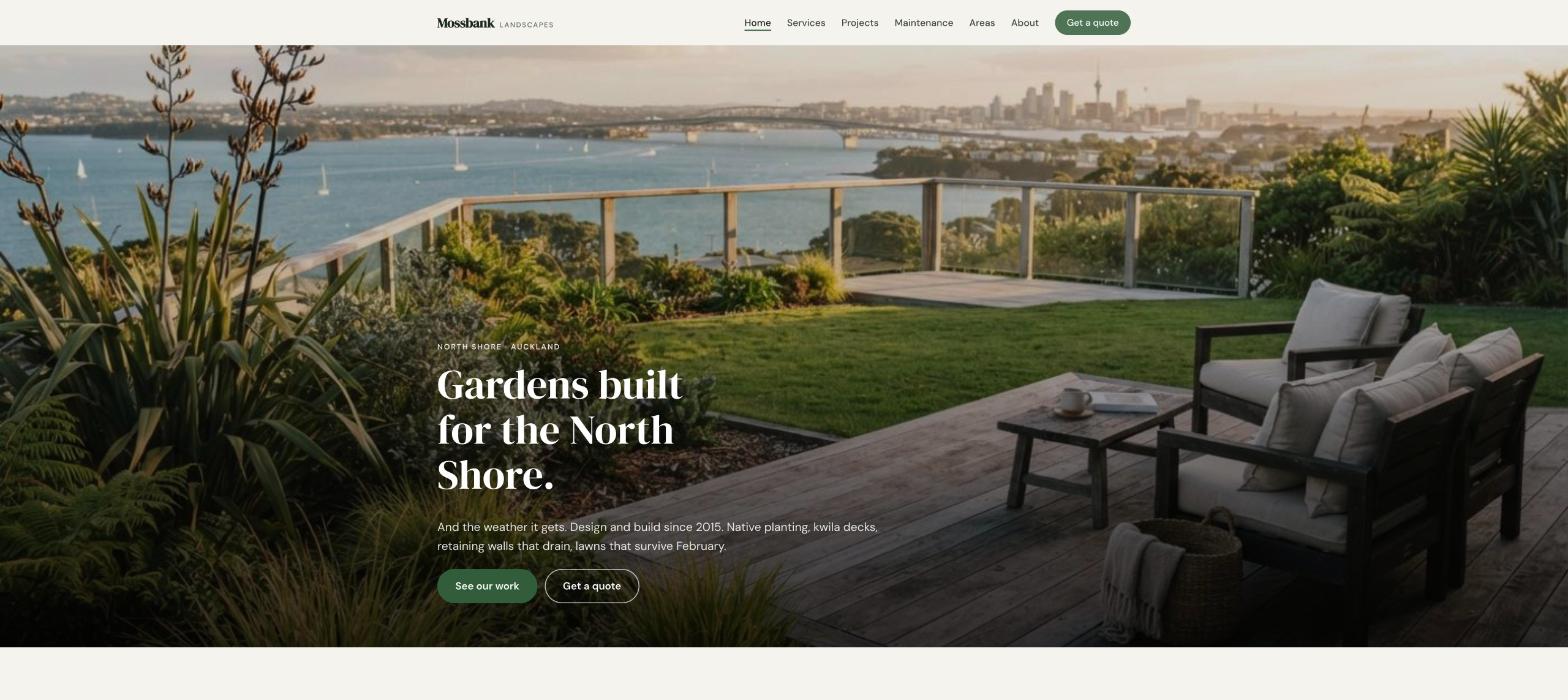
A practical guide for landscapers, garden designers and maintenance crews. What your site needs, copy-ready prompts you can paste into Ullbek, and how the jobs that used to need a developer — the services, the before-and-after projects, the area you cover, the quote form, the seasonal push — become a conversation. The worked example is a real Auckland landscaping firm built with Ullbek.
Why landscaper websites are harder than they look
A landscaper's website is read by someone standing in a garden they're unhappy with. They want to see what you've actually built, whether you do their kind of job, whether you come to their suburb, and what it roughly costs — and they want to see it in photos, not paragraphs. Most landscaping sites are a stock photo of someone else's lawn, a vague “we do everything”, and a gallery that hasn't been updated since the business started.
The old way
Pick a “green” template. Keep the stock hydrangea. Discover the gallery can't do before-and-after. Ask the web person to add last month's job. Wait. Pay. Leave “spring clean-ups” up through winter.
With Ullbek
Describe what you build and where. Get a site designed around it — projects as before-and-after stories, services with honest starting prices, suburbs as a real list, a quote form that takes a photo of the garden. Add last month's job by saying so.
This guide does two jobs. It tells you what a strong landscaping website includes, and it shows you how to get each piece built in Ullbek — in plain language, with your own projects and suburbs, using prompts you can copy.
How to use the prompts
Every prompt below is written for Mossbank Landscapes, the Auckland firm shown in the worked example. Swap the bold details for your name, your area, your services and your projects. Hit Copy, paste into the Ullbek chat, and adjust anything that doesn't fit. You're not a template — neither is your work, and neither should its website be.
What a great landscaper website needs
You don't need a dozen pages. You need the few things a homeowner checks before they ask for a quote — and a way to add last month's job without anyone's help.
A homepage that leads with one great garden
Your best finished project, one line about what you do, and two buttons: See our work and Get a quote.
Services with honest starting prices
Design and build, decks and paving, planting, lawns, retaining walls, maintenance — what's included and “from” where you can say it.
Projects as before-and-after stories
Six to ten jobs: the brief, what you did, the before, the after, the suburb. The section that sells; the one you'll add to most.
A service area Google can read
A real list of suburbs. This is how you show up for “landscaper Devonport” and not just your own name.
Maintenance as a plan, not a chore
Fortnightly or monthly, what's included, a seasonal calendar. Repeat revenue, explained.
A quote form that takes a photo
Name, phone, suburb, what you're after, a rough budget, a photo of the garden. Spam-checked and in your inbox — no plugin.
Who you are, and that you're insured
The crew, how long you've been doing it, insurance, the trade memberships. People let you dig up their garden; they want to know who you are.
The worked example: Mossbank Landscapes
Mossbank Landscapes is a fictional four-person landscaping firm on Auckland's North Shore — Tom Rahiri, design-and-build since 2015, native planting, decks and retaining walls, a maintenance round of forty gardens, covering Devonport to Albany. It was built in Ullbek from a description much like the kickoff prompt below, and it's live. Every prompt in this guide is written for Mossbank, so you can see the result of each one.
Mossbank Landscapes
Live example
Auckland landscaping · design & build, projects, maintenance plans, quotes · designed and built with Ullbek
Homepage — one great garden you actually built; the stock hydrangea left out
The prompt library
Work through these in order the first time you build. After launch, jump straight to the tier you need — a new project, a seasonal push, a new suburb — and paste the matching prompt.
Tier 1Kick off the whole site
Start with one rich description. Lead with what you build and the tone — practical, local, proud of the work — because that's what a green template can't give you and it's what Ullbek designs around. Tell it what not to invent.
Capability: full site from plain language
Kickoff — full landscaping site
Build a website for my landscaping business, Mossbank Landscapes, based in Birkenhead on Auckland's North Shore, phone 09 480 0176. I'm Tom Rahiri; four of us, design-and-build since 2015. We do garden design, native and coastal planting, timber decks, paving and paths, retaining walls, lawns, irrigation, and a fortnightly or monthly maintenance round. Covering Devonport, Takapuna, Milford, Birkenhead, Northcote, Glenfield, Browns Bay, Mairangi Bay, Albany. Fully insured, registered Master Landscaper. Tone: practical, local, proud of the work, never flowery. Pages: Home, Services, Projects, Maintenance, Areas, About, and Get a Quote. The homepage needs two clear buttons: “See our work” and “Get a quote”. Palette: a deep green, warm timber brown and a chalky off-white; sturdy, friendly type that reads outdoors on a phone. Don't invent projects, prices, reviews or awards I haven't given you; leave Projects as a placeholder I'll fill next.
Tier 2Shape the homepage
Once the shell exists, tighten the order of things. A landscaper's homepage is a short argument for one quote request — led by the work.
Capability: restructure layout by describing intent
Structure — homepage sections
Rebuild the Mossbank Landscapes homepage with these sections in order: (1) a full-width hero with the Devonport native garden and deck at golden hour, the line “Gardens built for the North Shore — and the weather it gets.”, and two buttons — See our work, Get a quote; (2) “What we do” — six service cards with starting prices; (3) “Recent projects” — four before-and-after cards linking to the project pages; (4) “Maintenance” — three sentences, the two plan prices, a link; (5) “Why Mossbank” — four plain promises (a design you can read, fixed quotes, our own crew not subbies, we tidy up every day); (6) “What clients say” — three reviews I'll give you; (7) “Where we work” — the suburb list with a link; (8) the quote form. Keep every section short enough to read on a phone standing in the garden.
Tier 3Services with honest starting prices
This is where landscaping sites go vague. Homeowners want to know roughly what a deck or a retaining wall costs before they ask. “From” prices and what's included, service by service.
Capability: structured service pages you can grow
Services — six cards with starting prices
Build the Services page for Mossbank Landscapes with six services, each with a two-sentence plain-English description and three facts: Garden design & build — a plan you can read, then we build it; small courtyards to full sections (Design from $1,500 · Fixed build quote · One crew start to finish). Decks & outdoor living — kwila, vitex or composite, built to code, council consent handled where needed (From $480 per m² · Consent handled · 10-year workmanship guarantee). Paving & paths — concrete pavers, natural stone, gravel, proper base work so it doesn't move (From $220 per m² · Drainage included · Edging done properly). Retaining walls — timber and block, engineered where height requires it (From $350 per m² face · Engineered over 1.5m · Drainage behind every wall). Planting & lawns — native and coastal planting that survives the Shore, new lawns from seed or ready-lawn (Plant lists you can keep · Irrigation optional · Ready-lawn from $28 per m²). Irrigation — drip and pop-up systems on a controller, so the planting makes it through February (From $1,800 · Zoned · Winter shut-off included). End with “Not sure what you need? Send a photo of the garden. We'll tell you what's worth doing first.”
Services — add a service
We now do pergolas and louvre roofs with a partner. Add a seventh service card, “Pergolas & louvres”, in the same style: two sentences, three facts (Timber or aluminium · Consent handled · From $9,500). Add it to the “What we do” grid on the homepage and to the quote form's job list. Nothing else changes.
Tier 4Projects as before-and-after stories
The section that sells, and the one you'll add to most. Each project: the brief, what you did, the before, the after, the suburb. Ullbek gives each one a page and a card, and adding one is a sentence.
Capability: galleries + stories from your uploads
Projects — the first six
Build the Projects page for Mossbank Landscapes: an index of before-and-after cards, each opening a page with the before photo, a small after-gallery, the suburb, the brief in two sentences, what we did in three, and roughly how long it took. Use only these facts (photos uploaded in folders by name): Devonport — a sloping back section into a native garden, a kwila deck and a lawn for the kids; six weeks. Takapuna — a bare new-build section: paving, a retaining wall, coastal planting and irrigation; four weeks. Birkenhead — a tired 1970s garden: pulled out, new paths, a vege garden, a planting plan the owners keep; three weeks. [three more in the same shape]. Each page ends with “Something like this?” linking to Get a Quote.
Projects — add last month's
Add a new project: Mairangi Bay — a steep front section with a block retaining wall, steps, native planting and a gravel path; five weeks; photos in the folder “mairangi-bay”. Put it first on the Projects index and in the homepage “Recent projects” cards, bumping the oldest off the homepage. Nothing else changes.
Tier 5Maintenance as a plan
Repeat revenue, explained. Two plans, what's included, a seasonal calendar so people know what happens when — and a form that asks the size of the garden.
Capability: structured plans + a seasonal calendar
Maintenance — two plans and a calendar
Build the Maintenance page for Mossbank Landscapes: two plans — Fortnightly from $140 a visit (lawns, edges, weeding, hedges, a tidy; for gardens that need to look sharp) and Monthly from $220 a visit (everything above plus pruning, feeding and a seasonal check; for established gardens); mark Monthly “Most gardens suit this”. Then “The year in your garden” — a simple four-season calendar: spring (feed, mulch, lawn renovation), summer (irrigation checks, deadheading, water), autumn (planting season, leaf clearing, pruning), winter (structural pruning, drainage, planning). A short form: Name, Phone, Suburb, Rough garden size (small / medium / large), Which plan?, with Ullbek's built-in form handling. A note: “We'll come and look before we quote — every garden's different.”
Tier 6Areas, and the quote form
Ullbek has a built-in form backend: ask for the fields you want and requests are spam-checked and sent to your inbox — no plugin, no form service. The suburbs list gets you found; the quote form with a photo gets you the job.
Capability: built-in forms → your inbox
Areas — the suburb list
Build the Areas page for Mossbank Landscapes: a short intro (“Based in Birkenhead, we work the North Shore every day. Nearby and not listed? Ring us.”), then a clear grid: Devonport, Stanley Bay, Bayswater, Takapuna, Milford, Castor Bay, Birkenhead, Northcote, Hillcrest, Glenfield, Beach Haven, Browns Bay, Mairangi Bay, Murrays Bay, Rothesay Bay, Albany, Greenhithe. Keep the suburbs as plain text so search engines read them as places. Title the page “Landscapers on Auckland's North Shore — Devonport to Albany”.
Get a Quote — the form
On the Get a Quote page for Mossbank Landscapes, add a form: Name, Phone (required), Email, Suburb (required), What are you after? (Design & build, Deck, Paving, Retaining wall, Planting or lawn, Irrigation, Maintenance, Not sure), Rough budget (under $10K, $10–25K, $25–50K, over $50K, no idea yet), Tell us about the garden, and a photo upload (“a couple of phone photos help a lot”). Use Ullbek's built-in form handling so requests email me with spam filtering. Above the form: “We reply within two working days, and we come and look before we quote. Fixed quotes, no surprises.” Beside it: phone, email tom@mossbank.co.nz, and the insurance and Master Landscaper line.
Where requests go
Form messages land in the email on your Ullbek account and in your dashboard — no extra tool to learn. Full walkthrough: Contact forms & submissions.
Tier 7About, and real reviews
People let you dig up their garden. A short true story, the crew, the insurance, and three real reviews with suburbs do more than any “award-winning” line.
Capability: brand voice from your real story
About — Tom and the crew, in facts
Write the About page for Mossbank Landscapes from these facts only — don't invent awards or staff: Tom Rahiri grew up in Northcote, did a horticulture apprenticeship at a Shore nursery, worked for a big landscaping contractor for six years, started Mossbank in 2015 with one ute; now four of us — Tom, Ana (planting and design), Mike and Sione (build); a maintenance round of about forty gardens; Registered Master Landscapers, fully insured; the name is from the mossy bank behind the first garden he built. Structure: a crew photo slot, “How we work” — four promises (a design you can read, fixed quotes, our own crew, we tidy up every day), the crew with one line each, “Check us” — insurance and membership. Tone: practical, warm.
Trust — real reviews only
Add a “What clients say” section on the homepage using only these real reviews (do not invent any): [paste two or three with a first name, suburb and the job]. Show five stars only where the reviewer gave five. If I haven't given you enough, use one and a button “Read our Google reviews” linking to [your profile URL]. Never fabricate ratings.
Tier 8Seasons, the things that change
This is the ongoing win. Spring clean-ups in September, planting season in autumn, a fully-booked summer — update it yourself in a sentence instead of waiting on a ticket.
Capability: ongoing edits without a developer
Seasonal — a slim banner
Add a slim banner across the top of every page: “Spring clean-ups and lawn renovations — booking now for September and October.” linking to Maintenance. Keep it compact so I can swap it each season; if a banner already exists, replace it rather than stacking.
Availability — we're full
Update the line under the quote form and on the homepage hero to: “Design-and-build: next start dates from February. Maintenance and small jobs: available now.” Date it. When I give you new dates, replace it rather than stacking.
Tier 9Polish for phones and search
Homeowners find you on a phone, standing in the garden. A few targeted asks before you publish go a long way.
Capability: responsive design + on-page SEO
Polish — mobile & SEO basics
Review the whole Mossbank Landscapes site on a phone: the Get a quote button visible without scrolling on every page, the phone number tap-to-call, before-and-after cards stacking cleanly with both photos visible, the quote form usable one-handed with the photo upload working. Give every page a title and meta description that mention landscaper North Shore Auckland and the main suburbs naturally — don't stuff keywords. Add alt text to every photo naming the suburb and the job. Make the address and phone plain text.
Tier 10Publish and go live
When it looks right, publish. You get a free *.ullbek.site address immediately, with HTTPS. Connect your own domain when you're ready — or buy one in the chat.
Capability: one-click publish · free address · your own domain
Launch — publish checklist
I'm ready to publish Mossbank Landscapes. Do a final pass: every page has a title and meta description, starting prices match between Services and the homepage, every project has a before and an after, the quote and maintenance forms send to my email, the suburb list matches the Areas page, and there are no placeholder or TODO notes left. Then publish to a free Ullbek address. After that, tell me how to put the site on mossbank.co.nz.
“A landscaper's website is never finished. A job finishes every month, the season turns four times a year, summer books out by October — and the site should say so before the next quote request.”
After launch: the updates that used to be painful
The real product for a landscaper isn't the first build — it's the end of every job, when there's an after photo to add. Here's how the common jobs map to what you've already learned:
Common landscaping-site updates → what to do in Ullbek
A finished project
The Tier 4 add-last-month's prompt — page, index and homepage cards together.
Seasonal push
The Tier 8 banner prompt — one line across every page, swapped each season.
Availability
The Tier 8 we're-full prompt — replace the line, date it.
New service
The Tier 3 add-a-service prompt — card, homepage grid and quote-form option.
New suburbs
Add them to the Areas grid and homepage list (Tier 6); update the page title.
Your best finished job as the hero does more than any slogan. Shoot it at golden hour and keep it current.
Always shoot the before
A phone photo on day one is the most persuasive thing you'll ever put on the site. Make it a habit.
Put “from” prices on services
Homeowners want a rough number before they ask. A range qualifies the enquiry and saves you a wasted visit.
Never invent reviews or projects
Ask for placeholders instead. A neighbour will recognise a stock garden before Google does.
Republish after every job
Edits in the builder aren't live until you publish again. New project, new season, new dates — publish, then check the live site on your phone.
Preview ≠ live
The preview shows your working site. Clients only see what you've published. After a new project or a seasonal change, publish again so the world sees it.