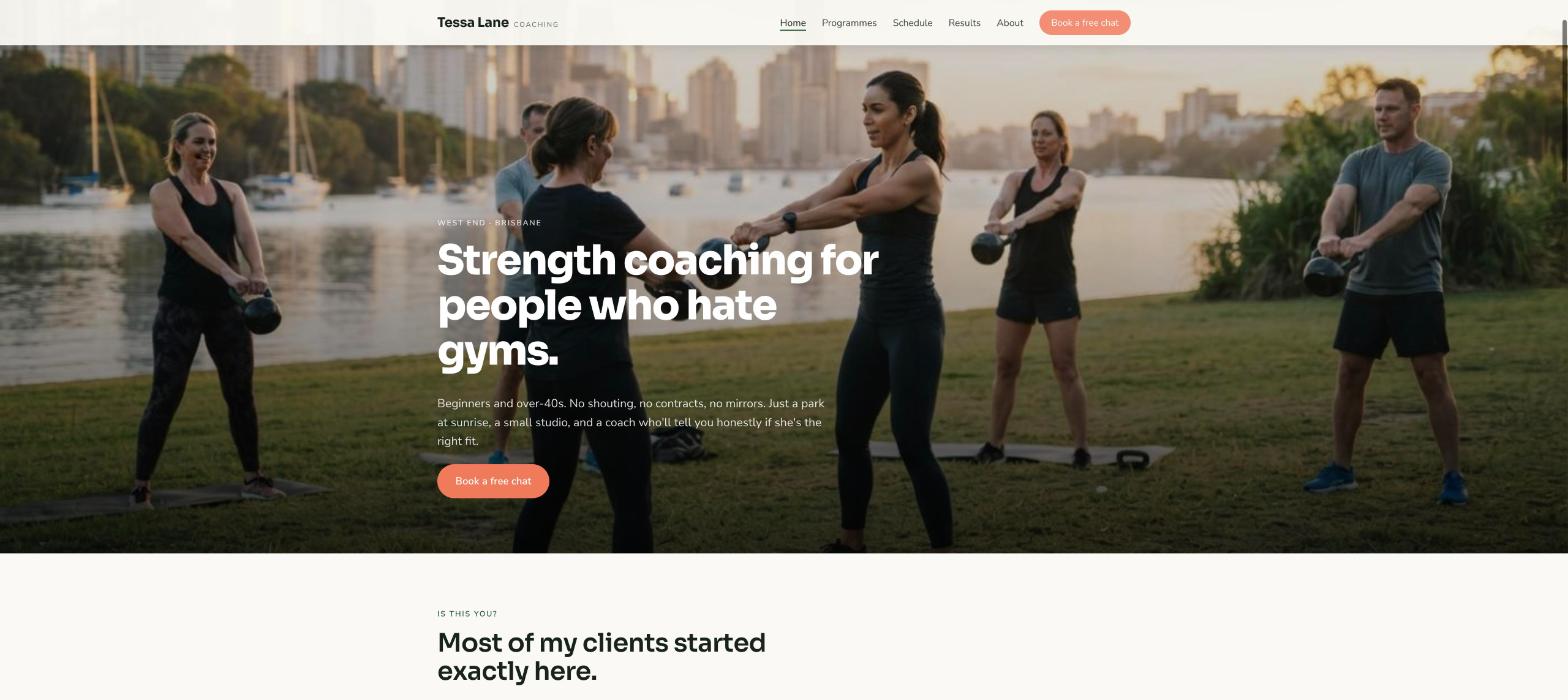
A practical guide for personal trainers and small coaching studios. What your site needs, copy-ready prompts you can paste into Ullbek, and how the jobs that used to need a developer — programmes and prices, client results, the weekly schedule, the free-consult form — become a conversation. The worked example is a real Brisbane coach built with Ullbek.
Why personal trainer websites are harder than they look
A trainer's website is read by someone who has just decided, again, to do something about it. They're nervous, they've been burned by a gym contract, and they want to know who you are, who you're for, what it costs, and whether the first step is small enough to take tonight. Most trainer sites shout — “TRANSFORM YOUR BODY”, stock abs, a “book now” with no price — and the nervous person closes the tab.
The old way
Pick a fitness template. Replace the stock abs. Discover the pricing block can't do “most people start here”. Ask the web guy to add the Saturday outdoor session. Wait. Pay. Leave January's challenge up until August.
With Ullbek
Describe who you coach and how. Get a site designed around it — programmes with real prices, results as stories, a weekly schedule that's a one-line edit, a free-consult form that lands in your inbox. Change the Saturday session by saying so.
This guide does two jobs. It tells you what a strong trainer website includes, and it shows you how to get each piece built in Ullbek — in plain language, with your own programmes and prices, using prompts you can copy.
How to use the prompts
Every prompt below is written for Tessa Lane Coaching, the Brisbane coach shown in the worked example. Swap the bold details for your name, your area, your programmes and your prices. Hit Copy, paste into the Ullbek chat, and adjust anything that doesn't fit. You're not a template — neither is your coaching, and neither should its website be.
What a great personal trainer website needs
You don't need a dozen pages. You need the few things a nervous beginner checks before they send the message — and a way to keep them current week to week.
A homepage that lowers the bar
Your face, who you coach, one honest line, and one button: Book a free chat. Not “transform”. Not “crush”.
Programmes with real prices
One-to-one, small group, online — what's in each, who it suits, what it costs per week or per block. “Most people start here” on one of them.
Your story, briefly
Why you coach, who you were before, what you're like at 6am. People hire the person who sounds like they'll be kind.
Results as stories, not before-and-afters
Three clients, first names, what they came in with, what changed, in their words. With permission, with a photo if they want.
The weekly schedule
Where and when the group sessions run. The section you'll change most, so it must be a one-line edit.
A free-consult form that reaches you
Name, phone, goal in a sentence, how they found you. Spam-checked and in your inbox — no plugin.
The practical bits
Where you train, parking, what to bring, cancellation terms in two kind sentences, your qualifications and insurance.
The worked example: Tessa Lane Coaching
Tessa Lane Coaching is a fictional one-person coaching business in Brisbane, Queensland — Tessa Lane, strength coach since 2016, training beginners and over-40s at a riverside park and a small private studio in West End, three programmes, a Saturday group session. It was built in Ullbek from a description much like the kickoff prompt below, and it's live. Every prompt in this guide is written for Tessa, so you can see the result of each one.
Tessa Lane Coaching
Live example
Brisbane personal trainer · programmes & prices, results, weekly schedule, free consult · designed and built with Ullbek
Work through these in order the first time you build. After launch, jump straight to the tier you need — the schedule, a price change, a new client story — and paste the matching prompt.
Tier 1Kick off the whole site
Start with one rich description. Lead with who you coach and the tone — kind, direct, un-shouty — because that's what a fitness template can't give you and it's what Ullbek designs around. Tell it what not to invent.
Capability: full site from plain language
Kickoff — full coaching site
Build a website for my personal training business, Tessa Lane Coaching, in Brisbane, Queensland. I'm Tessa Lane, a strength coach since 2016 (Cert IV Fitness, Level 2 ASCA, first aid, insured). I coach beginners and people over 40 who hate gyms — strength, mobility, getting up off the floor without a hand. Sessions at Orleigh Park, West End (outdoor, early) and a small private studio on Boundary Street. Three programmes: One-to-one from $95 a session, Small group (max 4) $45 a session, Online coaching $59 a week. Every new client starts with a free 20-minute chat. Tone: kind, direct, a bit funny, never shouty — no “transform”, no “beast mode”. Pages: Home, Programmes, About, Results, Schedule, and Contact. The homepage needs one main button: “Book a free chat”. Palette: warm off-white, a deep green and a coral accent; clean, friendly type that reads on a phone in the sun. Don't invent testimonials, results or qualifications I haven't given you; leave Results as a placeholder I'll fill next.
Tier 2Shape the homepage
Once the shell exists, tighten the order of things. A trainer's homepage is a short argument for one small first step — not a transformation gallery.
Capability: restructure layout by describing intent
Structure — homepage sections
Rebuild the Tessa Lane Coaching homepage with these sections in order: (1) a hero with a photo of me coaching at Orleigh Park at sunrise, the line “Strength coaching for people who hate gyms.”, one line under it (“Beginners and over-40s. No shouting, no contracts, no mirrors.”), and one button — Book a free chat; (2) “Is this you?” — three short cards: you've never lifted anything, you used to and stopped, you want to get up off the floor without a hand; (3) “Three ways to train” — the programmes with prices and “Most people start here” on Small group; (4) “What changed” — three client stories I'll give you; (5) “This week” — the schedule strip; (6) “About Tessa” — three sentences and a link; (7) the free-chat form. Keep every section short enough to read on a phone at the bus stop.
Tier 3Programmes with real prices
This is where fitness sites hide. A nervous beginner wants a number and a recommendation. Three programmes, what's in each, who it suits, the price — and “most people start here” on one.
Capability: structured programmes you can edit in a sentence
Programmes — three ways to train
Build the Programmes page for Tessa Lane Coaching with three columns: One-to-one — $95 a session, or $850 for a 10-pack: for people who want it private and tailored; a plan, every session with me, check-ins between. Small group — $45 a session, max 4 people: for people who like company and a lower price; Tuesday and Thursday 6am at the park, Saturday 7am; mark this “Most people start here”. Online coaching — $59 a week: for people who travel or live far away; a programme in an app, a weekly video check-in, messaging. Under the columns: “Every programme starts with a free 20-minute chat. No lock-in contracts. 24 hours' notice to move a session.” Then a short FAQ: I've never lifted — is that OK? (it's the point), I'm 58 — too old? (half my clients are over 50), What do I bring? (shoes, water, a towel), Do you do nutrition? (sensible basics, I'll refer you for the rest).
Programmes — a price change
From 1 February, One-to-one is $105 a session, $950 for a 10-pack; Small group stays $45; Online is $65 a week. Update the Programmes page and the three homepage cards; keep every description exactly as it is.
Tier 4The weekly schedule (the thing that changes most)
This is where template sites go stale. The Saturday session moves, a public holiday cancels Tuesday, a new Thursday evening starts. Ullbek makes the schedule a plain block you edit in a sentence.
Capability: structured content you can change every week
Schedule — the week
Build the Schedule page and the homepage “This week” strip for Tessa Lane Coaching: Tuesday 6:00am — Small group, Orleigh Park; Thursday 6:00am — Small group, Orleigh Park; Saturday 7:00am — Small group, Orleigh Park (wet weather: Boundary St studio); one-to-one sessions by arrangement, weekdays 5:30am–11am and 4pm–7pm at the studio. A note: “Public holidays — I'll post changes here and message the group the night before.” Each group slot has a “Join this session” button to the Contact form.
Schedule — this week's change
This week only: Tuesday 6am is cancelled (public holiday); add Wednesday 6am — Small group, Orleigh Park as a one-off. Show the change on the homepage strip with a small “This week” tag, keep the Schedule page's regular week as it is but add the same note at the top. Next Monday, remove it.
Tier 5The free chat that reaches you
Ullbek has a built-in form backend: ask for the fields you want and messages are spam-checked and sent to your inbox — no plugin, no form service. For a trainer, the form is the first small step: keep it to four questions.
Capability: built-in forms → your inbox
Contact — book a free chat
On the Contact page for Tessa Lane Coaching, add a “Book a free chat” form with: Name, Phone, Email, In a sentence, what do you want to be able to do? , Which programme are you curious about? (One-to-one, Small group, Online, No idea yet), and How did you find me?. Use Ullbek's built-in form handling so messages email me with spam filtering. Above the form: “Twenty minutes on the phone, no sales pitch. I'll tell you honestly if I'm the right coach for you.” Beside it: where I train, parking at Orleigh Park, and my email tessa@tessalane.coach.
Contact — if you already use a booking app
I take session bookings through [Mindbody / Acuity / your app]. Make every “Join this session” button open [your booking link] in a new tab. Keep the free-chat form on the Contact page for new clients only.
Where messages go
Form messages land in the email on your Ullbek account and in your dashboard — no extra tool to learn. Full walkthrough: Contact forms & submissions.
Tier 6Your story, and results as stories
People hire the coach who sounds kind. A short true story about you, and three client stories in their own words with permission, do more than any before-and-after. Never let the site invent a result.
Capability: brand voice from your real story
About — Tessa, in facts
Write the About page for Tessa Lane Coaching from these facts only — don't invent qualifications, clients or numbers: Tessa Lane grew up in Toowoomba, played state-level netball until a knee reconstruction at 24, hated every gym she rehabbed in, became a coach in 2016 to be the trainer she'd wanted; coached at two big gyms before going out on her own in 2020; most clients are beginners and over-40s; she's 38, has a staffy called Biscuit who comes to the park sessions. Qualifications: Cert IV Fitness, ASCA Level 2, current first aid, fully insured. Structure: a portrait, “Why I coach the way I do”, a short timeline, “What a session with me is like”, qualifications. Tone: kind, direct, a bit funny.
Results — in their words
Build the Results page for Tessa Lane Coaching as client stories, using only these real ones (do not invent any, and only use photos they've approved): [paste three — first name, age if they're happy to share, what they came in with, what changed, a quote]. Each as a card: a photo or a simple initial, the quote, and two sentences of context. A note at the top: “No before-and-afters. These are people, not projects.” If I haven't given you enough, use one and a button linking to [your Google reviews].
Tier 7Photos: the park, the studio, you
Fitness sites are full of stock abs under studio lights. Your park at sunrise, your actual studio, your face mid-laugh are what make a nervous person message you. Upload a batch and tell Ullbek where they belong.
Capability: your uploads · stock · AI images
Images — place your own photos
I've uploaded photos. Use the Orleigh Park sunrise shot as the homepage hero, my portrait on About, the group-session photos on the Small group card and the Schedule page, the studio shots on the One-to-one card. Crop so faces aren't cut off, optimise for the web, keep the colours natural — no high-contrast fitness look.
Images — stock until you shoot your own
I don't have good photos yet. Find realistic photos of ordinary people training outdoors in a park at sunrise — kettlebells on grass, a small group doing squats, a coach demonstrating a hinge — nothing with six-packs, mirrors or neon. Use them as placeholders, keep the tone warm, and note in the site brief which ones to replace with my own.
Tier 8Polish for phones and search
People find you on a phone, often at 10pm after deciding. A few targeted asks before you publish go a long way.
Capability: responsive design + on-page SEO
Polish — mobile & SEO basics
Review the whole Tessa Lane Coaching site on a phone: the Book a free chat button must be visible without scrolling on every page, the programme columns must stack cleanly with prices readable, the schedule strip must fit without horizontal scroll. Give every page a title and meta description that mention personal trainer West End Brisbane naturally where it fits — don't stuff keywords. Add alt text to every photo. Make the phone number tap-to-call.
Tier 9Publish and go live
When it looks right, publish. You get a free *.ullbek.site address immediately, with HTTPS. Connect your own domain when you're ready — or buy one in the chat.
Capability: one-click publish · free address · your own domain
Launch — publish checklist
I'm ready to publish Tessa Lane Coaching. Do a final pass: every page has a title and meta description, prices match everywhere they appear, the schedule is current, the free-chat form sends to my email, every client story has permission noted in the site brief, and there are no placeholder or TODO notes left. Then publish to a free Ullbek address. After that, tell me how to put the site on tessalane.coach.
“A coach's website is never finished. The Saturday session moves, prices change in February, a client finally deadlifts her bodyweight — and the site should say so by Monday.”
After launch: the updates that used to be painful
The real product for a coach isn't the first build — it's every week, when the schedule shifts. Here's how the common jobs map to what you've already learned:
Common coaching-site updates → what to do in Ullbek
This week's schedule
The Tier 4 this-week's-change prompt — homepage strip and a note on the Schedule page.
Price change
The Tier 3 price-change prompt — Programmes page and homepage cards together.
A new client story
Paste it with permission → the Tier 6 results prompt. Real ones only.
New photos
Upload from your phone → ask Ullbek to place and crop them (Tier 7).
Switching to a booking app
The Tier 5 booking-app prompt — session buttons repointed, free-chat form kept.
“Book a free chat” beats “Start your transformation”. The nervous beginner is your best client, and they close shouty tabs.
Put prices on the page
A number and a “most people start here” answers the question they're too shy to ask.
Make the schedule a one-line edit
If changing Saturday takes more than a sentence, it won't get changed. Keep the regular week on the Schedule page and the exceptions on the homepage.
Never invent results
Client stories with permission only. No composite “Sarah, 42”. People can tell.
Republish after every change
Edits in the builder aren't live until you publish again. Schedule, prices, a new story — publish, then check the live site on your phone.
Preview ≠ live
The preview shows your working site. Clients only see what you've published. After a schedule change or a new price, publish again so the world sees it.