Why cafe websites are harder than they look
A cafe website isn't a one-and-done brochure. Your menu changes. Seasonal specials appear and disappear. Hours shift for holidays. A new latte photo lands on your phone at 7am. Traditionally, every one of those updates meant emailing a developer, waiting days, and hoping the PDF they uploaded still opened on someone's phone.
The old way
Email the PDF. Wait for a developer. Pay for a small change. Hope the menu button still works. Repeat next month when the specials change.
With Ullbek
Drag the PDF into chat. Say “put this on the menu page as a download and show the first page inline.” Done in one conversation — you own the update.
This guide does two jobs at once. It tells you what a strong cafe website includes, and it shows you how to get each piece built in Ullbek — using the product the way it's meant to be used: plain language, your own files, and copy-ready prompts.
Every prompt below uses a fictional cafe called Rosie & Bean. Swap the bold details for your name, neighbourhood, hours, and menu. Hit Copy, paste into the Ullbek chat, and adjust anything that doesn't fit.
What a great cafe website needs
You don't need twenty pages. You need the few things a hungry visitor looks for in under thirty seconds — and a way for you to keep them current without help.
Homepage with a clear first impression
Who you are, where you are, what makes you different, and a path to the menu or a reservation.
Menu — online and downloadable
Readable on a phone. Prefer a designed page plus a PDF for print/share. Easy to swap when the specials change.
Hours, address, and a map
Current opening times, parking/transit notes, and a map link or embed. This is the page people screenshot.
Photos that feel like your place
Food, interior, people — not generic stock if you can help it. Phone photos work when they're well placed.
A way to get in touch or book
Contact form, table enquiry, catering request, or newsletter — messages should land in your inbox.
About / story
Why you opened, who roasts the beans, what the neighbourhood means to you. Trust lives here.
Mobile-first layout
Most cafe traffic is someone standing outside, on a phone, deciding whether to walk in.
See a live example
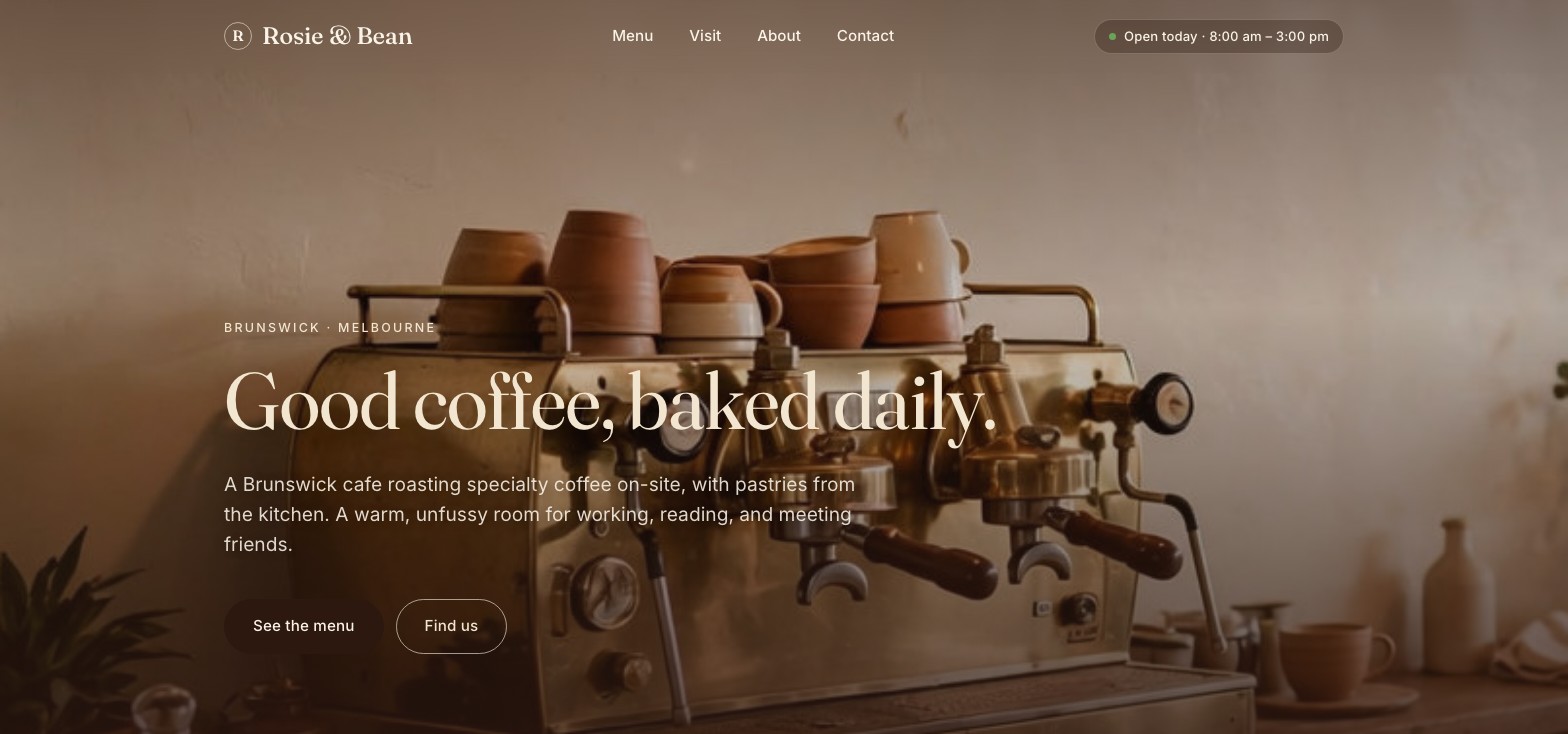
Before you build, look at the finished site. Rosie & Bean is a fictional neighbourhood cafe in Brunswick, Melbourne — a menu with its PDF download, hours and the tram stop, the story, and a way to ask for a table or catering — published on a free *.ullbek.site address. It was built in Ullbek from the kickoff prompt below and the prompts after it — it's the build in the film at the top of this page — and it's live.
Rosie & Bean
Live exampleBrunswick neighbourhood cafe · menu and PDF download, hours, table and catering enquiries · designed and built with Ullbek
The prompt library
Work through these in order the first time you build. After launch, jump straight to the tier you need — menu update, new photos, holiday hours — and paste the matching prompt.
Start with one rich description. Ullbek will research nothing it shouldn't invent — give it the facts, and it builds a first draft you can steer.
Capability: full site from plain languageOnce the shell exists, tighten structure. Ask for the sections a cafe visitor actually needs — not a generic “services” grid.
Capability: restructure layout by describing intentThis is where traditional websites fall over. You have a menu PDF from your designer or Canva. You need it on the site — maybe as a download, maybe previewed on the page. With Ullbek you don't email anyone. You drag the PDF into the chat window (or attach it to your message), then tell the AI what to do with it.
Drag the file straight into the chat, or use the attach control on the message box. Once it appears in the conversation, reference it in your prompt (“this PDF”, “the menu I just uploaded”). Ullbek can place it as a download button, host it for sharing, and help you design a menu page around it. See also Working with assets.
Phone photos of real flat whites beat perfect stock. Upload a handful, or ask Ullbek to pull royalty-free stock and generate supporting images in a consistent style.
Capability: your uploads · stock · AI imagesThe Visit page is the one people open while walking. Make hours impossible to miss, and link out to maps.
Capability: structured content you can update anytimeUllbek has a built-in form backend. You don't need Formspree, Google Forms, or a plugin. Ask for the fields you want — submissions are spam-checked and emailed to you.
Capability: built-in forms → your inboxForm messages land in the email on your Ullbek account — no extra dashboard to learn. Full walkthrough: Contact forms & submissions.
People buy coffee from people. A short, true story beats filler copy every time — and you should never invent reviews.
Capability: brand voice from your real storyThis is the ongoing win. A new single-origin, a live jazz Saturday, a sold-out pastry — update it yourself in chat instead of waiting on a ticket queue.
Capability: ongoing edits without a developerMost visitors are on a phone outside your door. A few targeted asks go a long way before you publish.
Capability: responsive design + on-page SEOWhen it looks right, publish. You get a free *.ullbek.site address immediately, with HTTPS. Connect your own domain when you're ready.
“The website isn't finished when it launches. For a cafe, launch is when the easy updates begin.”
After launch: the updates that used to be painful
The real product for a cafe owner isn't the first build — it's month two. Here's how common updates map to what you already learned:
Tips that save cafe owners hours
-
Lead with facts, not design jargon
Neighbourhood, hours, what you serve, and the feeling of the room beat “make it modern and clean.” Ullbek handles the design system; you supply the truth.
-
Keep a current menu PDF on your phone
When something changes, export from Canva or your designer, drag into chat, done. That single habit replaces most “quick website update” invoices.
-
Never invent reviews or awards
Ask Ullbek to leave placeholders rather than fabricate social proof. Fake testimonials erode trust the moment a regular notices.
-
Update in small passes
One prompt for hours, one for photos, one for the form. Smaller asks are easier to review in the preview and cheaper in attention.
-
Republish after important changes
Edits in the builder aren't automatically live. When the menu or hours change, publish again so the public site matches what you just built.
The left-hand preview shows your working site. Visitors only see what you've published. After a menu swap or hours change, publish again so the world sees it.
Related guides
Ready to build your cafe site?
Open Ullbek, paste the Tier 1 kickoff prompt, and swap in your name and neighbourhood. Your first draft is one conversation away.